РАЗНЫЕ МЕЛОЧИ В XSL

Разное

<img src="{dir}{image_large}" alt="{name}" width="{image_large_width}" height="{image_large_height}" /> 
<xsl:variable name="var_compare_id" select="."/>
<xsl:text disable-output-escaping="yes" select="."> </xsl:text>
<xsl:text> </xsl:text>
<xsl:value-of disable-output-escaping="yes" select="property_value[tag_name='short_name']/value" />
<xsl:if test="description !=''">
  <xsl:value-of disable-output-escaping="yes" select="description" />
</xsl:if>
<xsl:if test="position() mod 3 = 0 and position() != last()">
  <xsl:text disable-output-escaping="yes">
  &lt;/tr&gt;
  &lt;tr valign="top"&gt;
  </xsl:text>
</xsl:if>

<xsl:if test="property_value[tag_name='link']/value !=''">
   <xsl:value-of disable-output-escaping="yes" select="property_value[tag_name='link']/value" />
</xsl:if>

Дополнительное свойство - ссылка

property_value[tag_name='link']/value !=''

<xsl:if test="property_value[tag_name='link']/value !=''">
   <xsl:value-of disable-output-escaping="yes" select="property_value[tag_name='link']/value" />
</xsl:if>

<xsl:if test="property_value[tag_name='link']/value !=''">
<a href="{property_value[tag_name='link']/value}" target="_parent" >
  <img src="{dir}{image_small}" alt="{name}"/>
</a>
</xsl:if>

<xsl:if test="property_value[tag_name='short_name']/value !=''">
   <xsl:value-of disable-output-escaping="yes" select="property_value[tag_name='short_name']/value" />
</xsl:if>

Дополнительное свойство - изображение

<xsl:if test="property_value[tag_name='img']/file !=''">
<a href="{property_value[tag_name='img']/file}">
  <img src="{dir}{property_value[tag_name='img']/file}" alt="{name}"
width="{property_value[tag_name='img']/file_width}" height="{property_value[tag_name='img']/file_height}"/>
</a>
</xsl:if>

Ограничение количества групп в выпадающем меню

<!-- Если есть подгруппы -->
<xsl:if test="count(shop_group) > 0 and 1 > count(ancestor::shop_group)">
<ul class="left_menu gray_link gray" id="{@id}" style="display: none;">
<xsl:apply-templates select="shop_group"/>
</ul>
</xsl:if>

Выбираем последний элемент списка и назначаем ему класс last

<xsl:if test="position() mod 4 = 0 and position() > 3">
<xsl:attribute name="class">last</xsl:attribute>
</xsl:if>

Выбираем первый элемент списка и назначаем ему класс first

<xsl:if test="position() mod 1 = 0 and position() < 2">
<xsl:attribute name="class">first</xsl:attribute>
</xsl:if>

Ссылка на все товары производителя в карточке товара

<xsl:if test="shop_producer/node()">
<xsl:variable name="shop_produser_id" select="shop_producer/@id" />
<a href="{/shop/url}producer-{$shop_produser_id}" class="button">Другие товары этого производителя</a>
</xsl:if>

Ограничиваем текст по количеству знаков

<xsl:variable name="myConcatString" select="description"/>
<xsl:value-of disable-output-escaping="yes" select="substring($myConcatString, 1, 800)" /><xsl:text>...</xsl:text>

Вставляем код JAVASCRIPT в XSL

<SCRIPT>
<xsl:comment>
<xsl:text disable-output-escaping="yes">
<![CDATA[
.........код скрипта......................
]]>
</xsl:text>
</xsl:comment>
</SCRIPT>        

Шаблон для условия

      <xsl:choose>
<xsl:when test="">
...
</xsl:when>
<xsl:otherwise>
...
</xsl:otherwise>
</xsl:choose>

Если нет изображения, то скрываем блок на boostrap 5

<div class="d-none">
<xsl:if test="image_small != ''">
<xsl:attribute name="class">col-xs-3 col-sm-3 col-md-3 col-lg-3</xsl:attribute>
</xsl:if>
<xsl:if test="image_small != ''">
<div>
<a href="{url}">
<img src="{dir}{image_small}" alt="{name}"/>
</a>
</div>
</xsl:if>

Меняем адрес ссылки, если есть Дополнительное свойство - Ссылка на материал

<xsl:variable name="link">
<xsl:choose>
<xsl:when test="property_value[tag_name='link']/value !=''">
<xsl:value-of disable-output-escaping="yes" select="property_value[tag_name='link']/value" />
</xsl:when>
<xsl:otherwise>
<xsl:value-of disable-output-escaping="yes" select="url" />
</xsl:otherwise>
</xsl:choose>
</xsl:variable>
<xsl:choose>
<xsl:when test="property_value[tag_name='link']/value !=''">
<a href="{property_value[tag_name='link']/value}" >
<img src="{dir}{image_small}" class="news_img" alt="" />
</a>
</xsl:when>
<xsl:otherwise>
<img src="{dir}{image_small}" class="news_img" alt="" />
</xsl:otherwise>
</xsl:choose>

Определяем позицию
Добавляем атрибут

<xsl:attribute name="class">
<xsl:choose>
<xsl:when test="position() mod 2 = 0">right</xsl:when>
<xsl:otherwise>left</xsl:otherwise>
</xsl:choose>
</xsl:attribute>

Последний элемент строки

<xsl:if test="position() = last()">
<xsl:attribute name="style">background-image: none</xsl:attribute>
</xsl:if>
<xsl:if test="position() = last()">
<xsl:attribute name="class">last</xsl:attribute>
</xsl:if>

Для меню

<xsl:variable name="position">
<xsl:choose>
<xsl:when test="$count div position() <= 1">4</xsl:when>
<xsl:otherwise>3</xsl:otherwise>
</xsl:choose>
</xsl:variable>
<xsl:if test="position() mod $floor = 0 and position() != last()">
<xsl:text disable-output-escaping="yes">
</ul>
<ul>
</xsl:text>
</xsl:if>

Перевод строки после n-элемента

<xsl:if test="position() mod 4 = 0 and position() != last()">
<xsl:text disable-output-escaping="yes">
</ul>
<ul class="shop_table">
</xsl:text>
</xsl:if>
<xsl:if test="position() mod 3 = 0 and position() != last()">
<span class="table_row"></span>
</xsl:if>
<xsl:if test="position() mod 3 = 0 and position() != last()">
<xsl:attribute name="style">background-image: none</xsl:attribute>
</xsl:if>

В списках

<!-- Перевод строки после каждого 2-го элемента -->
<xsl:if test="((position() - 2) mod 2 = 0) and position() != last()">
<xsl:text disable-output-escaping="yes">
</div>
<div class="wrapper">
</xsl:text>
</xsl:if>

В таблице

<xsl:template match="shop_item">
<td>
.............
</td>
<xsl:if test="position() mod 3 = 0">
<xsl:text disable-output-escaping="yes"></tr><tr></xsl:text>
</xsl:if>
</xsl:template>
<div id="gallery" class="board" style="max-width: {$image_width + 50}px">

Вывод сообщение "В данном разделе магазина товаров нет", если раздел пустой

<xsl:if test="count(shop_item) = 0 and .//shop_group[@id=$group]/items_total_count = 0" >В данном разделе
товаров нет</xsl:if>

Вставляем значение дополнительного свойства в ссылку для изображения

<!-- Изображение для информационного элемента (если есть) -->
<xsl:choose>
<xsl:when test="property_value[tag_name='url']/value != ''">
<a href="{property_value[tag_name = 'url']/value}" target="_parent">
<img src="{dir}{image_small}" align="left"/>
</a>
</xsl:when>
<xsl:otherwise>
<img src="{dir}{image_small}" align="left"/>
</xsl:otherwise>
</xsl:choose>

Выводим массив дополнительных свойств - изображения (file)

<xsl:if test="property_value[tag_name='img']/file != ''">
<ul>
<xsl:for-each select="property_value[tag_name='img']">
<li><a href="{../dir}{file}" ><img src="{../dir}{file_small}" alt="{name}" /></a></li>
</xsl:for-each>
</ul>
</xsl:if>
<xsl:for-each select="property_value[tag_name='dopfoto']">
<a href="{../dir}{file}" target="_blank"><img src="{../dir}{file_small}" /></a>
</xsl:for-each>

Вставляем дату и время в XSL шаблон 

<dt>
<xsl:value-of select="substring-before(date, '.')"/>
<xsl:variable name="month_year" select="substring-after(date, '.')"/>
<xsl:variable name="month" select="substring-before($month_year, '.')"/>
<xsl:choose>
<xsl:when test="$month = 1"> января </xsl:when>
<xsl:when test="$month = 2"> февраля </xsl:when>
<xsl:when test="$month = 3"> марта </xsl:when>
<xsl:when test="$month = 4"> апреля </xsl:when>
<xsl:when test="$month = 5"> мая </xsl:when>
<xsl:when test="$month = 6"> июня </xsl:when>
<xsl:when test="$month = 7"> июля </xsl:when>
<xsl:when test="$month = 8"> августа </xsl:when>
<xsl:when test="$month = 9"> сентября </xsl:when>
<xsl:when test="$month = 10"> октября </xsl:when>
<xsl:when test="$month = 11"> ноября </xsl:when>
<xsl:otherwise> декабря </xsl:otherwise>
</xsl:choose>
<xsl:value-of select="substring-after($month_year, '.')"/><xsl:text> г.</xsl:text>
</dt>

Заменяем запятую на точку в цене (каталог товаров)

В самом начале шаблона вывода товаров определяем формат вывода
имеется 

<xsl:decimal-format name="my" decimal-separator="," grouping-separator=" "/>
добавляем
<xsl:decimal-format name="my1" decimal-separator="." grouping-separator=" "/>

в выводе цены вставляем код

<xsl:value-of select="format-number(price, '### ##0.00', 'my1')"/>

Откладываем в корзину минимальное количество товара по умолчанию

1. Создаем Допсвойство "Минимальное количество" min_quantity, тип строка.
  В карточке товара в Допсвойстве "Минимальное количество" указываем минимальное количество для заказа, например, 10шт.

2. В XSL-шаблоне "ИнтернетМагазинКаталогТоваров" или "ИнтернетМагазинТовар" создаем переменную quantum, которая из Допсвойства min_quantity выделяет только числа


3. Вставляем значение переменной $quantum в скрипт кнопки "В корзину"

ПРИМЕР
<div class="actions">
<xsl:variable name="string" select="property_value[tag_name='min_quantity']/value"/>
<!-- Выделяем из строки числа -->
<xsl:variable name="quantum" select="translate($string, translate($string,'0123456789,',''),'')" />
<a data-animation="fadeAndPop" data-reveal-id="modalCart" id="add_to_cart_{@id}" href="#">
<button class="button btn-cart" onclick="return $.bootstrapAddIntoCart('{/shop/url}cart/', {@id}, {$quantum}); yaCounter31644173.reachGoal('addtocart'); return true;" title="В корзину" type="button">
<i class="fa fa-shopping-cart bg-color5">
<b></b>
</i>
<span class="bg-color3"><span>В корзину</span></span>
</button>
</a>
</div>

Обработка даты - приведение к числу для последующего сравнения с другой датой

<xsl:variable name="datetime" select="datetime" />
<xsl:value-of select="concat(substring($datetime, 7, 4), substring($datetime, 4, 2), substring($datetime, 1, 2), substring($datetime, 12, 2), substring($datetime, 15, 2), substring($datetime, 18, 2) )" disable-output-escaping="yes" />

Пересобираем URL (удаление первых трех символов)


<xsl:variable name="url">
<xsl:for-each select="url">
<xsl:variable name="link">
<xsl:value-of select="."/>
</xsl:variable>
<xsl:value-of select='substring($link, 4, string-length($link) - 1)'/>
</xsl:for-each>
</xsl:variable>
<a href="/en{$url}">... </a>

Меняем формат вывода даты


<div class="date">
<xsl:variable name="month_year" select="substring-after(date, '.')"/>
<xsl:variable name="month" select="substring-before($month_year, '.')"/>
<xsl:variable name="time1" select="substring-after(datetime, ' ')"/>
<xsl:variable name="time2" select="substring-after($time1, ':')"/>
<xsl:variable name="hour" select="substring-before($time1, ':')"/>
<xsl:variable name="minutes" select="substring-before($time2, ':')"/>
<span><xsl:value-of select="substring-before(date, '.')"/>.<xsl:value-of select="$month"/> / <xsl:value-of select="$hour"/>:<xsl:value-of select="$minutes"/></span>
</div>

СОРТИРОВКА ТОВАРОВ ОТ МИНИМАЛЬНОЙ ЦЕНЫ ПО УМОЛЧАНИЮ


В XSL-шаблоне МагазинКаталогТоваров заменяем код          
<!--===== Выводим товары магазина =====-->
<div class="row products-grid">
<xsl:apply-templates select="shop_item"/>
</div>
на этот
<!--===== Выводим товары магазина =====-->
<div class="row products-grid">
<xsl:apply-templates select="shop_item">
<xsl:sort select="price" order="ascending" data-type="number"/>
</xsl:apply-templates>
</div>
 
Для сортировки товаров по умолчанию от максимальной цены заменить ascending на descending
Сортировка Допсвойств по id 
<xsl:apply-templates select="property_value[not(file/node())]">
<xsl:sort select="property_id" order="ascending" data-type="number"/>
</xsl:apply-templates>

Случайный вывод элементов


<xsl:template match="/">
<xsl:for-each select="shop_item">
<xsl:value-of select="generate-id()"/> <br/>
</xsl:for-each>
</xsl:template>

Выводим надпись "НОВИНКА" для товаров, загруженных за последние 30 дней


<xsl:variable name="сurrent_date" select="/shop/сurrent_date"/>
<xsl:variable name="date" select="translate(date, translate(date, '0123456789', ''), '')"/>
<xsl:variable name="difference_date" select="$сurrent_date - $date" />
<xsl:if test="number($difference_date) < 30">
<div class="ribbon-wrapper-new">НОВИНКА</div>
</xsl:if>

Предварительно добавляем в ТДС Интернет-магазина вывод текущей даты
Текущая дата в Каталоге товаров

Меняем высоту блока, в зависимости от размера файла изображения из Допсвойства


<div id="sub-menu" class="dropdown-menu">

<xsl:if test="property_value[tag_name='img']/file !=''">
<xsl:attribute name="style">height:<xsl:value-of disable-output-escaping="yes" select="20+(property_value[tag_name='img']/file/@height)" />px</xsl:attribute>
// добавляем к высоте картинки 20px, если нужно, изменить параметр
</xsl:if>
.........
</div>
XSL

Быстрый фильтр товаров. Производители

Вывод производителей в фильтре в виде checkbox.
Редактируем <xsl:template match="shop_producer"> показа производителей в коде XSL шаблона фильтра:

XSL

<div class="filter-item">
<div class="caption">Производитель</div>
<ul>
<xsl:apply-templates select="/shop/producers/shop_producer" />
</ul>
</div>
<!-- Шаблон показа производителей -->
<xsl:template match="shop_producer">
<xsl:variable name="id" select="@id" />
<xsl:variable name="name">
<xsl:choose>
<xsl:when test="/shop/filter_mode = 0">
<xsl:value-of select="name" />
</xsl:when>
<xsl:otherwise>
<xsl:value-of select="path" />
</xsl:otherwise>
</xsl:choose>
</xsl:variable>
<xsl:if test="position() = 4">
<xsl:text disable-output-escaping="yes">&lt;div class="hidden"&gt;</xsl:text>
</xsl:if>
<li>
<input type="checkbox" value="{@id}" name="producer_id[]" id="producer_id_{@id}" data-property="producer_id" data-value="{$name}">
<xsl:if test="/shop/producer_id = @id">
<xsl:attribute name="checked">checked</xsl:attribute>
</xsl:if>
<label for="producer_id_{@id}">
<xsl:value-of select="name"/>
<!--<xsl:if test="count/node()">
<xsl:text> (</xsl:text><xsl:value-of select="count"/><xsl:text>)</xsl:text>
</xsl:if>-->
</label>
</input>
</li>
<xsl:if test="position() >= 4 and position() = last()">
<xsl:text disable-output-escaping="yes">&lt;/div&gt;</xsl:text>
<a href="javascript:;" class="show-all js-show-all" data-on="Скрыть" data-off="Показать все"><span>Показать все</span></a>
</xsl:if>
</xsl:template>

Выбираем несколько случайных элементов из информационной системы

Выбираем несколько случайных элементов из информационной системы, имеющих хотя бы один общий тег с исходным и добавляем такие элементы контроллеру в тег samenews
Код вносится в типовую дин. страницу ИС перед показом контроллера

$oInformationsystem_Item = Core_Entity::factory('Informationsystem_Item', $Informationsystem_Controller_Show->item);
$oTag_Informationsystem_Items = $oInformationsystem_Item->Tag_Informationsystem_Items->findAll();
// Минимальное количество тегов для совпадения.
$iSameTags = 1;
$aTagIds = array();
foreach($oTag_Informationsystem_Items as $oTag_Informationsystem_Item)
{
   $aTagIds[] = $oTag_Informationsystem_Item->tag_id;
}

$oInformationsystem = Core_Entity::factory('Informationsystem', Core_Array::get(Core_Page::instance()->libParams, 'informationsystemId'));
$Informationsystem_id  = $oInformationsystem -> id; // Отбираем элементы только из текущей Инфосистемы


if (count($aTagIds))

{

   $oSameTag_Informationsystem_Items = Core_Entity::factory('Tag_Informationsystem_Item');

   $oSameTag_Informationsystem_Items->queryBuilder()
  ->select('tag_informationsystem_items.*')
  ->where('tag_id', 'IN', $aTagIds)
  ->where('tag_informationsystem_items.informationsystem_item_id', '!=', $oInformationsystem_Item->id)
  ->where('informationsystems.id', '=', $Informationsystem_id)
  ->join('informationsystem_items', 'tag_informationsystem_items.informationsystem_item_id', '=', 'informationsystem_items.id')
  ->join('informationsystems', 'informationsystem_items.informationsystem_id', '=', 'informationsystems.id')
  ->where('informationsystems.site_id', '=', CURRENT_SITE)

      
  ->groupBy('informationsystem_items.id')
  ->having('COUNT(tag_id)', '>=', $iSameTags)
  ->clearOrderBy()
  ->orderBy('RAND()')
       ->limit(5); // Указываем количество выводимых элементов

   $aSameTag_Informationsystem_Items = $oSameTag_Informationsystem_Items->findAll();

   $oXmlSamenews = Core::factory('Core_Xml_Entity')->name('samenews');

   $Informationsystem_Controller_Show->addEntity($oXmlSamenews);

   foreach($aSameTag_Informationsystem_Items as $oSameTag_Informationsystem_Item)

   {

      $oXmlSamenews->addEntity(

         $oSameTag_Informationsystem_Item

         ->Informationsystem_Item

         ->clearEntities()

         ->showXmlProperties(TRUE) // Добавляем дополнительные свойства

      );

   }

}

XSL . В XSL-шаблон вывода единицы Инфосистемы добавляем следующий код:

<xsl:if test="count(informationsystem/samenews) >0">
<div class="samenews"><p class="h4">Статьи по теме</p>
<div class="row"><xsl:apply-templates select="/informationsystem/samenews/informationsystem_item[@id]" mode="samenews"/></div>
</div>
</xsl:if>


<!--=== Шаблон для схожих статей ===-->
<xsl:template match="/informationsystem/samenews/informationsystem_item" mode="samenews">
<xsl:if test="@id !=''">
<div class="col-12"><a href="{url}"><xsl:value-of disable-output-escaping="yes" select="name"/></a>
<xsl:value-of disable-output-escaping="yes" select="description"/>
</div>
</xsl:if>
</xsl:template>

Вывод брендов с разбивкой по алфавиту

XSL шаблон, который выводит бренды из модуля интернет-магазина, разделяя их по алфавиту
<?xml version="1.0" encoding="utf-8"?>
<!DOCTYPE xsl:stylesheet>
<xsl:stylesheet version="1.0"
	xmlns:xsl="http://www.w3.org/1999/XSL/Transform"
	xmlns:hostcms="http://www.hostcms.ru/"
	exclude-result-prefixes="hostcms">
	<xsl:output xmlns="http://www.w3.org/TR/xhtml1/strict" doctype-public="-//W3C//DTD XHTML 1.0 Strict//EN" encoding="utf-8" indent="yes" method="html" omit-xml-declaration="no" version="1.0" media-type="text/xml"/>
	
	<xsl:key name="a" match="shop_producer" use="substring(name, 1, 1)" />
	
	
	<!-- МагазинСписокПроизводителей -->
	
	<xsl:template match="/">
		<section id="produsers">
			<xsl:apply-templates select="shop"/>
		</section>
	</xsl:template>
	
	<xsl:template match="shop">
		
		<div class="top">
			<h1>Бренды</h1>
		</div>
		
		<xsl:if test="count(shop_producer) = 0">
			<div id="error">Производители не найдены!</div>
		</xsl:if>
		
		<div class="block3" style="padding: 5px 0 12px 5px;">
			<div class="row">
				<ul>
					<xsl:apply-templates select="shop_producer" mode="alphabet">
						<xsl:sort select="name" order="ascending"/>
					</xsl:apply-templates>
				</ul>
			</div>
			
			<!--xsl:apply-templates select="shop_producer">
			<xsl:sort select="name" order="ascending"/>
		</xsl:apply-templates-->
	</div>
</xsl:template>

<xsl:template match="shop_producer" mode="alphabet">
	<xsl:variable name="a" select="substring(name,1,1)"/>
	<xsl:if test="not(preceding-sibling::shop_producer[starts-with(name, $a)][1])">
		<li class="col-xs-12">
			<h4><xsl:value-of select="$a"/></h4>
			
			<div class="row">
				<ul>
					<xsl:for-each select="/shop/shop_producer">
						<xsl:variable name="name" select="substring(name,1,1)"/>
						<xsl:if test="$a = $name">
						<li class="col-xs-6 col-sm-4 col-md-3 match-height"><a class="producer" href="{/shop/url}producer-{@id}/"><xsl:value-of disable-output-escaping="no" select="name"/></a></li>
						</xsl:if>
					</xsl:for-each>
				</ul>
			</div>
		</li>
	</xsl:if>
</xsl:template>

<xsl:template match="shop_producer">
	<a class="producer" href="{/shop/url}producers/{path}/"><xsl:value-of disable-output-escaping="no" select="name"/></a>
</xsl:template>

</xsl:stylesheet>
XSL

Делаем магазин каталог на Главной странице сайта

Создаем константу INDEX_PAGE_IS_DEFAULT = true
  • Идем в структуру сайта, открываем редактирование узла "Главная", переключаем тип с документа на ТДС, выбираем ТДС Интернет-магазин, указываем id магазина и нужные xsl-шаблоны.
  • Идем в раздел "Интернет-магазины", заходим в редактор нужного магазина и меняем в списке узел структуры, к которому он привязан. 

Добавляем инфосистему в показ каталога товаров на Главной

Код, который добавляет инфосистему в XML показа каталога на странице.
Размещаем в макета сайта. Код будет добавлять один инфоэлемент в случайном порядке. В частном случае инфоэлемент с видео.
<?php
          if (Core::moduleIsActive('shop'))
          {
              $Shop_Controller_Show = new Shop_Controller_Show(
                    Core_Entity::factory('Shop', 2)
              );
              $Shop_Controller_Show
                    ->xsl(
                        Core_Entity::factory('Xsl')->getByName('МагазинКаталогТоваровНаГлавнойСайт2')
                    )
                    ->groupsMode('none')
                    ->addForbiddenTags('/shop/shop_item', array('description','image_small','image_small_width','image_small_height','guid')) 
                    ->group(FALSE)
                    ->itemsPropertiesList(FALSE)
                    ->itemsProperties(TRUE)
                    ->limit(5);
                    
        // ADD ВИДЕО
        ob_start();
        $Informationsystem_Controller_Show = new Informationsystem_Controller_Show(
           Core_Entity::factory('Informationsystem', 11)
         );
        $Informationsystem_Controller_Show
      ->informationsystemItems()
      ->queryBuilder()
      ->clearOrderBy()
      ->orderBy('RAND()');

       $Informationsystem_Controller_Show
      ->xsl(Core_Entity::factory('Xsl')->getByName('СписокВидеоСайт2'))
      ->groupsMode('none')
      ->itemsForbiddenTags([
        'text',
        'description',
        'seo_description',
        'seo_keywords',
        'seo_title',
      ])
      ->group(false)
      ->itemsPropertiesList(false)
      ->itemsProperties(true)
      ->limit(1)
      // ->votes(TRUE)
      ->cache(false)
      ->show();

      $Shop_Controller_Show->addEntity(
    Core::factory('Core_Xml_Entity')
      ->name('video_file')
      ->value(ob_get_clean())
  );
  // END ADD
  

        // Объединение с нужной таблицей свойств
         $Shop_Controller_Show
        ->ShopItems()
        ->queryBuilder()
        ->where('shop_items.active', '=', 1)
        ->clearOrderBy()
        ->orderBy('RAND()')
        ->leftJoin('shop_item_properties', 'shop_items.shop_id', '=', 'shop_item_properties.shop_id')
        ->leftJoin('property_value_ints', 'shop_items.id', '=', 'property_value_ints.entity_id',
            array(
              array('AND' => array('shop_item_properties.property_id', '=', Core_QueryBuilder::expression('`property_value_ints`.`property_id`')))
            )
        )
        // Идентификатор дополнительного свойства
        ->where('shop_item_properties.property_id', '=', 39)
          // Значение дополнительного свойства
        ->where('property_value_ints.value', '=', '1')
        ->groupBy('shop_items.id')
        // Количество свойств
        ->having('COUNT(shop_item_properties.shop_id)', '=', 1);
          $Shop_Controller_Show->show();
          }
          ?>
Далее создаём XSL шаблон, который будет обрабатывать XML и выводить товары каталога.
В шаблоне делаем проверку, чтобы выводить наш добавляемый инфоэлемент на третьей позиции, к примеру.
А также проверяем, если инфоэлемент не подгружается, то выводить файл по умолчанию. У меня это видеофайл.
<?xml version="1.0" encoding="utf-8"?>
<xsl:stylesheet version="1.0"
	xmlns:xsl="http://www.w3.org/1999/XSL/Transform"
	xmlns:hostcms="http://www.hostcms.ru/"
	exclude-result-prefixes="hostcms">
	<xsl:output xmlns="http://www.w3.org/TR/xhtml1/strict" doctype-public="-//W3C//DTD XHTML 1.0 Strict//EN" encoding="utf-8" indent="yes" method="html" omit-xml-declaration="no" version="1.0" media-type="text/xml"/>

	<xsl:decimal-format name="my" decimal-separator="," grouping-separator=" "/>

	<xsl:template match="/shop">
		<div class="products-row">
			<xsl:choose>
				<xsl:when test="count(shop_item)">
					<xsl:apply-templates select="shop_item[position() &lt; 3]" />

					<div class="product">
						<xsl:choose>
							<xsl:when test="video_file !=''">
								<xsl:value-of disable-output-escaping="yes" select="video_file" />
							</xsl:when>
							<xsl:otherwise>
								<div class="video-bg">
									<video src="/video/bags003.mp4" type="video/mp4" autoplay="autoplay" muted="muted" loop="loop"></video>
									<div class="effects"></div>
								</div>
							</xsl:otherwise>
						</xsl:choose>
					</div>


					<xsl:apply-templates select="shop_item[position() &gt; 2]" />
				</xsl:when>
				<xsl:otherwise>
					<div class="alert-wrapper">
						<div class="alert alert-warning" role="alert">Нет товаров для отображения</div>
					</div>
				</xsl:otherwise>
			</xsl:choose>
		</div>
	</xsl:template>


	<xsl:template match="shop_item">
		<xsl:variable name="id" select="@id" />

		<div class="product">
			<div class="product-img">
				<a title="{name}" href="{url}">
					<xsl:choose>
						<xsl:when test="image_large != ''">
							<img alt="{name}" class="lozad" data-src="{dir}{image_large}" width="{image_large_width}" height="{image_large_height}" />
						</xsl:when>
						<!-- Картинка родительского товара -->
						<xsl:when test="modification_id and shop_item/image_large != ''">
							<img alt="{name}" title="{name}" data-src="{shop_item/dir}{shop_item/image_large}" class="lazyload"/>
						</xsl:when>
						<xsl:otherwise><img data-src="/hostcmsfiles/assets/images/no-image.svg" alt="{name}" class="lazyload"/></xsl:otherwise>
					</xsl:choose>
				</a>
			</div>


			<div class="product-description">

				<div class="product-labels">
					<xsl:if test="discount != 0">
						<div class="label label-discount">
							Скидка
							<xsl:choose>
								<xsl:when test="shop_discount/percent">
									<xsl:value-of disable-output-escaping="yes" select="round(shop_discount/percent)"/>%
								</xsl:when>
								<xsl:otherwise>
									<xsl:value-of disable-output-escaping="yes" select="shop_discount/value"/>
									<xsl:apply-templates select="/shop/shop_currency/code">
										<xsl:with-param name="value" select="price + discount" />
									</xsl:apply-templates>
								</xsl:otherwise>
							</xsl:choose>
						</div>
					</xsl:if>

					<xsl:choose>
						<xsl:when test="property_value[tag_name='in_reserve']/value !=0">
							<div class="label">В резерве</div>
						</xsl:when>
						<xsl:when test="property_value[tag_name='sold']/value !=0">
							<div class="label beige">Продана</div>
						</xsl:when>
						<xsl:when test="round(rest) = 0">
							<div class="label">Нет в наличии</div>
						</xsl:when>
						<xsl:otherwise>
							<div class="label beige">В наличии!</div>
						</xsl:otherwise>
					</xsl:choose>

					<xsl:if test="property_value[tag_name='best_price']/value =1">
						<div class="label label-best-price fw-bold yellow">Лучшая цена!</div>
					</xsl:if>
				</div>


				<div class="product-icons">
					<button type="button" class="icon icon-favorite" onclick="return $.addFavorite('{/shop/url}favorite/', {@id}, this)">
						<xsl:if test="/shop/favorite/shop_item[@id = $id]/node() or /shop/shop_favorite/shop_item[@id = $id]/node()">
							<xsl:attribute name="class">icon icon-favorite active</xsl:attribute>
						</xsl:if>
						<i class="svg_icon"><svg xmlns="http://www.w3.org/2000/svg" viewBox="0 0 512 512" width="17px" height="17px"><path class="beige" d="M462.3 62.7c-54.5-46.4-136-38.7-186.6 13.5L256 96.6l-19.7-20.3C195.5 34.1 113.2 8.7 49.7 62.7c-62.8 53.6-66.1 149.8-9.9 207.8l193.5 199.8c6.2 6.4 14.4 9.7 22.6 9.7 8.2 0 16.4-3.2 22.6-9.7L472 270.5c56.4-58 53.1-154.2-9.7-207.8zm-13.1 185.6L256.4 448.1 62.8 248.3c-38.4-39.6-46.4-115.1 7.7-161.2 54.8-46.8 119.2-12.9 142.8 11.5l42.7 44.1 42.7-44.1c23.2-24 88.2-58 142.8-11.5 54 46 46.1 121.5 7.7 161.2z"/></svg></i>
					</button>
				</div>

				<div class="product-description-wrapper">
					<xsl:if test="comments_average_grade/node()">
						<div class="five-stars-container">
							<span class="five-stars" style="width: {comments_average_grade * 20}%"></span>
						</div>
					</xsl:if>


					<a href="{url}" class="h4 product-name d-block"><xsl:value-of select="name"/></a>

					<xsl:if test="text != ''">
						<div class="description pt-3 pb-3"><xsl:value-of disable-output-escaping="yes" select="text"/></div>
					</xsl:if>

					<span class="h4 product-price">
						<xsl:apply-templates select="/shop/shop_currency/code">
							<xsl:with-param name="value" select="price" />
						</xsl:apply-templates>
						<xsl:if test="discount != 0">
							<span class="old-price">
								<xsl:apply-templates select="/shop/shop_currency/code">
									<xsl:with-param name="value" select="price + discount" />
								</xsl:apply-templates>
							</span>
						</xsl:if>
					</span>

					<div class="product-cart pt-3">
						<button class="btn btn-transparent btn-sm mb-2 white" data-item-id="{@id}" onclick="return $.oneStepCheckout('{/shop/url}cart/', $(this).data('item-id'), 1)" data-toggle="modal" data-target="#oneStepCheckout{@id}"> Заказать</button>

						<button type="button" class="btn btn-transparent btn-sm yellow mb-2" onclick="location.href = '{url}'">Подробнее</button>
						<!--xsl:choose>
						<xsl:when test="modifications_count &gt; 0">
							<a class="btn" href="{url}">Выбрать</a>
						</xsl:when>
						<xsl:otherwise>
							<a class="btn" onclick="return $.bootstrapAddIntoCart('{/shop/url}cart/', {@id}, 1)">
								<span><i class="fa fa-shopping-basket"></i></span>
								<span>В корзину</span>
							</a>
						</xsl:otherwise>
					</xsl:choose-->
				</div>
			</div>
		</div>
	</div>
</xsl:template>

<xsl:template match="shop_currency/code">
	<xsl:param name="value" />

	<xsl:variable name="spaced" select="format-number($value, '# ###', 'my')" />

	<xsl:choose>
		<xsl:when test=". = 'USD'">$<xsl:value-of select="$spaced"/></xsl:when>
		<xsl:when test=". = 'EUR'">€<xsl:value-of select="$spaced"/></xsl:when>
		<xsl:when test=". = 'GBP'">£<xsl:value-of select="$spaced"/></xsl:when>
		<xsl:when test=". = 'RUB'"><xsl:value-of select="$spaced"/> <span class="rub ps-1"> ₽</span></xsl:when>
		<xsl:when test=". = 'AUD'">AU$<xsl:value-of select="$spaced"/></xsl:when>
		<xsl:when test=". = 'CNY'"><xsl:value-of select="$spaced"/>元</xsl:when>
		<xsl:when test=". = 'JPY'"><xsl:value-of select="$spaced"/>¥</xsl:when>
		<xsl:when test=". = 'KRW'"><xsl:value-of select="$spaced"/>₩</xsl:when>
		<xsl:when test=". = 'PHP'"><xsl:value-of select="$spaced"/>₱</xsl:when>
		<xsl:when test=". = 'THB'"><xsl:value-of select="$spaced"/>฿</xsl:when>
		<xsl:when test=". = 'BRL'">R$<xsl:value-of select="$spaced"/></xsl:when>
		<xsl:when test=". = 'INR'"><xsl:value-of select="$spaced"/><i class="fa fa-inr"></i></xsl:when>
		<xsl:when test=". = 'TRY'"><xsl:value-of select="$spaced"/><i class="fa fa-try"></i></xsl:when>
		<xsl:when test=". = 'ILS'"><xsl:value-of select="$spaced"/><i class="fa fa-ils"></i></xsl:when>
		<xsl:otherwise><xsl:value-of select="$spaced"/> <xsl:value-of select="." /></xsl:otherwise>
	</xsl:choose>
</xsl:template>
</xsl:stylesheet>
А также создаём небольшой XSL шаблон для вывода инфоэлемента
<?xml version="1.0" encoding="utf-8"?>
<xsl:stylesheet version="1.0"
	xmlns:xsl="http://www.w3.org/1999/XSL/Transform"
	xmlns:hostcms="http://www.hostcms.ru/"
	exclude-result-prefixes="hostcms">
	<xsl:output xmlns="http://www.w3.org/TR/xhtml1/strict" doctype-public="-//W3C//DTD XHTML 1.0 Strict//EN" encoding="utf-8" indent="yes" method="html" omit-xml-declaration="no" version="1.0" media-type="text/xml"/>

	<xsl:template match="/informationsystem">

		<xsl:apply-templates select="informationsystem_item[active=1]"/>

	</xsl:template>

	<xsl:template match="informationsystem_item">
		<div class="video-bg">
			<video src="{property_value[tag_name='video_link']/value}" autoplay="autoplay" muted="muted" loop="loop"></video>
			<div class="effects"></div>
		</div>
	</xsl:template>


</xsl:stylesheet>

Интернационализация в XSL-шаблонах

В HostCMS интернационализация XSL-шаблонов осуществляется с использованием сущностей. Часто используемы внешние данные могут быть предварительно объявлены как сущности, а затем использованы в XSL-шаблоне.
Такое решение позволяет использовать один и тот же XSL-шаблон на разных сайтах, работающих на разных языках.
Для каждого языка, используемого на сайтах системы, автоматически создается отдельный DTD, который доступен при редактировании XSL-шаблона. Язык указывается в разделе "Сайты" в двухбуквенном формате ISO 639-1. Добавление сайта с новым языком автоматически добавляет для него DTD.
Подключение соответствующего языку DTD происходит автоматически, для этого в XSL-шаблоне вместо
<!DOCTYPE xsl:stylesheet>
указывается
<!DOCTYPE xsl:stylesheet SYSTEM "lang://21">
где 21 - идентификатор XSL-шаблона. Кроме идентификатора XSL-шаблона допускается использованием названия XSL-шаблона в случае его написания на английском языке, например, для XSL-шаблона с названием Search:
<!DOCTYPE xsl:stylesheet SYSTEM "lang://Search">
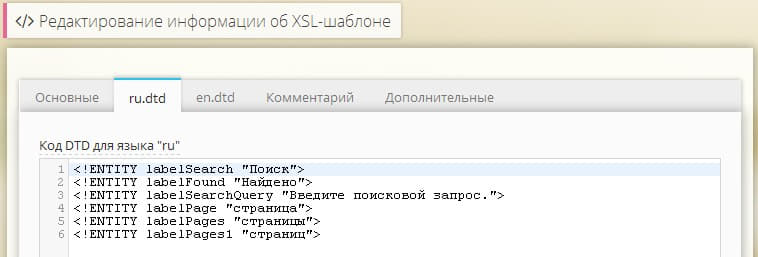
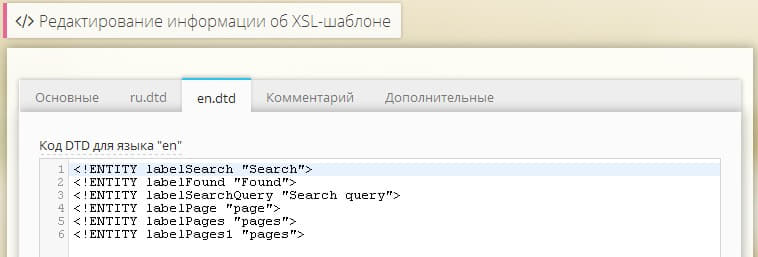
Объявление сущностей в DTD
Например, объявление сущности labelSearch:
<!ENTITY labelSearch "Поиск">
позволяет в дальнейшем использовать ее в XSL-шаблоне:
<h1>&labelSearch;</h1>
или в атрибутах
<img src="/images/my-image.png" alt="&labelSearch;" title="&labelSearch;" />
Ручное изменение используемого языка
Изменение языка подключаемого DTD возможно явным вызовом метода Core::setLng(), передав ему двухбуквенный код языка. Вызов необходимо делать перед использованием XSL, например, в начале макета.
Core::setLng('en');
Добавление DTD для языков, которые не указаны у сайтов
Вы можете добавить в конфигурационный файл modules/xsl/config/config.php дополнительные языки, для которых требуется создание DTD:

<?php
return array (
'lngs' => array('en', 'de', 'ru'),
);
XSL

Информационный блок в карточке товара

Добавляем в карточку товара блок с призывом задать вопрос

1. В XSL шаблон вывода карточки товара в нужном месте размещаем данный код: 

<div class="ask-question">
            <div class="d-flex justify-content-center">
              <svg xmlns="http://www.w3.org/2000/svg" viewBox="0 0 512 512" width="40px" height="40px">
                <path style="fill:#ccc" d="M448 0H64C28.7 0 0 28.7 0 64v288c0 35.3 28.7 64 64 64h96v84c0 7.1 5.8 12 12 12 2.4 0 4.9-.7 7.1-2.4L304 416h144c35.3 0 64-28.7 64-64V64c0-35.3-28.7-64-64-64zm32 352c0 17.6-14.4 32-32 32H293.3l-8.5 6.4L192 460v-76H64c-17.6 0-32-14.4-32-32V64c0-17.6 14.4-32 32-32h384c17.6 0 32 14.4 32 32v288zm-224-88c-13.3 0-24 10.7-24 24s10.7 24 24 24 24-10.7 24-24-10.7-24-24-24zm-8.5-24h17c4.2 0 7.7-3.3 8-7.5l7-112c.3-4.6-3.4-8.5-8-8.5h-31c-4.6 0-8.3 3.9-8 8.5l7 112c.3 4.2 3.8 7.5 8 7.5z"></path>
              </svg>
              <span class="ps-3 fs-4 fw-bold title">Есть вопросы?</span>
            </div>
            <div class="text">
						Если у вас есть вопросы по товару, то задавайте их и мы вам с радостью ответим.
					</div>
            <div class="last">
              <button type="button" id="questionModalOpen" data-bs-toggle="modal" data-bs-target="#questionModal" class="btn btn-transparent">Задать вопрос о товаре</button>
            </div>
          </div>

2. В макет добавляем код загрузки формы (в примере код формы с отправкой уведомления Пользователю). Форма будет в модальном окне. Нажатие на кнопку "Задать вопрос" вызовет открытие формы.

<?php
        // ФОРМА ЗАЯВКИ
        $oForm = Core_Entity::factory('Form', 1);  
        $Form_Controller_Show = new Form_Controller_Show($oForm);
       if (!is_null(Core_Array::getPost($oForm->button_name)))
          {
         $Form_Controller_Show
         ->values($_POST + $_FILES)
         // 0 - html, 1- plain text
         ->mailType(0)
         ->mailXsl(
            Core_Entity::factory('Xsl')->getByName('ПисьмоКураторуФормыВФорматеHTML')
         )
         ->mailFromFieldName('euronasos19@gmail.com')
         ->process();

        // Отправляем письмо-подтверждение пользователю
        $Form_Controller_Show1 = clone $Form_Controller_Show;
        $sEmail = Core_Array::get($Form_Controller_Show1->values, 'email');  // здесь указать название поля input для email в форме
        if (Core_Valid::email($sEmail)){
            ob_start();
            $Form_Controller_Show1
                ->xsl(
                    Core_Entity::factory('Xsl')->getByName('ПисьмоПодтверждениеПользователюФормыВФорматеHTML')
                )
                ->show();
            $sMailText = ob_get_clean();
            if (mb_strpos($sMailText, 'ERROR TRUE') === FALSE){
                $subject = 'На сайте site.ru Вами была заполнена форма Заявки';// Тему письма отредактировать
                $oCore_Mail = Core_Mail::instance()
                    ->to($sEmail)
                    ->from('info@site.ru')
                    ->subject($subject)
                    ->message(trim($sMailText))
                    ->contentType('text/html')
                    ->header('X-HostCMS-Reason', 'Form');

                $oCore_Mail->send();
                      }
                  }
              }
                $Form_Controller_Show
                  ->xsl(
                  Core_Entity::factory('Xsl')->getByName('ОтобразитьФормуЗаявкиВМодальномОкне')
                 )
                  ->show();
?>

XSL . ФормаЗаявкиВМодальномОкне

<?xml version="1.0" encoding="utf-8"?>
<!DOCTYPE xsl:stylesheet SYSTEM "lang://351">
<xsl:stylesheet version="1.0"
xmlns:xsl="http://www.w3.org/1999/XSL/Transform"
xmlns:hostcms="http://www.hostcms.ru/"
exclude-result-prefixes="hostcms">
<xsl:output xmlns="http://www.w3.org/TR/xhtml1/strict" doctype-public="-//W3C//DTD XHTML 1.0 Strict//EN" encoding="utf-8" indent="yes" method="html" omit-xml-declaration="no" version="1.0" media-type="text/xml" />
<!-- ОтобразитьФорму -->
<xsl:template match="/">
<xsl:apply-templates select="/form" />
</xsl:template>
<xsl:template match="/form">
<xsl:choose>
<xsl:when test="success/node() and success = 1">
<!--div id="fade" style="display: block;"></div-->
<div class="modal fade form-success-result" id="modalSuccess" tabindex="-1" role="dialog">
<div class="modal-dialog  modal-dialog-centered">
<div class="modal-content p-5">
<div class="modal-header text-center">
<!--div class="modal-title w-100 fs-4 fw-bold">&labelModalTitle1;</div-->
<button class="btn-close" type="button" data-bs-dismiss="modal"></button>
</div>
<div class="modal-body">
<xsl:value-of disable-output-escaping="yes" select="success_text" />
</div>
</div>
</div>
</div>
<script>
let modalSuccess = new bootstrap.Modal(document.getElementById('modalSuccess'));
modalSuccess.show();
</script>
</xsl:when>
<!-- Выводим ошибку (error), если она была передана через внешний параметр -->
<xsl:when test="error != ''">
<div class="modal fade form-success-result" id="modalError" tabindex="-1" role="dialog">
<div class="modal-dialog  modal-dialog-centered">
<div class="modal-content p-5">
<div class="modal-header text-center">
<div class="modal-title w-100 fs-3 fw-bold">ОШИБКА!</div>
<button class=" " type="button" data-bs-dismiss="modal"></button>
</div>
<div class="modal-body"><b><xsl:value-of disable-output-escaping="yes" select="error" /></b></div>
</div>
</div>
</div>
<script>
let modalError = new bootstrap.Modal(document.getElementById('modalError'));
modalError.show();
</script>
</xsl:when>
<xsl:when test="errorId/node()">
<div class="modal fade form-success-result" id="modalError" tabindex="-1" role="dialog">
<div class="modal-dialog  modal-dialog-centered">
<div class="modal-content p-5">
<div class="modal-header text-center">
<div class="modal-title w-100 fs-3 fw-bold">&labelERROR;</div>
<button class="btn-close" type="button" data-bs-dismiss="modal"></button>
</div>
<div class="modal-body">
<xsl:choose>
<xsl:when test="errorId = 0">
&labelTextErrorId0;
</xsl:when>
<xsl:when test="errorId = 1">
&labelTextErrorId1;
</xsl:when>
<xsl:when test="errorId = 2">
&labelTextErrorId2;
</xsl:when>
</xsl:choose>
</div>
</div>
</div>
</div>
<script>
let modalError = new bootstrap.Modal(document.getElementById('modalError'));
modalError.show();
</script>
</xsl:when>
<xsl:otherwise>
 <div class="modal fade" id="questionModal" tabindex="-1" aria-labelledby="questionModalLabel_{@id}" aria-hidden="true">
<div class="modal-dialog  modal-dialog-centered modal-dialog-scrollable">
<div class="modal-content">
<div class="modal-header justify-content-center">
<div class="h2 m-0 modal-title" id="questionModalLabel_{@id}"><xsl:value-of disable-output-escaping="yes" select="name" /></div>
<button class="btn-close" type="button" data-bs-dismiss="modal"></button>
</div>
<div class="modal-body">
<xsl:if test="description !=''">
<xsl:value-of disable-output-escaping="yes" select="description" />
</xsl:if>
<div id="add-text" class="text-center"> </div>
<!-- Параметр action формы должен быть "./", если обработчик на этой же странице, либо "./form/", если обработчик на другой странице, например ./form/ -->
<form name="form{@id}" id="form{@id}" class="validate" action="./" method="post" enctype="multipart/form-data" >
<!-- Вывод разделов формы 0-го уровня -->
<xsl:apply-templates select="form_field_dir" />
<!-- Вывод списка полей формы 0-го уровня -->
<xsl:apply-templates select="form_field" />
<!-- Код подтверждения -->
<xsl:if test="captcha_id != 0">
<div class="form-group mb-3">
<div class="row">
<div class="col-6 caption">
<input type="hidden" name="captcha_id" value="{/form/captcha_id}"/>
<input type="text" name="captcha" size="15" class="form-control required" minlength="4" title="Введите число, которое указано на картинке."/>
<div class="padding-5">&labelCheckNumber1;<sup><font color="red">*</font></sup></div>
</div>
<div class="col-6 field">
<img id="formCaptcha_{/form/@id}_{/form/captcha_id}" src="/captcha.php?id={captcha_id}&amp;height=30&amp;width=100" class="captcha" name="captcha" />
<div class="captcha">
<img src="/images/refresh.png" /> <span class="small" onclick="$('#formCaptcha_{/form/@id}_{/form/captcha_id}').updateCaptcha('{/form/captcha_id}', 30); return false" style="cursor:pointer">&labelCheckNumber2;</span>
</div>
</div>
</div>
</div>
</xsl:if>
<!--div class="margin-bottom-10">
<div class="g-recaptcha" data-sitekey="6LfemXMiAAAAAPtn9tHaYj5z-0yKJq4Tmi3Ph1Cw"></div>
</div-->
<xsl:if test="csrf_token/node() and csrf_token != ''">
<input type="hidden" name="{csrf_field}" value="{csrf_token}" />
</xsl:if>
<div class="form-group">
<input type="hidden" name="{button_name}" value="submit"/>
<button id="submit_{@id}" value="submit" name="{button_name}" type="submit" class="btn btn-black mt-4 w-100"><xsl:value-of select="button_value" /></button>
</div>
</form>
<div class="mt-4">
<div class="form-check">
<input id="checkbox{@id}" class="form-check-input" type="checkbox" name="checkbox" checked="checked" onchange="document.getElementById('submit_{@id}').disabled = !this.checked;"/>
<label for="checkbox{@id}" class="form-check-label small" style="text-align:justify">Я соглашаюсь на обработку своих персональных данных в соответствии с <a href="/private" class="link-border"> Политикой конфиденциальности</a></label>
</div>
</div>
</div>
</div>
</div>
</div>
<SCRIPT>
<xsl:comment>
<xsl:text disable-output-escaping="yes">
    <![CDATA[
    $(function() {
    $("#fileUpload").on('change', function () {
 
     //Get count of selected files
     var countFiles = $(this)[0].files.length;
     var imgPath = $(this)[0].value;
     var extn = imgPath.substring(imgPath.lastIndexOf('.') + 1).toLowerCase();
     var image_holder = $("#image-holder");
     image_holder.empty();
 
     if (extn == "png" || extn == "jpg" || extn == "jpeg" || extn == "webp") {
         if (typeof (FileReader) != "undefined") {
 
             //loop for each file selected for uploaded.
             for (var i = 0; i < countFiles; i++) {
 
                 var reader = new FileReader();
                 reader.onload = function (e) {
                     $("<img />", {
                         "src": e.target.result,
                             "class": "thumb-image"
                     }).appendTo(image_holder);
                 }
 
                 image_holder.show();
                 reader.readAsDataURL($(this)[0].files[i]);
             }
 
         } else {
             alert("Ваш брузер не поддерживает FileReader!");
         }
     } else {
         alert("Выберите файл в формате JPG, JPEG, PNG или WEBP!");
     }
    });
    });
]]>
</xsl:text>
</xsl:comment>
</SCRIPT>
</xsl:otherwise>
</xsl:choose>
</xsl:template>
<xsl:template match="form_field_dir">
<!--fieldset class="maillist_fieldset"-->
<!--legend><xsl:value-of select="name" /></legend-->
<!-- Вывод списка полей формы -->
<xsl:apply-templates select="form_field" />
<!-- Вывод разделов формы -->
<xsl:apply-templates select="form_field_dir" />
<!--/fieldset-->
</xsl:template>
<xsl:template match="form_field">
<!-- Не скрытое поле и не надпись -->
<xsl:if test="type != 7 and type != 8">
<div class="form-group mb-3">
<xsl:if test="type = 2">
<xsl:attribute name="class">form-group mb-2 me-4</xsl:attribute>
</xsl:if>
<xsl:variable name="caption">
<xsl:choose>
<xsl:when test="obligatory = 1">
<xsl:value-of select="caption" />*
</xsl:when>
<xsl:otherwise>
<xsl:value-of select="caption" />
</xsl:otherwise>
</xsl:choose>
</xsl:variable>
<xsl:choose>
<!-- Радиокнопки -->
<xsl:when test="type = 3 or type = 9">
<xsl:apply-templates select="list/list_item" />
</xsl:when>
<!-- Checkbox -->
<xsl:when test="type = 4">
<div class="pretty p-default p-pulse">
<input type="checkbox" name="{name}">
<xsl:if test="checked = 1 or value = 1">
<xsl:attribute name="checked">checked</xsl:attribute>
</xsl:if>
</input>
<div class="state p-danger-o">
<label><xsl:value-of select="value" /></label>
</div>
</div>
</xsl:when>
<!-- Textarea -->
<xsl:when test="type = 5">
<textarea class="form-control" name="{name}" cols="{cols}" rows="{rows}" placeholder="{$caption}">
<xsl:if test="obligatory = 1">
<xsl:attribute name="class">form-control required</xsl:attribute>
</xsl:if>
<xsl:value-of select="value" />
</textarea>
</xsl:when>
<!-- Список -->
<xsl:when test="type = 6">
<select name="{name}" class="wide">
<xsl:if test="obligatory = 1">
<xsl:attribute name="class">wide required</xsl:attribute>
<xsl:attribute name="title"><xsl:value-of select="caption" /></xsl:attribute>
</xsl:if>
<option value="">...</option>
<xsl:apply-templates select="list/list_item" />
</select>
</xsl:when>
<!-- Текстовые поля -->
<xsl:otherwise>
<xsl:if test="type = 2">
<label for="fileUpload" class="download-file">
<i class="svg_icon">
<svg xmlns="http://www.w3.org/2000/svg" viewBox="0 0 512 512" width="21px" height="21px" ><path style="fill:#797979" d="M464 64H48C21.49 64 0 85.49 0 112v288c0 26.51 21.49 48 48 48h416c26.51 0 48-21.49 48-48V112c0-26.51-21.49-48-48-48zm16 336c0 8.822-7.178 16-16 16H48c-8.822 0-16-7.178-16-16V112c0-8.822 7.178-16 16-16h416c8.822 0 16 7.178 16 16v288zM112 232c30.928 0 56-25.072 56-56s-25.072-56-56-56-56 25.072-56 56 25.072 56 56 56zm0-80c13.234 0 24 10.766 24 24s-10.766 24-24 24-24-10.766-24-24 10.766-24 24-24zm207.029 23.029L224 270.059l-31.029-31.029c-9.373-9.373-24.569-9.373-33.941 0l-88 88A23.998 23.998 0 0 0 64 344v28c0 6.627 5.373 12 12 12h360c6.627 0 12-5.373 12-12v-92c0-6.365-2.529-12.47-7.029-16.971l-88-88c-9.373-9.372-24.569-9.372-33.942 0zM416 352H96v-4.686l80-80 48 48 112-112 80 80V352z"/></svg>
</i>
<span class="download-file-text ps-2">Выберите сразу несколько фото</span>
</label>
</xsl:if>
<input class="form-control" type="text" name="{name}" value="{value}" size="{size}" placeholder="{$caption}">
<xsl:choose>
<!-- Поле для ввода пароля -->
<xsl:when test="type = 1">
<xsl:attribute name="type">password</xsl:attribute>
</xsl:when>
<!-- Поле загрузки файла -->
<xsl:when test="type = 2">
<xsl:attribute name="type">file</xsl:attribute>
<xsl:attribute name="multiple">true</xsl:attribute>
<xsl:attribute name="class">photo</xsl:attribute>
<xsl:attribute name="name">files[]</xsl:attribute>
<xsl:attribute name="id">fileUpload</xsl:attribute>
<xsl:attribute name="accept">image/jpg,image/jpeg,image/png,image/webp</xsl:attribute>
<div id="image-holder" class="d-flex flex-wrap"></div>
</xsl:when>
<!-- HTML5: Дата -->
<xsl:when test="type = 10">
<xsl:attribute name="type">date</xsl:attribute>
</xsl:when>
<!-- HTML5: Цвет -->
<xsl:when test="type = 11">
<xsl:attribute name="type">color</xsl:attribute>
</xsl:when>
<!-- HTML5: Месяц -->
<xsl:when test="type = 12">
<xsl:attribute name="type">month</xsl:attribute>
</xsl:when>
<!-- HTML5: Неделя -->
<xsl:when test="type = 13">
<xsl:attribute name="type">week</xsl:attribute>
</xsl:when>
<!-- HTML5: Время -->
<xsl:when test="type = 14">
<xsl:attribute name="type">time</xsl:attribute>
</xsl:when>
<!-- HTML5: Дата-Время -->
<xsl:when test="type = 15">
<xsl:attribute name="type">datetime</xsl:attribute>
</xsl:when>
<!-- HTML5: E-mail -->
<xsl:when test="type = 16">
<xsl:attribute name="type">email</xsl:attribute>
</xsl:when>
<!-- HTML5: Поиск -->
<xsl:when test="type = 17">
<xsl:attribute name="type">search</xsl:attribute>
</xsl:when>
<!-- HTML5: Телефон -->
<xsl:when test="type = 18">
<xsl:attribute name="type">tel</xsl:attribute>
</xsl:when>
<!-- HTML5: URL -->
<xsl:when test="type = 19">
<xsl:attribute name="type">url</xsl:attribute>
</xsl:when>
<!-- Текстовое поле -->
<xsl:otherwise>
<xsl:attribute name="type">text</xsl:attribute>
</xsl:otherwise>
</xsl:choose>
<xsl:if test="obligatory = 1">
<xsl:attribute name="class">form-control required</xsl:attribute>
</xsl:if>
<!--xsl:if test="@id = 15">
<xsl:attribute name="disabled">disabled</xsl:attribute>
</xsl:if-->
</input>
</xsl:otherwise>
</xsl:choose>
</div>
</xsl:if>
<!-- скрытое поле -->
<xsl:if test="type = 7">
<input type="hidden" name="{name}" value="{value}" />
</xsl:if>
</xsl:template>
</xsl:stylesheet>
//
//
//
Код DTD для языка "ru"

<!ENTITY labelModalTitle1 "Благодарим вас за заявку!">
<!ENTITY labelModalTitle2 "Заявка получена.">
<!ENTITY labelSuccessText "Мы свяжемся с вами в ближайшее время">
<!ENTITY labelSuccessText2 "Наш менеджер ответит на все ваши вопросы">

<!ENTITY labelERROR "ОШИБКА!">
<!ENTITY labelTextErrorId0 "Вы неправильно ввели код подтверждения отправки формы!">
<!ENTITY labelTextErrorId1 "Заполните все обязательные поля!">
<!ENTITY labelTextErrorId2 "С момента отправки последней формы прошло слишком мало времени!">

<!ENTITY labelTextError1 "Это поле пустое">
<!ENTITY labelTextError2 "E-mail должен иметь вид name@domain.com">

<!ENTITY labelText1 "Обязательное поле">

<!ENTITY labelCheckNumber1 "Проверочный код">
<!ENTITY labelCheckNumber2 "показать другой код">

Стили CSS

/******************************/

.ask-question {
    padding:20px;
    background-color: #f0f0f0;
    max-width:450px;
    text-align: center;
}
.ask-question > div:not(.last) {
     margin-bottom:15px;   
}

.btn.btn-transparent {

background: transparent;

border: 1px solid #212529;

color: #212529;

/******************************/

Использование jQuery Validate для проверки форм

Рабочая валидация с проверкой captcha
<script>
      $(function() {
            $(".validate").validate({
            focusInvalid: true,
            errorClass: "input_error",
            onkeyup: false,
            onfocusout: false,
            rules: {
            captcha: {
            required: true,
            remote: '/forms/'
            },
            author: "required",
             text: "required",
             email: {
                   required: true,
                   email: true
                  }
               },
               messages: {
                       author: "Пожалуйста, укажите своё Имя!",
                       text: "Пожалуйста, напишите свой комментарий!",
                       captcha: "Вы не вписали контрольное число!",
                       email: {
                       required: "Введите свой email",
                       email: "E-mail должен быть в формате name@domain.com"
                         }
            }});
        });
   </script>
Проверьте, подключен ли в макете файл jquery.validate.min.js, в системе управления он расположен в hostcmsfiles/jquery/jquery.validate.min.js
Core_Page::instance()
// jQuery
->js('/hostcmsfiles/jquery/jquery.min.js')
...
// Validate
->js('/hostcmsfiles/jquery/jquery.validate.min.js')
...
->showJs();

Указание валидации формы

Валидация конкретной формы или форм с классом validate указывается следующим образом:
<script>
$(".validate").validate();
</script>
Валидация всех форм:

<script>
$("form").validate();
</script>

Способы валидации форм

Использование имена классов как правила

Тем полям, которые нужно проверять, добавляете атрибут class="required"
<form action="." method="post" class="validate">
    <input type="text" name="name" value="" class="required" />
    <input type="submit" value="Submit" />
</form>

С помощью метод addClassRules вы можете расширить и добавить условие валидации:
<form action="." method="post" class="validate">
    <input type="text" name="name" value="" class="name" />
    <input type="text" name="zip" value="" class="zip" />
    <input type="submit" value="Submit" />
</form>
Проверка скриптом
<script >
$.validator.addClassRules("name", {
    required: true,
    minlength: 2
});
</script >
или сразу для нескольких полей:
<script >
$.validator.addClassRules({
name: {
required: true,
minlength: 2
},
zip: {
required: true,
digits: true,
minlength: 5,
maxlength: 5
}});
</script >

Передача опций при инициализации validate()

Методу validate() передаем объекты rules и messages которые состоят из пар ключ/значение. В rules в качестве ключа указываем атрибут name поля, значением указываем правило проверки. В messages в качестве ключа так же идет атрибут name поля, а в качестве значения указываем предупреждающее сообщение.
<script >
$(".validate").validate({
rules: {
name: "required",
email: {
required: true,
email: true
}
},
messages: {
name: "Please specify your name",
email: {
required: "Введите свой email",
email: "E-mail должен быть в формате name@domain.com"
}
}});
</script >
Список правил:
  • required — поле обязательное для заполнения (true или false);
  • remote — указывается файл для проверки поля (например: "check.php");
  • email — проверяет корректность e-mail адреса (true или false);
  • url — проверяет корректность url адреса (true или false);
  • date — проверка корректности даты (true или false);
  • dateISO — проверка корректности даты ISO (true или false);
  • number — проверка на число (true или false);
  • digits — только цифры (true или false);
  • creditcard — корректность номера кредитной карты (true или false);
  • equalTo — равное чему-то (например другому полю equalTo: "#pswd");
  • accept — проверка на правильное расширение (accept: "xls|csv");
  • maxlength — максимальное кол-во символов;
  • minlength — минимальное кол-во символов;
  • rangelength — кол-во символов от скольких и до скольких (rangelength: [2, 5]);
  • range — число должно быть в диапазоне от и до (range: [2, 12]);
  • max — максимальное значение числа;
  • min — минимальное значение числа.

Пример использования в XSL-шаблоне

Указываем форме класс например validate, и далее в XSL-шаблоне формы добавляем код проверки формы (пример взят из формы быстрого заказа в адаптивном шаблоне):
<script >
$(".validate").validate({
rules: {
surname: "required",
name: "required",
email: {
required: true,
email: true
}
},
messages: {
surname: "Введите фамилию!",
name: "Введите имя!",
email: {
required: "Введите e-mail!",
email: "Адрес должен быть вида name@domain.com"
}
},
focusInvalid: true,
errorClass: "input_error"
});
</script>
Проверка валидации и заблокированного E-mail нежелательного Пользователя
<SCRIPT>
            $(document).ready(function() {
            $('.select2').addClass('required');
            $("#form<xsl:value-of select="@id" />").submit(function (event) {
            event.preventDefault();
            var eml = $('input[name=email]').val();
            if(eml =='svinya.svintus@yandex.ru') {
            alert ('Вы не можете отправлять нам письма');
            $(location).attr('href', '/');
            }else{
            
            $(this).validate({
            focusInvalid: true,
            errorClass: "input_error"
            });
            }
            });
            });
        </SCRIPT>

Карточка услуги с вертикальным слайдером на основе Swiper

XSL

<!-- XSL шаблон "ВыводУслуги" -->

<?xml version="1.0" encoding="utf-8"?>
<xsl:stylesheet version="1.0"
xmlns:xsl="http://www.w3.org/1999/XSL/Transform"
xmlns:hostcms="http://www.hostcms.ru/"
exclude-result-prefixes="hostcms">
<xsl:output xmlns="http://www.w3.org/TR/xhtml1/strict" doctype-public="-//W3C//DTD XHTML 1.0 Strict//EN" encoding="utf-8" indent="yes" method="html" omit-xml-declaration="no" version="1.0" media-type="text/xml"/>
<xsl:template match="/">
<div class="item-page">
<xsl:apply-templates select="/informationsystem/informationsystem_item"/>
</div>
</xsl:template>
<xsl:template match="informationsystem_item">
<div class="container">
<header class="page-title">
<span class="decor-left"> </span>
<h1>
<xsl:choose>
<xsl:when test="property_value[tag_name='title']/value !=''">
<xsl:value-of select="property_value[tag_name='title']/value"/>
</xsl:when>
<xsl:otherwise>
<xsl:value-of select="name"/>
</xsl:otherwise>
</xsl:choose>
</h1>
<span class="decor-right"> </span>
</header>
<div class="row mb-5">
<div class="slider col-12 col-sm-6 col-lg-5">
<div class="slider__flex">
<div class="slider__col">
<xsl:if test="property_value[tag_name='img']/file !=''">
<div class="slider__prev"><svg xmlns="http://www.w3.org/2000/svg" viewBox="0 0 448 512" width="30px" height="30px"><path class="m-grey" d="M4.465 366.475l7.07 7.071c4.686 4.686 12.284 4.686 16.971 0L224 178.053l195.494 195.493c4.686 4.686 12.284 4.686 16.971 0l7.07-7.071c4.686-4.686 4.686-12.284 0-16.97l-211.05-211.051c-4.686-4.686-12.284-4.686-16.971 0L4.465 349.505c-4.687 4.686-4.687 12.284 0 16.97z"/></svg></div> <!-- Кнопка для переключения на предыдущий слайд -->
<div class="slider__thumbs">
<div class="swiper-container"> <!-- Слайдер с превью -->
<div class="swiper-wrapper">
<div class="swiper-slide">
<div class="slider__image">
<img class="img-fluid" src="{dir}{image_small}" alt="{name}"/>
</div>
</div>
<xsl:for-each select="property_value[tag_name='img']">
<div class="swiper-slide">
<div class="slider__image"><img src="{../dir}{file}" alt="{./name}" width="file_width" height="file_height"/></div>
</div>
</xsl:for-each>
</div>
</div>
</div>
<div class="slider__next"><svg xmlns="http://www.w3.org/2000/svg" viewBox="0 0 448 512" width="30px" height="30px"><path class="m-grey" d="M443.5 162.6l-7.1-7.1c-4.7-4.7-12.3-4.7-17 0L224 351 28.5 155.5c-4.7-4.7-12.3-4.7-17 0l-7.1 7.1c-4.7 4.7-4.7 12.3 0 17l211 211.1c4.7 4.7 12.3 4.7 17 0l211-211.1c4.8-4.7 4.8-12.3.1-17z"/></svg></div> <!-- Кнопка для переключения на следующий слайд -->
</xsl:if>
</div>
<div class="slider__images">
<div class="swiper-container"> <!-- Слайдер с изображениями -->
<div class="swiper-wrapper">
<div class="swiper-slide">
<div class="slider__image">
<img class="img-fluid" src="{dir}{image_small}" alt="{name}"/>
</div>
</div>
<xsl:for-each select="property_value[tag_name='img']">
<div class="swiper-slide">
<div class="slider__image"><img src="{../dir}{file}" alt="{./name}" width="file_width" height="file_height"/></div>
</div>
</xsl:for-each>
</div>
</div>
</div>
</div>
</div>
<div class="col-12 col-sm-6 col-lg-7">
<div class="text">
<xsl:value-of disable-output-escaping="yes" select="description"/>
<xsl:if test="property_value[tag_name='price']/value !=''">
<div class="mt-4">
<span class="fs-5">Цена: </span> <span class="fs-3"><xsl:value-of disable-output-escaping="yes" select="property_value[tag_name='price']/value" /> ₽</span>
</div>
</xsl:if>
<xsl:if test="property_value[tag_name='show_button']/value !=''">
<div class="mt-4">
<button type="button" class="btn btn-primary btn-lg" data-bs-toggle="modal" data-bs-target="#FormModal_4">
<span class="icon pe-2"><svg width="30px" height="30px" version="1.1" style="shape-rendering:geometricPrecision; text-rendering:geometricPrecision; image-rendering:optimizeQuality; fill-rule:evenodd; clip-rule:evenodd" viewBox="0 0 0.9 0.9">
<g id="Слой_x0020_1">
<path class="black" d="M0.5 0.11c0,0.02 -0.01,0.04 -0.01,0.05 0,0.01 0,0.02 -0.01,0.02 0,0.01 -0.01,0 -0.01,0 0,0 0.01,-0.06 0.01,-0.07 0,-0.01 0,-0.02 0.01,-0.02 0.01,0 0.01,0.01 0.01,0.02zm-0.05 0.78c-0.07,0 -0.12,-0.02 -0.18,-0.04 -0.04,-0.02 -0.06,-0.04 -0.09,-0.06l-0.04 -0.03c-0.09,-0.1 -0.15,-0.25 -0.12,-0.41 0.02,-0.07 0.05,-0.13 0.09,-0.18 0.01,-0.01 0.01,-0.01 0.02,-0.02 0,0 0.01,-0.01 0.01,-0.01 0.03,-0.03 0.08,-0.07 0.13,-0.09 0.03,-0.01 0.05,-0.02 0.08,-0.03 0.12,-0.03 0.25,0 0.35,0.07 0,0 0.01,0.01 0.01,0.01 0.02,0.01 0.06,0.05 0.07,0.06 0,0.01 0.01,0.02 0.02,0.03 0,0 0,0.01 0.01,0.01 0.05,0.07 0.08,0.16 0.08,0.25 0,0.07 -0.02,0.12 -0.04,0.18 -0.01,0.02 -0.03,0.05 -0.04,0.07 -0.01,0.01 -0.02,0.02 -0.03,0.03 0,0.01 -0.01,0.01 -0.02,0.02 0,0 0,0 0,0.01l-0.05 0.03c-0.07,0.06 -0.17,0.1 -0.26,0.1zm0.45 -0.42c0,-0.06 -0.01,-0.13 -0.03,-0.19 -0.01,-0.01 -0.02,-0.02 -0.02,-0.04 -0.01,-0.01 -0.03,-0.05 -0.05,-0.06 0,-0.01 0,-0.01 0,-0.01l-0.03 -0.04c-0.01,0 -0.01,-0.01 -0.02,-0.01l-0.02 -0.02c-0.13,-0.1 -0.3,-0.13 -0.45,-0.07 -0.03,0.01 -0.07,0.04 -0.1,0.06 0,0 0,0 0,0 -0.01,0.01 -0.01,0.01 -0.02,0.02 0,0 0,0 -0.01,0l-0.02 0.02c0,0.01 -0.01,0.01 -0.01,0.02l-0.02 0.01c-0.01,0.02 -0.04,0.06 -0.05,0.09 -0.09,0.16 -0.06,0.37 0.07,0.5 0.02,0.02 0.02,0.03 0.04,0.04 0,0.01 0.01,0.01 0.01,0.01 0.02,0.02 0.05,0.03 0.08,0.05 0.11,0.06 0.25,0.06 0.36,0.02 0.04,-0.02 0.09,-0.05 0.12,-0.07 0.01,-0.01 0.01,-0.01 0.02,-0.02 0.01,-0.01 0.01,-0.01 0.02,-0.01l0.02 -0.03c0.02,-0.03 0.04,-0.06 0.06,-0.09 0.02,-0.05 0.04,-0.11 0.05,-0.18zm-0.77 0.25l0 0 0 0.01 0 0c0,0 0,0 0,0 0,0 0,0 0,0 0.01,0 0.01,0 0.01,0l0.01 -0.01 0 -0.01 -0.02 0.01zm0.46 -0.67c-0.01,0 -0.01,0 -0.01,0l-0.01 0.02 0.01 0 0.01 -0.02zm-0.2 0.82l0 0 0.01 0 0 -0.02c0,0 -0.01,0 -0.01,0l0 0c0,0 0,0 0,0l0 0.02zm-0.35 -0.3l0 0.01 0.03 -0.01 -0.01 -0.01 -0.02 0.01zm0.58 -0.51l0 0 -0.01 0.02 0 0 0.01 -0.02zm0.09 0.05l0 0 -0.02 0.02 0.01 0.01c0,-0.01 0,-0.01 0.01,-0.01 0,-0.01 0,-0.01 0,-0.01 0,-0.01 0,0 0,0 0,0 0,-0.01 0,-0.01 0,0 0,0 0,0zm-0.31 -0.08l-0.01 0 0 0.02 0.01 0 0 -0.02zm-0.08 0.01l0.01 0.03 0 -0.01 0 -0.02c-0.01,0 -0.01,0 -0.01,0zm-0.29 0.32l0.03 0 0 -0.01 -0.02 0c0,0 0,0 -0.01,0.01zm0.51 -0.32l0 0.02 0.01 0 0 -0.02c0,0 0,0 0,0 -0.01,0 -0.01,-0.01 -0.01,0zm-0.51 0.46l0 0 0 0.01c0,0 0.01,0 0.01,-0.01 0.01,0 0.01,0 0.01,0l-0.02 0zm0.82 -0.17c0.01,0 0.01,0 0.01,0 -0.01,-0.01 -0.01,-0.01 -0.01,-0.01 0,0 0,0 0,0l-0.02 0.01 0 0 0.02 0zm-0.5 -0.29l0.01 0.02 0.01 0 -0.01 -0.03c0,0 0,0 -0.01,0.01zm0.51 0.32c0,0 0,0 0,0 0,-0.01 0,0 0,0l-0.02 0 0 0.01 0.02 -0.01zm-0.02 -0.07l0 -0.01 -0.02 0.01 0 0.01 0.02 -0.01zm0.03 0.11l0 -0.01c0,0 0,0 0,0 -0.01,0 -0.01,0 -0.01,0 -0.01,0 -0.01,0 -0.01,0l0 0.01c0,0 0.01,0 0.02,0zm-0.36 -0.37c0,0 0,0 0,0 0,0 -0.01,0 -0.01,0l0 0.02 0.01 0 0 -0.02zm-0.45 0.58c-0.01,0 -0.01,0 0,0 0,0 0,0 0,0 0,0 0,0 0,0l0.02 -0.01c0,0 0,0 0,0l-0.02 0.01zm0.44 0.26c0,0 0,0 0,0l0.01 0 -0.01 -0.02 0 0 0 0.02zm-0.32 -0.09c0.01,0 0.01,0 0.01,0.01 0,-0.01 0.01,-0.02 0.01,-0.02l0 -0.01 -0.02 0.02zm0.61 -0.58l0 0c-0.01,0 -0.01,0 -0.02,0.01l0 0c0,0 0,0 0.01,0.01l0.01 -0.02 0 0 0 0zm-0.76 0.33l0 0.01c0.01,0 0.02,0 0.03,0l0 -0.01 -0.03 0zm0.13 -0.4c0.01,0.01 0.02,0.02 0.02,0.02 0,0 0,0 0,0 0,-0.01 0,-0.01 0,-0.01 0,-0.01 -0.01,-0.01 -0.01,-0.01 0,0 0,0 0,0 -0.01,0 0,0 -0.01,0zm0.6 0.04l0 0 0 0 0 0 -0.01 0.01 0 0.01c0.01,-0.01 0.01,-0.01 0.02,-0.02 0,0 0,0 -0.01,0l0 0zm-0.15 0.67c0,0 -0.01,0 0,0 0,0 0,0 0,0l0 0 -0.01 -0.02 0 0 0.01 0.02zm-0.41 -0.73c0,0 0,0 0,0.01 0,0 0.01,0 0.01,0.01 0,-0.01 0,0 0,-0.01 0,0 0,-0.01 -0.01,-0.01 0,-0.01 0,0 0,-0.01l0 0.01zm0.15 0.75l0.01 0 0 -0.02 -0.01 0 0 0.02zm-0.32 -0.46l0.02 0 0 -0.01 -0.02 0 0 0.01 0 0zm0.03 -0.12l0.02 0.01 0 -0.01 -0.02 -0.01c0,0.01 0,0 0,0.01 0,0 0,0 0,0zm-0.01 0.04c0,0 0.01,0.01 0.02,0.01l0 -0.01 -0.02 -0.01c0,0 0,0 0,0 -0.01,0.01 -0.01,0.01 0,0.01zm0.23 -0.26c0.01,0 0.01,0.02 0.01,0.02l0.01 0 -0.01 -0.03 -0.01 0.01zm0.59 0.45l0 -0.01c0,0 0,0 0,0l0 0 -0.02 0 0 0.01 0.02 0zm-0.14 0.26l0 0c0,0 0,0 0,0 0,0 0,0 0,0 0,-0.01 0,0 0,-0.01l-0.01 -0.01c0,0 -0.01,0 -0.01,0 0,0 0.01,0.02 0.02,0.02zm-0.04 0.02c0.01,0 0.01,0 0.01,0l0 0 0 0c0,-0.01 -0.01,-0.01 -0.01,-0.02l-0.01 0c0,0.01 0.01,0.01 0.01,0.01 0,0.01 0,0.01 0,0.01zm-0.54 -0.04c0.01,0.01 0.01,0.01 0.01,0.01l0 0 0 0 0 0 0 -0.01 0.01 0 0 0 0 0 0 0 0.01 -0.01c-0.01,0 -0.01,0 -0.01,0l-0.02 0.01zm0.42 0.11c0,-0.01 0,-0.01 0.01,-0.01l-0.01 -0.02 -0.01 0 0.01 0.03zm0.17 -0.71l0 0 0 0 0 0 0 -0.01 0 0c0,0 0,0 0,0 0,0 0,0 0,0 0,0 0,0 -0.01,0 0,0.01 -0.01,0.01 -0.01,0.02l0.01 0 0.01 -0.01zm-0.43 0.7c0,0 0,0 0,0 0.01,0 0.01,0 0.01,0 0,0 0.01,-0.01 0.01,-0.02l-0.01 0 -0.01 0.02zm-0.2 -0.66l0 0c0.01,0.01 0.02,0.01 0.02,0.01l0 0c0,0 0,0 0,0 0,0 -0.01,-0.01 -0.01,-0.01 0,0 -0.01,0 -0.01,0 0,0 0,0 0,0zm0.72 0.43c0.01,0 0.01,0 0.01,0 0,0 0,0 0,0l-0.02 -0.01 -0.01 0c0.01,0.01 0.02,0.01 0.02,0.01zm-0.56 0.21c0.01,0.01 0,0.01 0.01,0.01 0,0 0,0 0,0l0 0 0.01 -0.02 -0.01 -0.01 -0.01 0.02zm-0.17 -0.14c0,0.01 0,0.01 0.01,0.01 0,0 0,0 0,0 0.01,0 0.01,-0.01 0.02,-0.01 0,0 0,-0.01 -0.01,-0.01 0,0 0,0.01 -0.01,0.01 0,0 0,0 -0.01,0zm0.68 0.02l0 0 0 0c0,0 0,0 0.01,0 -0.01,-0.01 -0.02,-0.02 -0.02,-0.02l-0.01 0.01 0.02 0.01zm-0.03 0.03c0.01,0 0.01,0 0.01,0l0 0 0 -0.01 0 0 0 0 -0.02 -0.01 0 0.01c0,0 0.01,0.01 0.01,0.01zm0.1 -0.15c0,0 0,0 0,-0.01 0,0 0,0 0,0l-0.02 -0.01 0 0.01 0.02 0.01zm0.01 -0.04c0,0 0,0 0,0 0,-0.01 0,-0.01 0,-0.01l-0.02 0 0 0c0,0.01 0.01,0.01 0.02,0.01zm-0.33 0.31c0.01,0 0.01,0 0.01,0 0,0 0,-0.02 0,-0.02 -0.01,0 -0.01,0 -0.01,0.01 0,0 0,0.01 0,0.01zm-0.39 -0.7c0,0 0.01,0.01 0.02,0.02 0,-0.01 0,-0.01 0,-0.01l-0.01 -0.01 0 0 0 0 -0.01 0 0 -0.01c0,0.01 0,0.01 0,0.01zm0.66 0.52l0 0 0 0 0 0 0 0 0 0 0.02 -0.03c0,0 0,0 0,0l-0.03 -0.01c0,0 -0.01,0.02 -0.01,0.02 0,0 0.01,0.01 0.01,0.01 0,0 0,0 0.01,0.01zm-0.58 0.11l0 0.01 0 0 0 0 0 0 0 0 0 0 0 0c0,0.01 0,0 0,0.01 0.01,0 0.01,0 0.01,0l0.01 0.01c0.01,0 0.01,0 0.01,0l0.01 -0.03c-0.01,0 -0.02,-0.01 -0.02,-0.01 -0.01,0.01 -0.01,0.01 -0.02,0.01zm0.65 -0.32l0 -0.04 -0.03 0.01c0,0 0,0 0,0.01 0,0 0,0 0,0 0,0.01 0,0.01 0,0.01l0.03 0.01zm-0.19 -0.38c0,0 -0.03,-0.01 -0.03,-0.01l-0.01 0.02c0,0.01 0.02,0.01 0.02,0.02 0.01,-0.01 0.02,-0.02 0.02,-0.03zm-0.65 0.38l0.02 -0.01 0 -0.02 -0.02 -0.01c-0.01,0 -0.01,0 -0.01,0.01l0 0.02c0,0.01 0,0.01 0.01,0.01zm0.2 -0.38l0.02 0.02c0,0 0.01,-0.01 0.02,-0.01l-0.01 -0.03c0,0 -0.01,0 -0.02,0.01 0,0 -0.01,0 -0.01,0.01zm-0.15 0.16c0,0 0.02,0.01 0.02,0.01 0.01,-0.01 0.01,-0.02 0.02,-0.02 -0.01,-0.01 -0.01,-0.01 -0.02,-0.01 0,-0.01 0,-0.01 -0.01,-0.01 0,0 0,0 0,0l-0.01 0.02c0,0 0,0 0,0 0,0.01 0,0 0,0.01zm0.75 0.01c0,-0.01 -0.01,-0.01 -0.01,-0.02 0,0 0,0 0,0l-0.01 -0.01c0,0 0,0 0,0 0,0 -0.02,0.01 -0.02,0.02 0,0 0,0.01 0.01,0.01l0 0.01 0.03 -0.01zm-0.76 0.38c0,0 0.01,0.02 0.01,0.02 0.01,0.01 0,0.01 0.01,0.01l0 0c0.01,-0.01 0.01,-0.01 0.02,-0.02 0,0 -0.01,-0.02 -0.01,-0.02l-0.03 0.01zm0.57 0.19c0,0 0.03,-0.02 0.03,-0.02l-0.02 -0.02c-0.01,0 -0.01,0.01 -0.02,0.01l0.01 0.03zm-0.21 -0.8l0.01 0.02 0.02 0 0.01 -0.02c0,-0.01 -0.01,-0.01 -0.01,-0.01l-0.03 0c0,0.01 0,0 0,0.01zm0 0.84c0,0 0.03,0 0.03,0 0.01,0 0.01,0 0.01,0l-0.01 -0.03 -0.02 0 -0.01 0.03zm0.14 -0.65c0,0 0,0 0,0l0.01 0c0.01,0.01 0.01,0.01 0.02,0.01 0,0 -0.01,0 -0.01,-0.01l0.05 -0.07c0,-0.01 0.01,0 0.01,0 0,-0.01 -0.01,-0.01 -0.01,-0.01 -0.01,0 -0.01,-0.01 -0.02,-0.01 0,0 0.01,0.01 0.01,0.01 0,0.01 -0.01,0.01 -0.01,0.01 -0.01,0.01 -0.03,0.06 -0.04,0.06 0,0.01 0,0 -0.01,0 0,0 0,0 0,0.01zm0.03 0.56l0.01 0c0,0 0,-0.01 0,-0.01 0.01,0 0.01,0 0.01,0l0 0c0,-0.01 0,0 0,-0.01 -0.01,0 -0.01,0 -0.01,-0.01 0,0 0,-0.01 -0.01,-0.02 0,-0.01 0,-0.02 -0.01,-0.04 0.01,0 0.01,0.01 0.01,0.01 0.01,0.01 0.05,0.04 0.05,0.04 0,0.01 0,0.01 0,0.01l0 0c0,0 0.02,-0.01 0.02,-0.01 0,-0.01 0,0 -0.02,-0.01l-0.01 -0.01c-0.01,-0.01 -0.01,-0.01 -0.02,-0.02 0,0 -0.01,0 -0.01,-0.01 0,0 -0.01,0 -0.01,-0.01 0,0 0,0 0,0 -0.02,-0.02 -0.02,-0.01 -0.01,0.04l0.02 0.04c0,0.01 -0.01,0.01 -0.01,0.02zm-0.46 -0.52c0.01,-0.01 0.01,-0.02 0.02,0 0,0.01 0.01,0.02 0.01,0.02 -0.01,0 -0.02,0 -0.02,0 -0.02,0 -0.01,-0.01 -0.02,-0.01 0,0 0,0 0,0.01 0,0 -0.02,0.02 -0.01,0.02 0,0 0,0 0,-0.01 0.01,0 0.05,0 0.06,0.01 0,0.01 0.02,0.03 0.02,0.04 0,0.01 0,0.01 0,0.01 0,0 0.02,-0.02 0.01,-0.02 0,0 0,0 -0.01,0 0,0 -0.01,-0.03 -0.02,-0.03 0.01,0 0.02,0 0.03,0 0.02,0 0.01,0 0.01,0.01 0.01,0 0.01,0 0.01,-0.01 0,0 0,0 0,0 0.01,0 0.01,-0.01 0.01,-0.02 0,0 0,0.01 -0.01,0.01l-0.05 -0.01c0,0 -0.02,-0.03 -0.02,-0.03 0,-0.01 0,-0.01 0,-0.02 -0.01,0 -0.01,0 -0.01,0.01l-0.01 0.01c0,0 0,0 0,0.01zm0.61 0c0.01,0 0.01,0 0.01,0.01 0.01,0.01 -0.01,0.01 -0.03,0.02 -0.01,0.01 -0.03,0.02 -0.04,0.02 -0.01,0.01 -0.01,0.01 -0.01,0 0,-0.01 0,-0.01 0.01,-0.01l0.04 -0.03c0,0 0.01,-0.01 0.02,-0.01zm-0.01 -0.02c0,0.01 0.01,0.01 -0.02,0.03 -0.01,0 -0.04,0.02 -0.05,0.03 0,0 0,0 0,0 -0.01,-0.01 0,-0.01 -0.01,-0.01 0,0.01 0.01,0.03 0.02,0.04 0,0 0,0.01 0.01,0.01 0,-0.01 -0.01,-0.01 0,-0.01 0,-0.01 0.03,-0.02 0.04,-0.02 0,-0.01 0.03,-0.02 0.03,-0.02 0.01,0 0.01,0 0.01,0 0,0 0,0 0.01,0 0,0 -0.03,-0.04 -0.03,-0.05 0,0 0,0 -0.01,0zm-0.3 0.57c-0.01,0 -0.01,-0.01 -0.01,-0.02 0,-0.01 0,-0.07 0.01,-0.07 0,-0.01 0,0 0.01,-0.01 -0.01,0 -0.03,0 -0.04,0 0.01,0 0,0 0.01,0 0,0 0,0 0,0 0,0.01 0,0.07 0,0.08 0,0.02 -0.01,0.01 -0.01,0.02 0,0 0.01,0 0.02,0 0.01,0 0.01,0 0.02,0l0.01 0c-0.01,-0.01 -0.01,0 -0.01,-0.02 0,0 0,-0.01 0,-0.02 0.01,-0.01 0.01,-0.03 0.02,-0.04 0,0.01 0,0.03 0.01,0.04 0,0.01 0.01,0.02 0.01,0.03 0,0.01 0,0.01 0,0.01l-0.01 0c0,0 0,0 0.01,0 0,0 0.02,0 0.02,0l0 0c0,-0.01 0,0 -0.01,-0.01 0,0 0,-0.01 0,-0.01 -0.01,-0.01 -0.01,-0.02 -0.01,-0.03l-0.02 -0.05c-0.01,0 0,0 -0.01,0.01l-0.01 0.04c0,0.01 0,0.04 -0.01,0.05zm0.24 -0.23c0,0 0,0 0,-0.01 0.01,0 0.01,0 0.01,0 0,0 0.06,0.03 0.06,0.03 0.01,0 0.02,0.01 0.02,0.02 -0.01,0 -0.09,-0.03 -0.11,-0.03 0.01,0.01 0.01,0.01 0.02,0.02l0.01 0.01c0,0.01 0.01,0.01 0.01,0.02 0,0 0.02,0.02 0.02,0.03 0.01,0.01 0.01,0 0.01,0.01 0,0 0,0 0.01,-0.01l0 -0.01c-0.01,0 0,0.02 -0.03,-0.02l-0.01 -0.02c-0.01,0 -0.01,-0.01 -0.02,-0.01l0.07 0.02c0.01,0 0,0 0,0.01 0.01,0 0.01,0 0.01,0 0,-0.01 0,-0.01 0,-0.01 0.01,0 0.01,0 0.01,-0.01 0.01,-0.01 0,0 0.01,-0.02l0 -0.01c0,0 0,0 0,0 0,0 0,0.01 -0.01,0.01 0,0 -0.01,-0.01 -0.01,-0.01 -0.01,0 -0.06,-0.03 -0.06,-0.03 -0.01,-0.01 0,-0.01 -0.01,-0.01 0,0 -0.01,0.02 -0.01,0.03zm-0.54 -0.15l0.02 0.01c0,0.01 0.01,0.01 0.02,0.02 -0.01,0 -0.08,0 -0.09,0 0,0 0,0 0,-0.01 0,0 0.01,-0.01 0.02,-0.01 0,0 0.02,-0.01 0.03,-0.01zm-0.05 -0.02c0,-0.01 0,0 0,-0.01 0,0 0,0 0.01,0 0,0 0.01,0.01 0.02,0.01 0,0 0,0.01 0.01,0.01 -0.01,0 -0.03,0.01 -0.03,0.01 -0.01,0 -0.01,-0.01 -0.01,-0.01 0,0 0,0 0,0l-0.01 0.03c0,0.01 0.01,0 0.01,0.02 0,0 0,0.01 0,0.01 0,0 0,0 0,-0.01 0.01,0 0.06,0 0.08,0 0.02,0 0.01,0 0.02,0.01l0 -0.01c0,0 0,0 0,0 0,0 0,-0.01 0,-0.01l0 -0.02c-0.01,0 0,0 -0.01,0 0,0 0,0 0,0l0 0.01c0,0 -0.01,-0.01 -0.02,-0.01l-0.01 -0.01c0,0 0,-0.01 -0.01,-0.01 0.01,0 0.03,-0.01 0.04,-0.01 0.01,0 0,0.01 0.01,0.01 0,-0.01 0,-0.03 0,-0.03 0,0 0,0 0,0 -0.01,0.01 -0.02,0.01 -0.02,0.01 -0.04,0.02 -0.03,0.02 -0.05,0.01 0,-0.01 -0.02,-0.02 -0.02,-0.02 -0.01,-0.01 0,-0.01 -0.01,-0.01 0,0 0,0.02 0,0.03zm0.24 -0.2c-0.01,-0.01 -0.03,-0.02 -0.04,-0.03 -0.01,0 -0.01,0 -0.01,-0.01 0,-0.01 0,-0.03 0,-0.04 0,0 0.01,0 0.01,0 0.01,0 0.04,0.07 0.04,0.08zm-0.07 -0.07c0.01,0 0.01,-0.01 0.01,0.01 0,0.01 0,0.02 0,0.03 0,-0.01 -0.02,-0.02 -0.02,-0.02 0,-0.01 0,-0.01 0,-0.01 0,0 -0.03,0.01 -0.03,0.01 0,0.01 0,0 0,0.01 0,0 0,0 0,0 0,0 0.01,-0.01 0.02,0 0.01,0 0.02,0.02 0.04,0.02 0,0.01 0,0.04 0,0.05 -0.01,0 -0.01,0.01 -0.01,0.01 0,0 0.02,-0.01 0.02,-0.01l-0.01 0c0,-0.01 0,-0.04 0,-0.05l0.03 0.02c0,0 0,0.01 0,0.01 0,0 0,0 0,0.01 0,-0.01 0.01,-0.01 0.02,-0.02 0.01,0 0.02,0 0.02,-0.01 0,0 0,0 -0.01,0 0,0 -0.03,-0.07 -0.03,-0.08 -0.01,0 0,0 0,-0.01 0,0 0,0 0,0 0,0 0,0 0,0 -0.01,0.01 -0.01,0.01 -0.01,0.01 -0.01,0 -0.01,0 -0.01,0 -0.01,0.01 -0.03,0.01 -0.03,0.02zm0.47 0.31c0.02,0 0.03,0 0.05,0 0.01,0 0.02,-0.01 0.03,0 0,0 0,0.01 0,0.01 0,0.01 -0.01,0.01 -0.01,0.01 -0.01,0 -0.08,-0.01 -0.08,-0.01 -0.01,0 -0.01,-0.01 0,-0.01 0,0 0,0 0.01,0zm0.06 -0.03c0.01,-0.01 0.02,-0.01 0.02,0 0,0.02 -0.01,0.02 -0.02,0.02 -0.02,0 -0.04,0 -0.06,0 0,0 -0.02,0 -0.02,-0.01 0.01,-0.01 0.02,-0.01 0.03,-0.01 0.01,0 0.03,0 0.05,0zm-0.08 -0.02c0,0.01 0,0.03 0,0.04 0,0.01 0,0.03 0,0.04 0,0 0,0 0,0 0,0 0,-0.01 0.01,-0.01 0,0 0.03,0 0.03,0 0.02,0.01 0.05,0.01 0.06,0.01l0 0.01c0,0 0,0 0,-0.01 0,-0.01 0,-0.01 0,-0.01 0,-0.02 0,-0.04 0,-0.05l0 -0.02c0,0 0,0 0,0 0,-0.01 0,-0.01 0,-0.01l-0.01 0.01c0,0 0,0 0,0 0,0 -0.08,0.01 -0.08,0.01 -0.01,0 -0.01,-0.01 -0.01,-0.01zm-0.41 0.27c0,0 0.01,0 0,0.01l-0.03 0.05c0,0.01 -0.01,0.02 -0.02,0.02 0,0 -0.01,0 0,-0.01 0,0 0.01,-0.03 0.02,-0.03 0,-0.01 0.02,-0.04 0.03,-0.04zm-0.02 -0.02c0.01,0.01 0.01,0.01 -0.01,0.03l-0.01 0.02c0,0 -0.02,0.03 -0.02,0.03 -0.01,0.01 -0.01,0 -0.01,0 -0.01,0.01 0,0.01 0,0.01 0.01,0.01 0.01,0.01 0.03,0.02l0.01 0.01c0,0 0.02,0 0.02,0 0,0 -0.01,0 0,-0.02l0.04 -0.03c0,-0.01 0,-0.01 0,-0.01 0,0.01 0,0.02 0,0.04 0,0.01 0,0.03 -0.01,0.03 0,0.01 0,0 -0.01,0 0.01,0.01 0.03,0.02 0.03,0.02 0,-0.01 -0.01,0 0,-0.03 0,-0.02 0.01,-0.06 0.01,-0.08 -0.01,0 0,0 -0.01,0.01l-0.04 0.04c0,0 0,0 0,0l-0.02 0.02c0,0 0,0 -0.01,0 0,-0.01 0,-0.01 0.01,-0.02 0.01,-0.01 0.03,-0.05 0.03,-0.06 0.01,0 0.01,0 0.01,0 0,0 0,0 0.01,0 0,0 -0.02,-0.01 -0.03,-0.01 0,-0.01 -0.02,-0.02 -0.02,-0.02zm-0.07 -0.08l-0.02 0.01c-0.01,0.01 -0.05,0.03 -0.06,0.03 0,0 -0.01,0 -0.01,-0.01 0,0 0.02,-0.01 0.02,-0.01 0.01,0 0.02,-0.01 0.03,-0.01 0.01,-0.01 0.04,-0.02 0.04,-0.01 0,0 0,0 0,0zm-0.01 -0.02c0,0 0,0 0,0.01l-0.04 0.01c-0.01,0 -0.01,0.01 -0.02,0.01 -0.01,0 -0.02,0.01 -0.03,0 0,-0.01 0.01,-0.01 0.02,-0.01l0.05 -0.02c0.01,0 0.02,-0.01 0.02,0zm-0.1 0c0.01,0.03 0.03,0.07 0.03,0.08 0.01,0.01 0.01,0.01 0.01,0.01 0,0 0,0.01 0,0.01 0,0 0,0 0,0 0.01,0 0,0 0.01,0 0,-0.01 -0.02,-0.01 0.03,-0.02 0.01,-0.01 0.02,-0.01 0.04,-0.02l-0.04 0.05c-0.01,0.02 -0.01,0.01 -0.02,0.01l0 0c0,0 0,0 0,0l0.02 0.02c0,0.01 0,0 0,0l0 0c0,-0.01 0.01,-0.02 0.01,-0.02l0.05 -0.06c0,-0.01 0,-0.01 0,-0.01 -0.02,0 -0.09,0.04 -0.1,0.03 -0.01,-0.01 0.01,-0.01 0.01,-0.02l0.06 -0.03c0.01,0 0.01,0.01 0.01,0.01 0,-0.01 -0.01,-0.03 -0.01,-0.03 -0.01,-0.02 -0.01,-0.03 -0.01,-0.03 0,-0.01 0,-0.01 0,-0.01 -0.01,0.01 0,0.01 -0.02,0.02 -0.01,0 -0.02,0.01 -0.03,0.01l-0.04 0.01c-0.01,0 0,0 -0.01,-0.01zm0.34 -0.4c0,0 0,-0.01 -0.01,-0.01 0,-0.01 0,-0.01 0.01,-0.02 0,-0.01 0.01,-0.03 0.02,-0.03 0.01,0 0.01,0.01 0.01,0.02 0,0.01 0,0.01 0,0.02 -0.01,0.02 -0.01,0.03 -0.01,0.05 0,0 0,0 0,-0.01 0,0 0,0 0,0l-0.01 -0.05c0,0.01 0,0.02 -0.01,0.03zm-0.02 0.13l0 0 0.01 0.04 0 0 0 0.03 0 0 0.01 0.08 -0.01 0 0 0.01c0,0 0,0 -0.01,0.01l0 0c0,0.01 0.01,0.01 0.01,0.02 0,0 0,0 0.01,0 0,0.01 0,0.01 0.01,0.01l0 0c0.01,0 0.01,-0.01 0.01,-0.01 0.01,0 0.01,-0.01 0.02,0l0.06 0c0,0 0,0 0.01,0l0.03 0.01 0 0 0.03 -0.01 0.01 0 0.09 -0.02 -0.09 -0.02 -0.01 0 -0.03 0 0 0 -0.03 0 -0.01 0 -0.07 0.01 0 0c0,-0.01 -0.01,-0.01 -0.01,-0.01 0,0 0,0 0,-0.01 0,-0.01 0.01,-0.06 0.01,-0.07l0 0 0 -0.03 0 0 0 -0.03c0,-0.01 0,-0.01 0,-0.01l-0.01 -0.09c0.01,0 0.05,0 0.05,0 -0.01,-0.01 -0.02,0.01 -0.01,-0.02 0,-0.01 0,-0.02 0,-0.03 0,0 0.01,-0.03 0.01,-0.04 0,0 0,0 0.01,0l0 0c0,0 0,-0.01 0,-0.01l0 0c0,0 -0.01,0 -0.01,0 -0.01,0 -0.02,0 -0.03,0 -0.01,0 -0.04,-0.01 -0.05,0 0.01,0 0.01,0 0.01,0 0,0.01 -0.01,0.03 -0.01,0.04 -0.01,-0.01 -0.02,-0.03 -0.02,-0.04 0.01,0 0.01,0 0.01,0 0,0 -0.03,0 -0.04,0 0.01,0 0.01,0 0.03,0.02 0.01,0.03 0.02,0.02 0,0.06 0,0 -0.01,0.01 -0.01,0.01 -0.01,0.01 -0.01,0.01 -0.01,0.01 0,0 0.02,0 0.03,0 -0.01,-0.01 -0.02,0 -0.01,-0.02 0.01,-0.01 0.01,-0.02 0.02,-0.03 0,0.01 0,0.02 0.01,0.02 0,0.01 0,0.01 0,0.02 0,0.01 0,0 0,0.01 0,0 0,0.01 0,0.02 -0.01,0.02 -0.01,0.06 -0.02,0.07z"></path>
</g>
</svg></span>Записаться на примерку</button>
<!--a href="#formSection2" id="sampleRegistration" class="btn btn-primary btn-lg" data-products="{name}" >записаться на примерку</a-->
</div>
</xsl:if>
</div>
</div>
</div>
</div>
<!-- Из чего складывается стоимость -->
<xsl:if test="count(property_value[tag_name='element'])">
<section id="pricing" class="section-block style1">
<div class="container">
<xsl:if test="property_value[tag_name='title_block1']/value !=''">
<header class="section-title">
<span class="decor-left"> </span>
<h3>
<xsl:choose>
<xsl:when test="property_value[tag_name='title_block1']/value !=''">
<xsl:value-of select="property_value[tag_name='title_block1']/value"/>
</xsl:when>
<xsl:otherwise>
Примеры наших работ
</xsl:otherwise>
</xsl:choose>
</h3>
<span class="decor-right"> </span>
</header>
</xsl:if>
<div class="items-wrapper">
<xsl:for-each select="property_value[tag_name='element']">
<div class="item">
<div class="item-inner">
<xsl:value-of disable-output-escaping="yes" select="value" />
</div>
</div>
</xsl:for-each>
</div>
</div>
</section>
</xsl:if>
<!-- Примеры работ -->
<xsl:if test="property_value[tag_name='works']">
<xsl:if test="property_value[tag_name='title_block2']/value !=''">
<header class="section-title mt-5">
<span class="decor-left"> </span>
<h3>
<xsl:choose>
<xsl:when test="property_value[tag_name='title_block2']/value !=''">
<xsl:value-of select="property_value[tag_name='title_block2']/value"/>
</xsl:when>
<xsl:otherwise>
Примеры наших работ
</xsl:otherwise>
</xsl:choose>
</h3>
<span class="decor-right"> </span>
</header>
</xsl:if>
<section class="section-block our-work-main our-work-slider style1 bg-fourth">
<div class="container">
<xsl:value-of disable-output-escaping="yes" select="property_value[tag_name='works']/value"/>
</div>
</section>
</xsl:if>
<!-- Ткани -->
<xsl:if test="property_value[tag_name='fabrics'] !=''">
<section class="section-block fabrick-brands style1">
<div class="container">
<xsl:if test="property_value[tag_name='title_block3']/value !=''">
<header class="section-title mb-3">
<span class="decor-left"> </span>
<h2>
<xsl:choose>
<xsl:when test="property_value[tag_name='title_block3']/value !=''">
<xsl:value-of select="property_value[tag_name='title_block3']/value"/>
</xsl:when>
<xsl:otherwise>
800+ элитных тканей
</xsl:otherwise>
</xsl:choose>
</h2>
<span class="decor-right"> </span>
</header>
<xsl:if test="property_value[tag_name='sub_title3']/value !=''">
<p class="text-center mb-5"><xsl:value-of disable-output-escaping="yes" select="property_value[tag_name='sub_title3']/value"/></p>
</xsl:if>
</xsl:if>
<xsl:value-of disable-output-escaping="yes" select="property_value[tag_name='fabrics']/value"/>
</div>
</section>
</xsl:if>
<!-- Инфо баннер -->
<xsl:if test="property_value[tag_name='banner1']/file !=''">
<div class="info-block background" style="background-image:url({dir}{property_value[tag_name='banner1']/file})" >
<div class="info-block-wrapper">
<div class="container h-100 position-relative">
<div class="h-100 info-block-inner">
<div></div>
<div class="floating-block">
<xsl:if test="property_value[tag_name='banner-title']/value !=''">
<div class="h3"><xsl:value-of disable-output-escaping="yes" select="property_value[tag_name='banner-title']/value"/></div>
</xsl:if>
<xsl:if test="property_value[tag_name='banner-caption']/value !=''">
<p><xsl:value-of disable-output-escaping="yes" select="property_value[tag_name='banner-caption']/value"/></p>
</xsl:if>
<button id="certificateOrder_{@id}" type="button" class="btn btn-primary mt-4" data-bs-toggle="modal" data-name="Сертификат на пошив изделия - {name}" data-bs-target="#FormModal_2" >Заказать сертификат</button>
</div>
</div>
</div>
</div>
</div>
</xsl:if>
<!-- Этапы и сроки -->
<xsl:if test="count(property_value[tag_name='stages']/informationsystem_item)">
<section id="stages" class="section-block style1 bg-light-grey">
<div class="container">
<xsl:if test="property_value[tag_name='title_block4']/value !=''">
<header class="section-title">
<span class="decor-left"> </span>
<h2>
<xsl:choose>
<xsl:when test="property_value[tag_name='title_block4']/value !=''">
<xsl:value-of select="property_value[tag_name='title_block4']/value"/>
</xsl:when>
<xsl:otherwise>
Этапы и сроки работ
</xsl:otherwise>
</xsl:choose>
</h2>
<span class="decor-right"> </span>
</header>
</xsl:if>
<div class="items-wrapper">
<xsl:for-each select="property_value[tag_name='stages']/informationsystem_item">
<div class="item">
<div class="item-inner">
<div class="image position-relative">
<img src="{dir}{image_large}" alt="" />
<span class="namber"><xsl:value-of select="position()" /></span>
</div>
<div class="caption">
<div class="title fs-4 pb-2 mb-3"><xsl:value-of select="name" /></div>
<xsl:if test="property_value[tag_name='term']/value !=''">
<p class="grey">Срок: <xsl:value-of select="property_value[tag_name='term']/value" /></p>
</xsl:if>
<div class="description"><xsl:value-of disable-output-escaping="yes" select="description" /></div>
</div>
</div>
</div>
</xsl:for-each>
</div>
</div>
</section>
</xsl:if>
<!-- Отзывы -->
<xsl:if test="property_value[tag_name='reviews']/value !=''">
<section id="videoReviews" class="section-block style1 bg-sixty">
<div class="container">
<header class="section-title">
<span class="decor-left"> </span>
<h2>Отзывы наших клиентов</h2>
<span class="decor-right"> </span>
</header>
<div id="reviewsCarousel" class="owl-carousel">
<xsl:for-each select="property_value[tag_name='reviews']/informationsystem_item">
<div class="review" data-aos="fade-right">
<xsl:if test="position() = 2">
<xsl:attribute name="data-aos-offset">200</xsl:attribute>
</xsl:if>
<xsl:if test="position() = 3">
<xsl:attribute name="data-aos-offset">400</xsl:attribute>
</xsl:if>
<div class="review-image mb-3">
<div class="youtube" id="{property_value[tag_name='id_video']/value}" style="width: 100%; height: 250px;"></div>
</div>
<div class="info">
<xsl:if test="property_value[tag_name='author']/value !=''">
<div class="title fs-5 mb-2"><xsl:value-of disable-output-escaping="yes" select="property_value[tag_name='author']/value" /></div>
</xsl:if>
<xsl:value-of disable-output-escaping="yes" select="description"/>
</div>
</div>
</xsl:for-each>
</div>
</div>
</section>
</xsl:if>
<xsl:if test="/informationsystem/show_comments/node() and /informationsystem/show_comments = 1">
<xsl:choose>
<xsl:when test="count(comment)">
<div class="reviews">
<!-- <div class="col-12"> -->
<xsl:apply-templates select="comment[parent_id = 0]"/>
<!-- </div> -->
</div>
</xsl:when>
<xsl:otherwise>
<div class="alert alert-info item-text">Отзывы отсутствуют.</div>
</xsl:otherwise>
</xsl:choose>
</xsl:if>
<!-- If allowed to display add comment form,
1 - Only authorized
2 - All
-->
<xsl:if test="/informationsystem/show_add_comments/node() and ((/informationsystem/show_add_comments = 1 and /informationsystem/siteuser_id &gt; 0) or /informationsystem/show_add_comments = 2)">
<div class="action text-center">
<a class="btn btn-transparent" onclick="$('.action').hide();$('#AddComment').show()">Написать отзыв</a>
</div>
<div class="row">
<div class="col-12">
<div id="AddComment" class="comment_reply">
<xsl:call-template name="AddCommentForm"></xsl:call-template>
</div>
</div>
</div>
</xsl:if>
<!-- Другие услуги -->
<xsl:if test="count(/informationsystem/samenews/informationsystem_item) >0">
<section id="similarServices" class="section-block style1">
<div class="container">
<header class="section-title">
<span class="decor-left"> </span>
<h2>У нас вы также можете заказать</h2>
<span class="decor-right"> </span>
</header>
<div id="similarServicesCarousel" class="owl-carousel">
<xsl:apply-templates select="//samenews/informationsystem_item[@id]" mode="samenews"/>
</div>
</div>
</section>
</xsl:if>
<!-- Видео блок-->
<xsl:if test="property_value[tag_name='show-video']/value=1">
<div id="videoBlock">
<xsl:if test="property_value[tag_name='video-text']/value !=''">
<div class="container mb-5">
<div class="caption text"><xsl:value-of disable-output-escaping="yes" select="property_value[tag_name='video-text']/value"/></div>
</div>
</xsl:if>
<div class="video-wrapper">
<video class="video" loop="loop" autoplay="" muted="">
<xsl:if test="property_value[tag_name='video-mp4']/file !=''">
<source src="{dir}{property_value[tag_name='video-mp4']/file}" type="video/mp4" />
</xsl:if>
<xsl:if test="property_value[tag_name='video-ogv']/file !=''">
<source src="{dir}{property_value[tag_name='video-ogv']/file}" type="video/ogv" />
</xsl:if>
<xsl:if test="property_value[tag_name='video-webm']/file !=''">
<source src="{dir}{property_value[tag_name='video-webm']/file}" type="video/webm" />
</xsl:if>
</video>
</div>
</div>
</xsl:if>
<!-- СЕО текст -->
<section id="infoBlock" class="section-block style1 bg-sixty">
<div class="container">
<div class="text"><xsl:value-of disable-output-escaping="yes" select="text"/></div>
</div>
</section>
</xsl:template>
<!--=== Шаблон для схожих инфоэлементов ===-->
<xsl:template match="//samenews/informationsystem_item" mode="samenews">
<xsl:if test="@id !=''">
<div class="item text-center">
<div class="image mb-3">
<a href="{url}" tabindex="0">
<xsl:choose>
<xsl:when test="image_small != ''">
<img src="{dir}{image_small}" alt="{name}" width="{image_small_width}" height="{image_small_height}"/>
</xsl:when>
<xsl:otherwise><img src="/hostcmsfiles/assets/images/no-image.svg" alt="{name}"/></xsl:otherwise>
</xsl:choose>
</a>
</div>
<div class="caption">
<h4><xsl:value-of select="name"/></h4>
<p class=""><xsl:value-of select="name"/></p>
</div>
</div>
</xsl:if>
</xsl:template>
<xsl:template name="AddCommentForm">
<xsl:param name="id" select="0"/>
<!-- Заполняем форму -->
<xsl:variable name="subject">
<xsl:if test="/informationsystem/comment/parent_id/node() and /informationsystem/comment/parent_id/node() and /informationsystem/comment/parent_id= $id">
<xsl:value-of select="/informationsystem/comment/subject"/>
</xsl:if>
</xsl:variable>
<xsl:variable name="email">
<xsl:if test="/informationsystem/comment/email/node() and /informationsystem/comment/parent_id/node() and /informationsystem/comment/parent_id= $id">
<xsl:value-of select="/informationsystem/comment/email"/>
</xsl:if>
</xsl:variable>
<xsl:variable name="phone">
<xsl:if test="/informationsystem/comment/parent_id/node() and /informationsystem/comment/parent_id/node() and /informationsystem/comment/parent_id= $id">
<xsl:value-of select="/informationsystem/form_user_phone"/>
</xsl:if>
</xsl:variable>
<xsl:variable name="text">
<xsl:if test="/informationsystem/comment/text/node() and /informationsystem/comment/parent_id/node() and /informationsystem/comment/parent_id= $id">
<xsl:value-of select="/informationsystem/comment/text"/>
</xsl:if>
</xsl:variable>
<xsl:variable name="name">
<xsl:if test="/informationsystem/comment/author/node() and /informationsystem/comment/parent_id/node() and /informationsystem/comment/parent_id= $id">
<xsl:value-of select="/informationsystem/comment/author"/>
</xsl:if>
</xsl:variable>
<div class="row">
<div class="col-12">
<div class="form-wrapper">
<form action="{/informationsystem/shop_item/url}" id="review" class="show" name="comment_form_0{$id}" method="post" enctype="multipart/form-data">
<!-- Авторизированным не показываем -->
<xsl:if test="/informationsystem/siteuser_id = 0">
<div class="form-group">
<label for="name">Имя</label>
<input name="name" type="text" class="form-control" id="name" value="{$name}"/>
</div>
<div class="form-group">
<label for="email">E-mail</label>
<input name="email" type="text" class="form-control" id="email" value="{$email}"/>
</div>
<div class="form-group">
<label for="phone">Телефон</label>
<input name="phone" type="text" class="form-control" id="phone" value="{$phone}"/>
</div>
</xsl:if>
<div class="form-group">
<label for="subject">Тема</label>
<input name="subject" type="text" class="form-control" id="subject" value="{$subject}"/>
</div>
<div class="form-group">
<label for="textarea_text">Комментарий</label>
<textarea rows="5" name="text" class="form-control" id="textarea_text">
<xsl:value-of select="$text"/>
</textarea>
</div>
<div class="form-group">
<div class="row">
<div class="col-12">
<div class="stars">
<select name="grade" onchange="alert(1)">
<option value="1">Poor</option>
<option value="2">Fair</option>
<option value="3">Average</option>
<option value="4">Good</option>
<option value="5">Excellent</option>
</select>
</div>
</div>
</div>
</div>
<!-- Обработка CAPTCHA -->
<xsl:if test="//captcha_id != 0 and /informationsystem/siteuser_id = 0">
<div class="form-group">
<!-- <label for="textarea_text"></label> -->
<div class="captcha captcha-refresh">
<img id="comment_{$id}" class="captcha lazyload" data-src="/captcha.php?id={//captcha_id}{$id}&amp;height=30&amp;width=100" title="Контрольное число" name="captcha"/>
<img src="/images/refresh.png" />
<span onclick="$('#comment_{$id}').updateCaptcha('{//captcha_id}{$id}', 30); return false">Показать другое число</span>
</div>
</div>
<div class="row">
<div class="form-group col-12 col-md-6">
<label for="captcha">Контрольное число<sup><font color="red">*</font></sup></label>
<div class="field">
<input type="hidden" name="captcha_id" value="{//captcha_id}{$id}"/>
<input type="text" name="captcha" size="15" class="form-control" minlength="4" title="Введите число, которое указано выше."/>
</div>
</div>
</div>
</xsl:if>
<div class="form-group">
<div class="row">
<div class="col-12 text-center">
<button id="submit_email{$id}" type="submit" class="btn" name="add_comment" value="add_comment">Опубликовать</button>
</div>
</div>
</div>
<input type="hidden" name="parent_id" value="{$id}"/>
</form>
</div>
</div>
</div>
</xsl:template>
<!-- Отображение комментариев -->
<xsl:template match="comment">
<!-- Отображаем комментарий, если задан текст или тема комментария -->
<xsl:if test="text != '' or subject != ''">
<a name="comment{@id}"></a>
<ul class="media-list">
<li class="media">
<xsl:apply-templates select="." mode="comment_node"/>
</li>
</ul>
</xsl:if>
</xsl:template>
<xsl:template match="comment" mode="sub_comment">
<div class="media">
<xsl:apply-templates select="." mode="comment_node"/>
</div>
</xsl:template>
<xsl:template match="comment" mode="comment_node">
<div class="media-left">
<div class="avatar-inner">
<xsl:choose>
<xsl:when test="siteuser/property_value[tag_name = 'avatar']/file != ''">
<img data-src="{siteuser/dir}{siteuser/property_value[tag_name = 'avatar']/file}" class="lazyload" />
</xsl:when>
<xsl:otherwise>
<img alt="{siteuser/login}" data-src="/hostcmsfiles/forum/avatar.gif" class="lazyload"/>
</xsl:otherwise>
</xsl:choose>
</div>
<div class="rating">
<xsl:if test="grade != 0">
<span><xsl:call-template name="show_average_grade">
<xsl:with-param name="grade" select="grade"/>
<xsl:with-param name="const_grade" select="5"/>
</xsl:call-template></span>
</xsl:if>
</div>
</div>
<div class="media-body">
<h4 class="media-heading">
<xsl:choose>
<xsl:when test="subject != ''">
<xsl:value-of select="subject"/>
</xsl:when>
<xsl:otherwise>Без темы</xsl:otherwise>
</xsl:choose>
</h4>
<p><xsl:value-of disable-output-escaping="yes" select="text"/></p>
<div class="review-info">
<xsl:if test="/informationsystem/show_add_comments/node()
and ((/informationsystem/show_add_comments = 1 and /informationsystem/siteuser_id > 0)
or /informationsystem/show_add_comments = 2)">
<span class="review-answer" onclick="$('.action').hide();$('#AddComment input[name=\'parent_id\']').val('{@id}');$('#AddComment').show()">Ответить</span>
</xsl:if>
<span><xsl:value-of select="datetime"/></span>
<i class="fa fa-user"></i>
<span>
<xsl:choose>
<!-- Комментарий добавил авторизированный пользователь -->
<xsl:when test="count(siteuser)">
<a href="/users/info/{siteuser/path}/"><xsl:value-of select="siteuser/login"/></a>
</xsl:when>
<!-- Комментарй добавил неавторизированный пользователь -->
<xsl:otherwise>
<span><xsl:value-of select="author" /></span>
</xsl:otherwise>
</xsl:choose>
</span>
</div>
<xsl:if test="count(comment)">
<xsl:apply-templates select="comment" mode="sub_comment"/>
</xsl:if>
</div>
</xsl:template>
<!-- Star Rating -->
<xsl:template name="show_average_grade">
<xsl:param name="grade" select="0"/>
<xsl:param name="const_grade" select="0"/>
<!-- To avoid loops -->
<xsl:variable name="current_grade" select="$grade * 1"/>
<xsl:choose>
<!-- If a value is an integer -->
<xsl:when test="floor($current_grade) = $current_grade and not($const_grade &gt; ceiling($current_grade))">
<xsl:if test="$current_grade - 1 &gt; 0">
<xsl:call-template name="show_average_grade">
<xsl:with-param name="grade" select="$current_grade - 1"/>
<xsl:with-param name="const_grade" select="$const_grade - 1"/>
</xsl:call-template>
</xsl:if>
<xsl:if test="$current_grade != 0">
<img src="/images/star-full.png"/>
</xsl:if>
</xsl:when>
<xsl:when test="$current_grade != 0 and not($const_grade &gt; ceiling($current_grade))">
<xsl:if test="$current_grade - 0.5 &gt; 0">
<xsl:call-template name="show_average_grade">
<xsl:with-param name="grade" select="$current_grade - 0.5"/>
<xsl:with-param name="const_grade" select="$const_grade - 1"/>
</xsl:call-template>
</xsl:if>
<img src="/images/star-half.png"/>
</xsl:when>
<!-- Show the gray stars until the current position does not reach the value increased to an integer -->
<xsl:otherwise>
<xsl:call-template name="show_average_grade">
<xsl:with-param name="grade" select="$current_grade"/>
<xsl:with-param name="const_grade" select="$const_grade - 1"/>
</xsl:call-template>
<img src="/images/star-empty.png"/>
</xsl:otherwise>
</xsl:choose>
</xsl:template>
<!-- Вывод даты с месяцем на русском -->
<xsl:template name="date_to_str">
<xsl:param name="date" select="date"/>
<xsl:variable select="substring-after($date, '.')" name="month_postfixDate" />
<xsl:variable select="substring-before($month_postfixDate, '.')" name="month" />
<xsl:value-of select="substring-before($date, '.')"/>&#160;<xsl:choose>
<xsl:when test="$month = 1">января</xsl:when>
<xsl:when test="$month = 2">февраля</xsl:when>
<xsl:when test="$month = 3">марта</xsl:when>
<xsl:when test="$month = 4">апреля</xsl:when>
<xsl:when test="$month = 5">мая</xsl:when>
<xsl:when test="$month = 6">июня</xsl:when>
<xsl:when test="$month = 7">июля</xsl:when>
<xsl:when test="$month = 8">августа</xsl:when>
<xsl:when test="$month = 9">сентября</xsl:when>
<xsl:when test="$month = 10">октября</xsl:when>
<xsl:when test="$month = 11">ноября</xsl:when>
<xsl:otherwise>декабря</xsl:otherwise>
</xsl:choose>&#160;<xsl:value-of select="substring-after($month_postfixDate, '.')"/> г.
</xsl:template>
</xsl:stylesheet>

JavaScript / jQuery

/**
 * Swiper 9.0.2
 * Most modern mobile touch slider and framework with hardware accelerated transitions
 * https://swiperjs.com
 *
 * Copyright 2014-2023 Vladimir Kharlampidi
 *
 * Released under the MIT License
 *
 * Released on: February 3, 2023
 */
!function(e,t){"object"==typeof exports&&"undefined"!=typeof module?module.exports=t():"function"==typeof define&&define.amd?define(t):(e="undefined"!=typeof globalThis?globalThis:e||self).Swiper=t()}(this,(function(){"use strict";function e(e){return null!==e&&"object"==typeof e&&"constructor"in e&&e.constructor===Object}function t(s,a){void 0===s&&(s={}),void 0===a&&(a={}),Object.keys(a).forEach((i=>{void 0===s[i]?s[i]=a[i]:e(a[i])&&e(s[i])&&Object.keys(a[i]).length>0&&t(s[i],a[i])}))}const s={body:{},addEventListener(){},removeEventListener(){},activeElement:{blur(){},nodeName:""},querySelector:()=>null,querySelectorAll:()=>[],getElementById:()=>null,createEvent:()=>({initEvent(){}}),createElement:()=>({children:[],childNodes:[],style:{},setAttribute(){},getElementsByTagName:()=>[]}),createElementNS:()=>({}),importNode:()=>null,location:{hash:"",host:"",hostname:"",href:"",origin:"",pathname:"",protocol:"",search:""}};function a(){const e="undefined"!=typeof document?document:{};return t(e,s),e}const i={document:s,navigator:{userAgent:""},location:{hash:"",host:"",hostname:"",href:"",origin:"",pathname:"",protocol:"",search:""},history:{replaceState(){},pushState(){},go(){},back(){}},CustomEvent:function(){return this},addEventListener(){},removeEventListener(){},getComputedStyle:()=>({getPropertyValue:()=>""}),Image(){},Date(){},screen:{},setTimeout(){},clearTimeout(){},matchMedia:()=>({}),requestAnimationFrame:e=>"undefined"==typeof setTimeout?(e(),null):setTimeout(e,0),cancelAnimationFrame(e){"undefined"!=typeof setTimeout&&clearTimeout(e)}};function r(){const e="undefined"!=typeof window?window:{};return t(e,i),e}function n(e,t){return void 0===t&&(t=0),setTimeout(e,t)}function l(){return Date.now()}function o(e,t){void 0===t&&(t="x");const s=r();let a,i,n;const l=function(e){const t=r();let s;return t.getComputedStyle&&(s=t.getComputedStyle(e,null)),!s&&e.currentStyle&&(s=e.currentStyle),s||(s=e.style),s}(e);return s.WebKitCSSMatrix?(i=l.transform||l.webkitTransform,i.split(",").length>6&&(i=i.split(", ").map((e=>e.replace(",","."))).join(", ")),n=new s.WebKitCSSMatrix("none"===i?"":i)):(n=l.MozTransform||l.OTransform||l.MsTransform||l.msTransform||l.transform||l.getPropertyValue("transform").replace("translate(","matrix(1, 0, 0, 1,"),a=n.toString().split(",")),"x"===t&&(i=s.WebKitCSSMatrix?n.m41:16===a.length?parseFloat(a[12]):parseFloat(a[4])),"y"===t&&(i=s.WebKitCSSMatrix?n.m42:16===a.length?parseFloat(a[13]):parseFloat(a[5])),i||0}function d(e){return"object"==typeof e&&null!==e&&e.constructor&&"Object"===Object.prototype.toString.call(e).slice(8,-1)}function c(e){return"undefined"!=typeof window&&void 0!==window.HTMLElement?e instanceof HTMLElement:e&&(1===e.nodeType||11===e.nodeType)}function p(){const e=Object(arguments.length<=0?void 0:arguments[0]),t=["__proto__","constructor","prototype"];for(let s=1;s<arguments.length;s+=1){const a=s<0||arguments.length<=s?void 0:arguments[s];if(null!=a&&!c(a)){const s=Object.keys(Object(a)).filter((e=>t.indexOf(e)<0));for(let t=0,i=s.length;t<i;t+=1){const i=s[t],r=Object.getOwnPropertyDescriptor(a,i);void 0!==r&&r.enumerable&&(d(e[i])&&d(a[i])?a[i].__swiper__?e[i]=a[i]:p(e[i],a[i]):!d(e[i])&&d(a[i])?(e[i]={},a[i].__swiper__?e[i]=a[i]:p(e[i],a[i])):e[i]=a[i])}}}return e}function u(e,t,s){e.style.setProperty(t,s)}function m(e){let{swiper:t,targetPosition:s,side:a}=e;const i=r(),n=-t.translate;let l,o=null;const d=t.params.speed;t.wrapperEl.style.scrollSnapType="none",i.cancelAnimationFrame(t.cssModeFrameID);const c=s>n?"next":"prev",p=(e,t)=>"next"===c&&e>=t||"prev"===c&&e<=t,u=()=>{l=(new Date).getTime(),null===o&&(o=l);const e=Math.max(Math.min((l-o)/d,1),0),r=.5-Math.cos(e*Math.PI)/2;let c=n+r*(s-n);if(p(c,s)&&(c=s),t.wrapperEl.scrollTo({[a]:c}),p(c,s))return t.wrapperEl.style.overflow="hidden",t.wrapperEl.style.scrollSnapType="",setTimeout((()=>{t.wrapperEl.style.overflow="",t.wrapperEl.scrollTo({[a]:c})})),void i.cancelAnimationFrame(t.cssModeFrameID);t.cssModeFrameID=i.requestAnimationFrame(u)};u()}function h(e){return e.querySelector(".swiper-slide-transform")||e.shadowEl&&e.shadowEl.querySelector(".swiper-slide-transform")||e}function f(e,t){return void 0===t&&(t=""),[...e.children].filter((e=>e.matches(t)))}function g(e,t){void 0===t&&(t=[]);const s=document.createElement(e);return s.classList.add(...Array.isArray(t)?t:[t]),s}function v(e){const t=r(),s=a(),i=e.getBoundingClientRect(),n=s.body,l=e.clientTop||n.clientTop||0,o=e.clientLeft||n.clientLeft||0,d=e===t?t.scrollY:e.scrollTop,c=e===t?t.scrollX:e.scrollLeft;return{top:i.top+d-l,left:i.left+c-o}}function w(e,t){return r().getComputedStyle(e,null).getPropertyValue(t)}function b(e){let t,s=e;if(s){for(t=0;null!==(s=s.previousSibling);)1===s.nodeType&&(t+=1);return t}}function y(e,t){const s=[];let a=e.parentElement;for(;a;)t?a.matches(t)&&s.push(a):s.push(a),a=a.parentElement;return s}function E(e,t){t&&e.addEventListener("transitionend",(function s(a){a.target===e&&(t.call(e,a),e.removeEventListener("transitionend",s))}))}function x(e,t,s){const a=r();return s?e["width"===t?"offsetWidth":"offsetHeight"]+parseFloat(a.getComputedStyle(e,null).getPropertyValue("width"===t?"margin-right":"margin-top"))+parseFloat(a.getComputedStyle(e,null).getPropertyValue("width"===t?"margin-left":"margin-bottom")):e.offsetWidth}let S,T,M;function C(){return S||(S=function(){const e=r(),t=a();return{smoothScroll:t.documentElement&&"scrollBehavior"in t.documentElement.style,touch:!!("ontouchstart"in e||e.DocumentTouch&&t instanceof e.DocumentTouch)}}()),S}function P(e){return void 0===e&&(e={}),T||(T=function(e){let{userAgent:t}=void 0===e?{}:e;const s=C(),a=r(),i=a.navigator.platform,n=t||a.navigator.userAgent,l={ios:!1,android:!1},o=a.screen.width,d=a.screen.height,c=n.match(/(Android);?[\s\/]+([\d.]+)?/);let p=n.match(/(iPad).*OS\s([\d_]+)/);const u=n.match(/(iPod)(.*OS\s([\d_]+))?/),m=!p&&n.match(/(iPhone\sOS|iOS)\s([\d_]+)/),h="Win32"===i;let f="MacIntel"===i;return!p&&f&&s.touch&&["1024x1366","1366x1024","834x1194","1194x834","834x1112","1112x834","768x1024","1024x768","820x1180","1180x820","810x1080","1080x810"].indexOf(`${o}x${d}`)>=0&&(p=n.match(/(Version)\/([\d.]+)/),p||(p=[0,1,"13_0_0"]),f=!1),c&&!h&&(l.os="android",l.android=!0),(p||m||u)&&(l.os="ios",l.ios=!0),l}(e)),T}function L(){return M||(M=function(){const e=r();let t=!1;function s(){const t=e.navigator.userAgent.toLowerCase();return t.indexOf("safari")>=0&&t.indexOf("chrome")<0&&t.indexOf("android")<0}if(s()){const s=String(e.navigator.userAgent);if(s.includes("Version/")){const[e,a]=s.split("Version/")[1].split(" ")[0].split(".").map((e=>Number(e)));t=e<16||16===e&&a<2}}return{isSafari:t||s(),needPerspectiveFix:t,isWebView:/(iPhone|iPod|iPad).*AppleWebKit(?!.*Safari)/i.test(e.navigator.userAgent)}}()),M}var A={on(e,t,s){const a=this;if(!a.eventsListeners||a.destroyed)return a;if("function"!=typeof t)return a;const i=s?"unshift":"push";return e.split(" ").forEach((e=>{a.eventsListeners[e]||(a.eventsListeners[e]=[]),a.eventsListeners[e][i](t)})),a},once(e,t,s){const a=this;if(!a.eventsListeners||a.destroyed)return a;if("function"!=typeof t)return a;function i(){a.off(e,i),i.__emitterProxy&&delete i.__emitterProxy;for(var s=arguments.length,r=new Array(s),n=0;n<s;n++)r[n]=arguments[n];t.apply(a,r)}return i.__emitterProxy=t,a.on(e,i,s)},onAny(e,t){const s=this;if(!s.eventsListeners||s.destroyed)return s;if("function"!=typeof e)return s;const a=t?"unshift":"push";return s.eventsAnyListeners.indexOf(e)<0&&s.eventsAnyListeners[a](e),s},offAny(e){const t=this;if(!t.eventsListeners||t.destroyed)return t;if(!t.eventsAnyListeners)return t;const s=t.eventsAnyListeners.indexOf(e);return s>=0&&t.eventsAnyListeners.splice(s,1),t},off(e,t){const s=this;return!s.eventsListeners||s.destroyed?s:s.eventsListeners?(e.split(" ").forEach((e=>{void 0===t?s.eventsListeners[e]=[]:s.eventsListeners[e]&&s.eventsListeners[e].forEach(((a,i)=>{(a===t||a.__emitterProxy&&a.__emitterProxy===t)&&s.eventsListeners[e].splice(i,1)}))})),s):s},emit(){const e=this;if(!e.eventsListeners||e.destroyed)return e;if(!e.eventsListeners)return e;let t,s,a;for(var i=arguments.length,r=new Array(i),n=0;n<i;n++)r[n]=arguments[n];"string"==typeof r[0]||Array.isArray(r[0])?(t=r[0],s=r.slice(1,r.length),a=e):(t=r[0].events,s=r[0].data,a=r[0].context||e),s.unshift(a);return(Array.isArray(t)?t:t.split(" ")).forEach((t=>{e.eventsAnyListeners&&e.eventsAnyListeners.length&&e.eventsAnyListeners.forEach((e=>{e.apply(a,[t,...s])})),e.eventsListeners&&e.eventsListeners[t]&&e.eventsListeners[t].forEach((e=>{e.apply(a,s)}))})),e}};var z={updateSize:function(){const e=this;let t,s;const a=e.el;t=void 0!==e.params.width&&null!==e.params.width?e.params.width:a.clientWidth,s=void 0!==e.params.height&&null!==e.params.height?e.params.height:a.clientHeight,0===t&&e.isHorizontal()||0===s&&e.isVertical()||(t=t-parseInt(w(a,"padding-left")||0,10)-parseInt(w(a,"padding-right")||0,10),s=s-parseInt(w(a,"padding-top")||0,10)-parseInt(w(a,"padding-bottom")||0,10),Number.isNaN(t)&&(t=0),Number.isNaN(s)&&(s=0),Object.assign(e,{width:t,height:s,size:e.isHorizontal()?t:s}))},updateSlides:function(){const e=this;function t(t){return e.isHorizontal()?t:{width:"height","margin-top":"margin-left","margin-bottom ":"margin-right","margin-left":"margin-top","margin-right":"margin-bottom","padding-left":"padding-top","padding-right":"padding-bottom",marginRight:"marginBottom"}[t]}function s(e,s){return parseFloat(e.getPropertyValue(t(s))||0)}const a=e.params,{wrapperEl:i,slidesEl:r,size:n,rtlTranslate:l,wrongRTL:o}=e,d=e.virtual&&a.virtual.enabled,c=d?e.virtual.slides.length:e.slides.length,p=f(r,`.${e.params.slideClass}, swiper-slide`),m=d?e.virtual.slides.length:p.length;let h=[];const g=[],v=[];let b=a.slidesOffsetBefore;"function"==typeof b&&(b=a.slidesOffsetBefore.call(e));let y=a.slidesOffsetAfter;"function"==typeof y&&(y=a.slidesOffsetAfter.call(e));const E=e.snapGrid.length,S=e.slidesGrid.length;let T=a.spaceBetween,M=-b,C=0,P=0;if(void 0===n)return;"string"==typeof T&&T.indexOf("%")>=0&&(T=parseFloat(T.replace("%",""))/100*n),e.virtualSize=-T,p.forEach((e=>{l?e.style.marginLeft="":e.style.marginRight="",e.style.marginBottom="",e.style.marginTop=""})),a.centeredSlides&&a.cssMode&&(u(i,"--swiper-centered-offset-before",""),u(i,"--swiper-centered-offset-after",""));const L=a.grid&&a.grid.rows>1&&e.grid;let A;L&&e.grid.initSlides(m);const z="auto"===a.slidesPerView&&a.breakpoints&&Object.keys(a.breakpoints).filter((e=>void 0!==a.breakpoints[e].slidesPerView)).length>0;for(let i=0;i<m;i+=1){let r;if(A=0,p[i]&&(r=p[i]),L&&e.grid.updateSlide(i,r,m,t),!p[i]||"none"!==w(r,"display")){if("auto"===a.slidesPerView){z&&(p[i].style[t("width")]="");const n=getComputedStyle(r),l=r.style.transform,o=r.style.webkitTransform;if(l&&(r.style.transform="none"),o&&(r.style.webkitTransform="none"),a.roundLengths)A=e.isHorizontal()?x(r,"width",!0):x(r,"height",!0);else{const e=s(n,"width"),t=s(n,"padding-left"),a=s(n,"padding-right"),i=s(n,"margin-left"),l=s(n,"margin-right"),o=n.getPropertyValue("box-sizing");if(o&&"border-box"===o)A=e+i+l;else{const{clientWidth:s,offsetWidth:n}=r;A=e+t+a+i+l+(n-s)}}l&&(r.style.transform=l),o&&(r.style.webkitTransform=o),a.roundLengths&&(A=Math.floor(A))}else A=(n-(a.slidesPerView-1)*T)/a.slidesPerView,a.roundLengths&&(A=Math.floor(A)),p[i]&&(p[i].style[t("width")]=`${A}px`);p[i]&&(p[i].swiperSlideSize=A),v.push(A),a.centeredSlides?(M=M+A/2+C/2+T,0===C&&0!==i&&(M=M-n/2-T),0===i&&(M=M-n/2-T),Math.abs(M)<.001&&(M=0),a.roundLengths&&(M=Math.floor(M)),P%a.slidesPerGroup==0&&h.push(M),g.push(M)):(a.roundLengths&&(M=Math.floor(M)),(P-Math.min(e.params.slidesPerGroupSkip,P))%e.params.slidesPerGroup==0&&h.push(M),g.push(M),M=M+A+T),e.virtualSize+=A+T,C=A,P+=1}}if(e.virtualSize=Math.max(e.virtualSize,n)+y,l&&o&&("slide"===a.effect||"coverflow"===a.effect)&&(i.style.width=`${e.virtualSize+a.spaceBetween}px`),a.setWrapperSize&&(i.style[t("width")]=`${e.virtualSize+a.spaceBetween}px`),L&&e.grid.updateWrapperSize(A,h,t),!a.centeredSlides){const t=[];for(let s=0;s<h.length;s+=1){let i=h[s];a.roundLengths&&(i=Math.floor(i)),h[s]<=e.virtualSize-n&&t.push(i)}h=t,Math.floor(e.virtualSize-n)-Math.floor(h[h.length-1])>1&&h.push(e.virtualSize-n)}if(d&&a.loop){const t=v[0]+T;if(a.slidesPerGroup>1){const s=Math.ceil((e.virtual.slidesBefore+e.virtual.slidesAfter)/a.slidesPerGroup),i=t*a.slidesPerGroup;for(let e=0;e<s;e+=1)h.push(h[h.length-1]+i)}for(let s=0;s<e.virtual.slidesBefore+e.virtual.slidesAfter;s+=1)1===a.slidesPerGroup&&h.push(h[h.length-1]+t),g.push(g[g.length-1]+t),e.virtualSize+=t}if(0===h.length&&(h=[0]),0!==a.spaceBetween){const s=e.isHorizontal()&&l?"marginLeft":t("marginRight");p.filter(((e,t)=>!(a.cssMode&&!a.loop)||t!==p.length-1)).forEach((e=>{e.style[s]=`${T}px`}))}if(a.centeredSlides&&a.centeredSlidesBounds){let e=0;v.forEach((t=>{e+=t+(a.spaceBetween?a.spaceBetween:0)})),e-=a.spaceBetween;const t=e-n;h=h.map((e=>e<0?-b:e>t?t+y:e))}if(a.centerInsufficientSlides){let e=0;if(v.forEach((t=>{e+=t+(a.spaceBetween?a.spaceBetween:0)})),e-=a.spaceBetween,e<n){const t=(n-e)/2;h.forEach(((e,s)=>{h[s]=e-t})),g.forEach(((e,s)=>{g[s]=e+t}))}}if(Object.assign(e,{slides:p,snapGrid:h,slidesGrid:g,slidesSizesGrid:v}),a.centeredSlides&&a.cssMode&&!a.centeredSlidesBounds){u(i,"--swiper-centered-offset-before",-h[0]+"px"),u(i,"--swiper-centered-offset-after",e.size/2-v[v.length-1]/2+"px");const t=-e.snapGrid[0],s=-e.slidesGrid[0];e.snapGrid=e.snapGrid.map((e=>e+t)),e.slidesGrid=e.slidesGrid.map((e=>e+s))}if(m!==c&&e.emit("slidesLengthChange"),h.length!==E&&(e.params.watchOverflow&&e.checkOverflow(),e.emit("snapGridLengthChange")),g.length!==S&&e.emit("slidesGridLengthChange"),a.watchSlidesProgress&&e.updateSlidesOffset(),!(d||a.cssMode||"slide"!==a.effect&&"fade"!==a.effect)){const t=`${a.containerModifierClass}backface-hidden`,s=e.el.classList.contains(t);m<=a.maxBackfaceHiddenSlides?s||e.el.classList.add(t):s&&e.el.classList.remove(t)}},updateAutoHeight:function(e){const t=this,s=[],a=t.virtual&&t.params.virtual.enabled;let i,r=0;"number"==typeof e?t.setTransition(e):!0===e&&t.setTransition(t.params.speed);const n=e=>a?t.slides.filter((t=>parseInt(t.getAttribute("data-swiper-slide-index"),10)===e))[0]:t.slides[e];if("auto"!==t.params.slidesPerView&&t.params.slidesPerView>1)if(t.params.centeredSlides)(t.visibleSlides||[]).forEach((e=>{s.push(e)}));else for(i=0;i<Math.ceil(t.params.slidesPerView);i+=1){const e=t.activeIndex+i;if(e>t.slides.length&&!a)break;s.push(n(e))}else s.push(n(t.activeIndex));for(i=0;i<s.length;i+=1)if(void 0!==s[i]){const e=s[i].offsetHeight;r=e>r?e:r}(r||0===r)&&(t.wrapperEl.style.height=`${r}px`)},updateSlidesOffset:function(){const e=this,t=e.slides,s=e.isElement?e.isHorizontal()?e.wrapperEl.offsetLeft:e.wrapperEl.offsetTop:0;for(let a=0;a<t.length;a+=1)t[a].swiperSlideOffset=(e.isHorizontal()?t[a].offsetLeft:t[a].offsetTop)-s},updateSlidesProgress:function(e){void 0===e&&(e=this&&this.translate||0);const t=this,s=t.params,{slides:a,rtlTranslate:i,snapGrid:r}=t;if(0===a.length)return;void 0===a[0].swiperSlideOffset&&t.updateSlidesOffset();let n=-e;i&&(n=e),a.forEach((e=>{e.classList.remove(s.slideVisibleClass)})),t.visibleSlidesIndexes=[],t.visibleSlides=[];for(let e=0;e<a.length;e+=1){const l=a[e];let o=l.swiperSlideOffset;s.cssMode&&s.centeredSlides&&(o-=a[0].swiperSlideOffset);const d=(n+(s.centeredSlides?t.minTranslate():0)-o)/(l.swiperSlideSize+s.spaceBetween),c=(n-r[0]+(s.centeredSlides?t.minTranslate():0)-o)/(l.swiperSlideSize+s.spaceBetween),p=-(n-o),u=p+t.slidesSizesGrid[e];(p>=0&&p<t.size-1||u>1&&u<=t.size||p<=0&&u>=t.size)&&(t.visibleSlides.push(l),t.visibleSlidesIndexes.push(e),a[e].classList.add(s.slideVisibleClass)),l.progress=i?-d:d,l.originalProgress=i?-c:c}},updateProgress:function(e){const t=this;if(void 0===e){const s=t.rtlTranslate?-1:1;e=t&&t.translate&&t.translate*s||0}const s=t.params,a=t.maxTranslate()-t.minTranslate();let{progress:i,isBeginning:r,isEnd:n,progressLoop:l}=t;const o=r,d=n;if(0===a)i=0,r=!0,n=!0;else{i=(e-t.minTranslate())/a;const s=Math.abs(e-t.minTranslate())<1,l=Math.abs(e-t.maxTranslate())<1;r=s||i<=0,n=l||i>=1,s&&(i=0),l&&(i=1)}if(s.loop){const s=b(t.slides.filter((e=>"0"===e.getAttribute("data-swiper-slide-index")))[0]),a=b(t.slides.filter((e=>1*e.getAttribute("data-swiper-slide-index")==t.slides.length-1))[0]),i=t.slidesGrid[s],r=t.slidesGrid[a],n=t.slidesGrid[t.slidesGrid.length-1],o=Math.abs(e);l=o>=i?(o-i)/n:(o+n-r)/n,l>1&&(l-=1)}Object.assign(t,{progress:i,progressLoop:l,isBeginning:r,isEnd:n}),(s.watchSlidesProgress||s.centeredSlides&&s.autoHeight)&&t.updateSlidesProgress(e),r&&!o&&t.emit("reachBeginning toEdge"),n&&!d&&t.emit("reachEnd toEdge"),(o&&!r||d&&!n)&&t.emit("fromEdge"),t.emit("progress",i)},updateSlidesClasses:function(){const e=this,{slides:t,params:s,slidesEl:a,activeIndex:i}=e,r=e.virtual&&s.virtual.enabled,n=e=>f(a,`.${s.slideClass}${e}, swiper-slide${e}`)[0];let l;if(t.forEach((e=>{e.classList.remove(s.slideActiveClass,s.slideNextClass,s.slidePrevClass)})),r)if(s.loop){let t=i-e.virtual.slidesBefore;t<0&&(t=e.virtual.slides.length+t),t>=e.virtual.slides.length&&(t-=e.virtual.slides.length),l=n(`[data-swiper-slide-index="${t}"]`)}else l=n(`[data-swiper-slide-index="${i}"]`);else l=t[i];if(l){l.classList.add(s.slideActiveClass);let e=function(e,t){const s=[];for(;e.nextElementSibling;){const a=e.nextElementSibling;t?a.matches(t)&&s.push(a):s.push(a),e=a}return s}(l,`.${s.slideClass}, swiper-slide`)[0];s.loop&&!e&&(e=t[0]),e&&e.classList.add(s.slideNextClass);let a=function(e,t){const s=[];for(;e.previousElementSibling;){const a=e.previousElementSibling;t?a.matches(t)&&s.push(a):s.push(a),e=a}return s}(l,`.${s.slideClass}, swiper-slide`)[0];s.loop&&0===!a&&(a=t[t.length-1]),a&&a.classList.add(s.slidePrevClass)}e.emitSlidesClasses()},updateActiveIndex:function(e){const t=this,s=t.rtlTranslate?t.translate:-t.translate,{snapGrid:a,params:i,activeIndex:r,realIndex:n,snapIndex:l}=t;let o,d=e;const c=e=>{let s=e-t.virtual.slidesBefore;return s<0&&(s=t.virtual.slides.length+s),s>=t.virtual.slides.length&&(s-=t.virtual.slides.length),s};if(void 0===d&&(d=function(e){const{slidesGrid:t,params:s}=e,a=e.rtlTranslate?e.translate:-e.translate;let i;for(let e=0;e<t.length;e+=1)void 0!==t[e+1]?a>=t[e]&&a<t[e+1]-(t[e+1]-t[e])/2?i=e:a>=t[e]&&a<t[e+1]&&(i=e+1):a>=t[e]&&(i=e);return s.normalizeSlideIndex&&(i<0||void 0===i)&&(i=0),i}(t)),a.indexOf(s)>=0)o=a.indexOf(s);else{const e=Math.min(i.slidesPerGroupSkip,d);o=e+Math.floor((d-e)/i.slidesPerGroup)}if(o>=a.length&&(o=a.length-1),d===r)return o!==l&&(t.snapIndex=o,t.emit("snapIndexChange")),void(t.params.loop&&t.virtual&&t.params.virtual.enabled&&(t.realIndex=c(d)));let p;p=t.virtual&&i.virtual.enabled&&i.loop?c(d):t.slides[d]?parseInt(t.slides[d].getAttribute("data-swiper-slide-index")||d,10):d,Object.assign(t,{snapIndex:o,realIndex:p,previousIndex:r,activeIndex:d}),t.emit("activeIndexChange"),t.emit("snapIndexChange"),n!==p&&t.emit("realIndexChange"),(t.initialized||t.params.runCallbacksOnInit)&&t.emit("slideChange")},updateClickedSlide:function(e){const t=this,s=t.params,a=e.closest(`.${s.slideClass}, swiper-slide`);let i,r=!1;if(a)for(let e=0;e<t.slides.length;e+=1)if(t.slides[e]===a){r=!0,i=e;break}if(!a||!r)return t.clickedSlide=void 0,void(t.clickedIndex=void 0);t.clickedSlide=a,t.virtual&&t.params.virtual.enabled?t.clickedIndex=parseInt(a.getAttribute("data-swiper-slide-index"),10):t.clickedIndex=i,s.slideToClickedSlide&&void 0!==t.clickedIndex&&t.clickedIndex!==t.activeIndex&&t.slideToClickedSlide()}};var k={getTranslate:function(e){void 0===e&&(e=this.isHorizontal()?"x":"y");const{params:t,rtlTranslate:s,translate:a,wrapperEl:i}=this;if(t.virtualTranslate)return s?-a:a;if(t.cssMode)return a;let r=o(i,e);return s&&(r=-r),r||0},setTranslate:function(e,t){const s=this,{rtlTranslate:a,params:i,wrapperEl:r,progress:n}=s;let l,o=0,d=0;s.isHorizontal()?o=a?-e:e:d=e,i.roundLengths&&(o=Math.floor(o),d=Math.floor(d)),i.cssMode?r[s.isHorizontal()?"scrollLeft":"scrollTop"]=s.isHorizontal()?-o:-d:i.virtualTranslate||(r.style.transform=`translate3d(${o}px, ${d}px, 0px)`),s.previousTranslate=s.translate,s.translate=s.isHorizontal()?o:d;const c=s.maxTranslate()-s.minTranslate();l=0===c?0:(e-s.minTranslate())/c,l!==n&&s.updateProgress(e),s.emit("setTranslate",s.translate,t)},minTranslate:function(){return-this.snapGrid[0]},maxTranslate:function(){return-this.snapGrid[this.snapGrid.length-1]},translateTo:function(e,t,s,a,i){void 0===e&&(e=0),void 0===t&&(t=this.params.speed),void 0===s&&(s=!0),void 0===a&&(a=!0);const r=this,{params:n,wrapperEl:l}=r;if(r.animating&&n.preventInteractionOnTransition)return!1;const o=r.minTranslate(),d=r.maxTranslate();let c;if(c=a&&e>o?o:a&&e<d?d:e,r.updateProgress(c),n.cssMode){const e=r.isHorizontal();if(0===t)l[e?"scrollLeft":"scrollTop"]=-c;else{if(!r.support.smoothScroll)return m({swiper:r,targetPosition:-c,side:e?"left":"top"}),!0;l.scrollTo({[e?"left":"top"]:-c,behavior:"smooth"})}return!0}return 0===t?(r.setTransition(0),r.setTranslate(c),s&&(r.emit("beforeTransitionStart",t,i),r.emit("transitionEnd"))):(r.setTransition(t),r.setTranslate(c),s&&(r.emit("beforeTransitionStart",t,i),r.emit("transitionStart")),r.animating||(r.animating=!0,r.onTranslateToWrapperTransitionEnd||(r.onTranslateToWrapperTransitionEnd=function(e){r&&!r.destroyed&&e.target===this&&(r.wrapperEl.removeEventListener("transitionend",r.onTranslateToWrapperTransitionEnd),r.onTranslateToWrapperTransitionEnd=null,delete r.onTranslateToWrapperTransitionEnd,s&&r.emit("transitionEnd"))}),r.wrapperEl.addEventListener("transitionend",r.onTranslateToWrapperTransitionEnd))),!0}};function $(e){let{swiper:t,runCallbacks:s,direction:a,step:i}=e;const{activeIndex:r,previousIndex:n}=t;let l=a;if(l||(l=r>n?"next":r<n?"prev":"reset"),t.emit(`transition${i}`),s&&r!==n){if("reset"===l)return void t.emit(`slideResetTransition${i}`);t.emit(`slideChangeTransition${i}`),"next"===l?t.emit(`slideNextTransition${i}`):t.emit(`slidePrevTransition${i}`)}}var I={slideTo:function(e,t,s,a,i){void 0===e&&(e=0),void 0===t&&(t=this.params.speed),void 0===s&&(s=!0),"string"==typeof e&&(e=parseInt(e,10));const r=this;let n=e;n<0&&(n=0);const{params:l,snapGrid:o,slidesGrid:d,previousIndex:c,activeIndex:p,rtlTranslate:u,wrapperEl:h,enabled:f}=r;if(r.animating&&l.preventInteractionOnTransition||!f&&!a&&!i)return!1;const g=Math.min(r.params.slidesPerGroupSkip,n);let v=g+Math.floor((n-g)/r.params.slidesPerGroup);v>=o.length&&(v=o.length-1);const w=-o[v];if(l.normalizeSlideIndex)for(let e=0;e<d.length;e+=1){const t=-Math.floor(100*w),s=Math.floor(100*d[e]),a=Math.floor(100*d[e+1]);void 0!==d[e+1]?t>=s&&t<a-(a-s)/2?n=e:t>=s&&t<a&&(n=e+1):t>=s&&(n=e)}if(r.initialized&&n!==p){if(!r.allowSlideNext&&w<r.translate&&w<r.minTranslate())return!1;if(!r.allowSlidePrev&&w>r.translate&&w>r.maxTranslate()&&(p||0)!==n)return!1}let b;if(n!==(c||0)&&s&&r.emit("beforeSlideChangeStart"),r.updateProgress(w),b=n>p?"next":n<p?"prev":"reset",u&&-w===r.translate||!u&&w===r.translate)return r.updateActiveIndex(n),l.autoHeight&&r.updateAutoHeight(),r.updateSlidesClasses(),"slide"!==l.effect&&r.setTranslate(w),"reset"!==b&&(r.transitionStart(s,b),r.transitionEnd(s,b)),!1;if(l.cssMode){const e=r.isHorizontal(),s=u?w:-w;if(0===t){const t=r.virtual&&r.params.virtual.enabled;t&&(r.wrapperEl.style.scrollSnapType="none",r._immediateVirtual=!0),t&&!r._cssModeVirtualInitialSet&&r.params.initialSlide>0?(r._cssModeVirtualInitialSet=!0,requestAnimationFrame((()=>{h[e?"scrollLeft":"scrollTop"]=s}))):h[e?"scrollLeft":"scrollTop"]=s,t&&requestAnimationFrame((()=>{r.wrapperEl.style.scrollSnapType="",r._immediateVirtual=!1}))}else{if(!r.support.smoothScroll)return m({swiper:r,targetPosition:s,side:e?"left":"top"}),!0;h.scrollTo({[e?"left":"top"]:s,behavior:"smooth"})}return!0}return r.setTransition(t),r.setTranslate(w),r.updateActiveIndex(n),r.updateSlidesClasses(),r.emit("beforeTransitionStart",t,a),r.transitionStart(s,b),0===t?r.transitionEnd(s,b):r.animating||(r.animating=!0,r.onSlideToWrapperTransitionEnd||(r.onSlideToWrapperTransitionEnd=function(e){r&&!r.destroyed&&e.target===this&&(r.wrapperEl.removeEventListener("transitionend",r.onSlideToWrapperTransitionEnd),r.onSlideToWrapperTransitionEnd=null,delete r.onSlideToWrapperTransitionEnd,r.transitionEnd(s,b))}),r.wrapperEl.addEventListener("transitionend",r.onSlideToWrapperTransitionEnd)),!0},slideToLoop:function(e,t,s,a){if(void 0===e&&(e=0),void 0===t&&(t=this.params.speed),void 0===s&&(s=!0),"string"==typeof e){e=parseInt(e,10)}const i=this;let r=e;return i.params.loop&&(i.virtual&&i.params.virtual.enabled?r+=i.virtual.slidesBefore:r=b(i.slides.filter((e=>1*e.getAttribute("data-swiper-slide-index")===r))[0])),i.slideTo(r,t,s,a)},slideNext:function(e,t,s){void 0===e&&(e=this.params.speed),void 0===t&&(t=!0);const a=this,{enabled:i,params:r,animating:n}=a;if(!i)return a;let l=r.slidesPerGroup;"auto"===r.slidesPerView&&1===r.slidesPerGroup&&r.slidesPerGroupAuto&&(l=Math.max(a.slidesPerViewDynamic("current",!0),1));const o=a.activeIndex<r.slidesPerGroupSkip?1:l,d=a.virtual&&r.virtual.enabled;if(r.loop){if(n&&!d&&r.loopPreventsSliding)return!1;a.loopFix({direction:"next"}),a._clientLeft=a.wrapperEl.clientLeft}return r.rewind&&a.isEnd?a.slideTo(0,e,t,s):a.slideTo(a.activeIndex+o,e,t,s)},slidePrev:function(e,t,s){void 0===e&&(e=this.params.speed),void 0===t&&(t=!0);const a=this,{params:i,snapGrid:r,slidesGrid:n,rtlTranslate:l,enabled:o,animating:d}=a;if(!o)return a;const c=a.virtual&&i.virtual.enabled;if(i.loop){if(d&&!c&&i.loopPreventsSliding)return!1;a.loopFix({direction:"prev"}),a._clientLeft=a.wrapperEl.clientLeft}function p(e){return e<0?-Math.floor(Math.abs(e)):Math.floor(e)}const u=p(l?a.translate:-a.translate),m=r.map((e=>p(e)));let h=r[m.indexOf(u)-1];if(void 0===h&&i.cssMode){let e;r.forEach(((t,s)=>{u>=t&&(e=s)})),void 0!==e&&(h=r[e>0?e-1:e])}let f=0;if(void 0!==h&&(f=n.indexOf(h),f<0&&(f=a.activeIndex-1),"auto"===i.slidesPerView&&1===i.slidesPerGroup&&i.slidesPerGroupAuto&&(f=f-a.slidesPerViewDynamic("previous",!0)+1,f=Math.max(f,0))),i.rewind&&a.isBeginning){const i=a.params.virtual&&a.params.virtual.enabled&&a.virtual?a.virtual.slides.length-1:a.slides.length-1;return a.slideTo(i,e,t,s)}return a.slideTo(f,e,t,s)},slideReset:function(e,t,s){return void 0===e&&(e=this.params.speed),void 0===t&&(t=!0),this.slideTo(this.activeIndex,e,t,s)},slideToClosest:function(e,t,s,a){void 0===e&&(e=this.params.speed),void 0===t&&(t=!0),void 0===a&&(a=.5);const i=this;let r=i.activeIndex;const n=Math.min(i.params.slidesPerGroupSkip,r),l=n+Math.floor((r-n)/i.params.slidesPerGroup),o=i.rtlTranslate?i.translate:-i.translate;if(o>=i.snapGrid[l]){const e=i.snapGrid[l];o-e>(i.snapGrid[l+1]-e)*a&&(r+=i.params.slidesPerGroup)}else{const e=i.snapGrid[l-1];o-e<=(i.snapGrid[l]-e)*a&&(r-=i.params.slidesPerGroup)}return r=Math.max(r,0),r=Math.min(r,i.slidesGrid.length-1),i.slideTo(r,e,t,s)},slideToClickedSlide:function(){const e=this,{params:t,slidesEl:s}=e,a="auto"===t.slidesPerView?e.slidesPerViewDynamic():t.slidesPerView;let i,r=e.clickedIndex;const l=e.isElement?"swiper-slide":`.${t.slideClass}`;if(t.loop){if(e.animating)return;i=parseInt(e.clickedSlide.getAttribute("data-swiper-slide-index"),10),t.centeredSlides?r<e.loopedSlides-a/2||r>e.slides.length-e.loopedSlides+a/2?(e.loopFix(),r=b(f(s,`${l}[data-swiper-slide-index="${i}"]`)[0]),n((()=>{e.slideTo(r)}))):e.slideTo(r):r>e.slides.length-a?(e.loopFix(),r=b(f(s,`${l}[data-swiper-slide-index="${i}"]`)[0]),n((()=>{e.slideTo(r)}))):e.slideTo(r)}else e.slideTo(r)}};var O={loopCreate:function(e){const t=this,{params:s,slidesEl:a}=t;if(!s.loop||t.virtual&&t.params.virtual.enabled)return;f(a,`.${s.slideClass}, swiper-slide`).forEach(((e,t)=>{e.setAttribute("data-swiper-slide-index",t)})),t.loopFix({slideRealIndex:e,direction:s.centeredSlides?void 0:"next"})},loopFix:function(e){let{slideRealIndex:t,slideTo:s=!0,direction:a,setTranslate:i,activeSlideIndex:r,byController:n,byMousewheel:l}=void 0===e?{}:e;const o=this;if(!o.params.loop)return;o.emit("beforeLoopFix");const{slides:d,allowSlidePrev:c,allowSlideNext:p,slidesEl:u,params:m}=o;if(o.allowSlidePrev=!0,o.allowSlideNext=!0,o.virtual&&m.virtual.enabled)return s&&(m.centeredSlides||0!==o.snapIndex?m.centeredSlides&&o.snapIndex<m.slidesPerView?o.slideTo(o.virtual.slides.length+o.snapIndex,0,!1,!0):o.snapIndex===o.snapGrid.length-1&&o.slideTo(o.virtual.slidesBefore,0,!1,!0):o.slideTo(o.virtual.slides.length,0,!1,!0)),o.allowSlidePrev=c,o.allowSlideNext=p,void o.emit("loopFix");const h="auto"===m.slidesPerView?o.slidesPerViewDynamic():Math.ceil(parseFloat(m.slidesPerView,10));let f=m.loopedSlides||h;f%m.slidesPerGroup!=0&&(f+=m.slidesPerGroup-f%m.slidesPerGroup),o.loopedSlides=f;const g=[],v=[];let w=o.activeIndex;void 0===r?r=b(o.slides.filter((e=>e.classList.contains("swiper-slide-active")))[0]):w=r;const y="next"===a||!a,E="prev"===a||!a;let x=0,S=0;if(r<f){x=f-r;for(let e=0;e<f-r;e+=1){const t=e-Math.floor(e/d.length)*d.length;g.push(d.length-t-1)}}else if(r>o.slides.length-2*f){S=r-(o.slides.length-2*f);for(let e=0;e<S;e+=1){const t=e-Math.floor(e/d.length)*d.length;v.push(t)}}if(E&&g.forEach((e=>{u.prepend(o.slides[e])})),y&&v.forEach((e=>{u.append(o.slides[e])})),o.recalcSlides(),m.watchSlidesProgress&&o.updateSlidesOffset(),s)if(g.length>0&&E)if(void 0===t){const e=o.slidesGrid[w],t=o.slidesGrid[w+x]-e;l?o.setTranslate(o.translate-t):(o.slideTo(w+x,0,!1,!0),i&&(o.touches[o.isHorizontal()?"startX":"startY"]+=t))}else i&&o.slideToLoop(t,0,!1,!0);else if(v.length>0&&y)if(void 0===t){const e=o.slidesGrid[w],t=o.slidesGrid[w-S]-e;l?o.setTranslate(o.translate-t):(o.slideTo(w-S,0,!1,!0),i&&(o.touches[o.isHorizontal()?"startX":"startY"]+=t))}else o.slideToLoop(t,0,!1,!0);if(o.allowSlidePrev=c,o.allowSlideNext=p,o.controller&&o.controller.control&&!n){const e={slideRealIndex:t,slideTo:!1,direction:a,setTranslate:i,activeSlideIndex:r,byController:!0};Array.isArray(o.controller.control)?o.controller.control.forEach((t=>{t.params.loop&&t.loopFix(e)})):o.controller.control instanceof o.constructor&&o.controller.control.params.loop&&o.controller.control.loopFix(e)}o.emit("loopFix")},loopDestroy:function(){const e=this,{slides:t,params:s,slidesEl:a}=e;if(!s.loop||e.virtual&&e.params.virtual.enabled)return;e.recalcSlides();const i=[];t.forEach((e=>{const t=void 0===e.swiperSlideIndex?1*e.getAttribute("data-swiper-slide-index"):e.swiperSlideIndex;i[t]=e})),t.forEach((e=>{e.removeAttribute("data-swiper-slide-index")})),i.forEach((e=>{a.append(e)})),e.recalcSlides(),e.slideTo(e.realIndex,0)}};function D(e){const t=this,s=a(),i=r(),n=t.touchEventsData;n.evCache.push(e);const{params:o,touches:d,enabled:c}=t;if(!c)return;if(!o.simulateTouch&&"mouse"===e.pointerType)return;if(t.animating&&o.preventInteractionOnTransition)return;!t.animating&&o.cssMode&&o.loop&&t.loopFix();let p=e;p.originalEvent&&(p=p.originalEvent);let u=p.target;if("wrapper"===o.touchEventsTarget&&!t.wrapperEl.contains(u))return;if("which"in p&&3===p.which)return;if("button"in p&&p.button>0)return;if(n.isTouched&&n.isMoved)return;const m=!!o.noSwipingClass&&""!==o.noSwipingClass,h=e.composedPath?e.composedPath():e.path;m&&p.target&&p.target.shadowRoot&&h&&(u=h[0]);const f=o.noSwipingSelector?o.noSwipingSelector:`.${o.noSwipingClass}`,g=!(!p.target||!p.target.shadowRoot);if(o.noSwiping&&(g?function(e,t){return void 0===t&&(t=this),function t(s){if(!s||s===a()||s===r())return null;s.assignedSlot&&(s=s.assignedSlot);const i=s.closest(e);return i||s.getRootNode?i||t(s.getRootNode().host):null}(t)}(f,u):u.closest(f)))return void(t.allowClick=!0);if(o.swipeHandler&&!u.closest(o.swipeHandler))return;d.currentX=p.pageX,d.currentY=p.pageY;const v=d.currentX,w=d.currentY,b=o.edgeSwipeDetection||o.iOSEdgeSwipeDetection,y=o.edgeSwipeThreshold||o.iOSEdgeSwipeThreshold;if(b&&(v<=y||v>=i.innerWidth-y)){if("prevent"!==b)return;e.preventDefault()}Object.assign(n,{isTouched:!0,isMoved:!1,allowTouchCallbacks:!0,isScrolling:void 0,startMoving:void 0}),d.startX=v,d.startY=w,n.touchStartTime=l(),t.allowClick=!0,t.updateSize(),t.swipeDirection=void 0,o.threshold>0&&(n.allowThresholdMove=!1);let E=!0;u.matches(n.focusableElements)&&(E=!1,"SELECT"===u.nodeName&&(n.isTouched=!1)),s.activeElement&&s.activeElement.matches(n.focusableElements)&&s.activeElement!==u&&s.activeElement.blur();const x=E&&t.allowTouchMove&&o.touchStartPreventDefault;!o.touchStartForcePreventDefault&&!x||u.isContentEditable||p.preventDefault(),t.params.freeMode&&t.params.freeMode.enabled&&t.freeMode&&t.animating&&!o.cssMode&&t.freeMode.onTouchStart(),t.emit("touchStart",p)}function G(e){const t=a(),s=this,i=s.touchEventsData,{params:r,touches:n,rtlTranslate:o,enabled:d}=s;if(!d)return;if(!r.simulateTouch&&"mouse"===e.pointerType)return;let c=e;if(c.originalEvent&&(c=c.originalEvent),!i.isTouched)return void(i.startMoving&&i.isScrolling&&s.emit("touchMoveOpposite",c));const p=i.evCache.findIndex((e=>e.pointerId===c.pointerId));p>=0&&(i.evCache[p]=c);const u=i.evCache.length>1?i.evCache[0]:c,m=u.pageX,h=u.pageY;if(c.preventedByNestedSwiper)return n.startX=m,void(n.startY=h);if(!s.allowTouchMove)return c.target.matches(i.focusableElements)||(s.allowClick=!1),void(i.isTouched&&(Object.assign(n,{startX:m,startY:h,prevX:s.touches.currentX,prevY:s.touches.currentY,currentX:m,currentY:h}),i.touchStartTime=l()));if(r.touchReleaseOnEdges&&!r.loop)if(s.isVertical()){if(h<n.startY&&s.translate<=s.maxTranslate()||h>n.startY&&s.translate>=s.minTranslate())return i.isTouched=!1,void(i.isMoved=!1)}else if(m<n.startX&&s.translate<=s.maxTranslate()||m>n.startX&&s.translate>=s.minTranslate())return;if(t.activeElement&&c.target===t.activeElement&&c.target.matches(i.focusableElements))return i.isMoved=!0,void(s.allowClick=!1);if(i.allowTouchCallbacks&&s.emit("touchMove",c),c.targetTouches&&c.targetTouches.length>1)return;n.currentX=m,n.currentY=h;const f=n.currentX-n.startX,g=n.currentY-n.startY;if(s.params.threshold&&Math.sqrt(f**2+g**2)<s.params.threshold)return;if(void 0===i.isScrolling){let e;s.isHorizontal()&&n.currentY===n.startY||s.isVertical()&&n.currentX===n.startX?i.isScrolling=!1:f*f+g*g>=25&&(e=180*Math.atan2(Math.abs(g),Math.abs(f))/Math.PI,i.isScrolling=s.isHorizontal()?e>r.touchAngle:90-e>r.touchAngle)}if(i.isScrolling&&s.emit("touchMoveOpposite",c),void 0===i.startMoving&&(n.currentX===n.startX&&n.currentY===n.startY||(i.startMoving=!0)),i.isScrolling||s.zoom&&s.params.zoom&&s.params.zoom.enabled&&i.evCache.length>1)return void(i.isTouched=!1);if(!i.startMoving)return;s.allowClick=!1,!r.cssMode&&c.cancelable&&c.preventDefault(),r.touchMoveStopPropagation&&!r.nested&&c.stopPropagation();let v=s.isHorizontal()?f:g,w=s.isHorizontal()?n.currentX-n.previousX:n.currentY-n.previousY;r.oneWayMovement&&(v=Math.abs(v)*(o?1:-1),w=Math.abs(w)*(o?1:-1)),n.diff=v,v*=r.touchRatio,o&&(v=-v,w=-w);const b=s.touchesDirection;s.swipeDirection=v>0?"prev":"next",s.touchesDirection=w>0?"prev":"next";const y=s.params.loop&&!(s.virtual&&s.params.virtual.enabled)&&!r.cssMode;if(!i.isMoved){if(y&&s.loopFix({direction:s.swipeDirection}),i.startTranslate=s.getTranslate(),s.setTransition(0),s.animating){const e=new window.CustomEvent("transitionend",{bubbles:!0,cancelable:!0});s.wrapperEl.dispatchEvent(e)}i.allowMomentumBounce=!1,!r.grabCursor||!0!==s.allowSlideNext&&!0!==s.allowSlidePrev||s.setGrabCursor(!0),s.emit("sliderFirstMove",c)}let E;i.isMoved&&b!==s.touchesDirection&&y&&Math.abs(v)>=1&&(s.loopFix({direction:s.swipeDirection,setTranslate:!0}),E=!0),s.emit("sliderMove",c),i.isMoved=!0,i.currentTranslate=v+i.startTranslate;let x=!0,S=r.resistanceRatio;if(r.touchReleaseOnEdges&&(S=0),v>0?(y&&!E&&i.currentTranslate>(r.centeredSlides?s.minTranslate()-s.size/2:s.minTranslate())&&s.loopFix({direction:"prev",setTranslate:!0,activeSlideIndex:0}),i.currentTranslate>s.minTranslate()&&(x=!1,r.resistance&&(i.currentTranslate=s.minTranslate()-1+(-s.minTranslate()+i.startTranslate+v)**S))):v<0&&(y&&!E&&i.currentTranslate<(r.centeredSlides?s.maxTranslate()+s.size/2:s.maxTranslate())&&s.loopFix({direction:"next",setTranslate:!0,activeSlideIndex:s.slides.length-("auto"===r.slidesPerView?s.slidesPerViewDynamic():Math.ceil(parseFloat(r.slidesPerView,10)))}),i.currentTranslate<s.maxTranslate()&&(x=!1,r.resistance&&(i.currentTranslate=s.maxTranslate()+1-(s.maxTranslate()-i.startTranslate-v)**S))),x&&(c.preventedByNestedSwiper=!0),!s.allowSlideNext&&"next"===s.swipeDirection&&i.currentTranslate<i.startTranslate&&(i.currentTranslate=i.startTranslate),!s.allowSlidePrev&&"prev"===s.swipeDirection&&i.currentTranslate>i.startTranslate&&(i.currentTranslate=i.startTranslate),s.allowSlidePrev||s.allowSlideNext||(i.currentTranslate=i.startTranslate),r.threshold>0){if(!(Math.abs(v)>r.threshold||i.allowThresholdMove))return void(i.currentTranslate=i.startTranslate);if(!i.allowThresholdMove)return i.allowThresholdMove=!0,n.startX=n.currentX,n.startY=n.currentY,i.currentTranslate=i.startTranslate,void(n.diff=s.isHorizontal()?n.currentX-n.startX:n.currentY-n.startY)}r.followFinger&&!r.cssMode&&((r.freeMode&&r.freeMode.enabled&&s.freeMode||r.watchSlidesProgress)&&(s.updateActiveIndex(),s.updateSlidesClasses()),s.params.freeMode&&r.freeMode.enabled&&s.freeMode&&s.freeMode.onTouchMove(),s.updateProgress(i.currentTranslate),s.setTranslate(i.currentTranslate))}function H(e){const t=this,s=t.touchEventsData,a=s.evCache.findIndex((t=>t.pointerId===e.pointerId));if(a>=0&&s.evCache.splice(a,1),["pointercancel","pointerout","pointerleave"].includes(e.type))return;const{params:i,touches:r,rtlTranslate:o,slidesGrid:d,enabled:c}=t;if(!c)return;if(!i.simulateTouch&&"mouse"===e.pointerType)return;let p=e;if(p.originalEvent&&(p=p.originalEvent),s.allowTouchCallbacks&&t.emit("touchEnd",p),s.allowTouchCallbacks=!1,!s.isTouched)return s.isMoved&&i.grabCursor&&t.setGrabCursor(!1),s.isMoved=!1,void(s.startMoving=!1);i.grabCursor&&s.isMoved&&s.isTouched&&(!0===t.allowSlideNext||!0===t.allowSlidePrev)&&t.setGrabCursor(!1);const u=l(),m=u-s.touchStartTime;if(t.allowClick){const e=p.path||p.composedPath&&p.composedPath();t.updateClickedSlide(e&&e[0]||p.target),t.emit("tap click",p),m<300&&u-s.lastClickTime<300&&t.emit("doubleTap doubleClick",p)}if(s.lastClickTime=l(),n((()=>{t.destroyed||(t.allowClick=!0)})),!s.isTouched||!s.isMoved||!t.swipeDirection||0===r.diff||s.currentTranslate===s.startTranslate)return s.isTouched=!1,s.isMoved=!1,void(s.startMoving=!1);let h;if(s.isTouched=!1,s.isMoved=!1,s.startMoving=!1,h=i.followFinger?o?t.translate:-t.translate:-s.currentTranslate,i.cssMode)return;if(t.params.freeMode&&i.freeMode.enabled)return void t.freeMode.onTouchEnd({currentPos:h});let f=0,g=t.slidesSizesGrid[0];for(let e=0;e<d.length;e+=e<i.slidesPerGroupSkip?1:i.slidesPerGroup){const t=e<i.slidesPerGroupSkip-1?1:i.slidesPerGroup;void 0!==d[e+t]?h>=d[e]&&h<d[e+t]&&(f=e,g=d[e+t]-d[e]):h>=d[e]&&(f=e,g=d[d.length-1]-d[d.length-2])}let v=null,w=null;i.rewind&&(t.isBeginning?w=t.params.virtual&&t.params.virtual.enabled&&t.virtual?t.virtual.slides.length-1:t.slides.length-1:t.isEnd&&(v=0));const b=(h-d[f])/g,y=f<i.slidesPerGroupSkip-1?1:i.slidesPerGroup;if(m>i.longSwipesMs){if(!i.longSwipes)return void t.slideTo(t.activeIndex);"next"===t.swipeDirection&&(b>=i.longSwipesRatio?t.slideTo(i.rewind&&t.isEnd?v:f+y):t.slideTo(f)),"prev"===t.swipeDirection&&(b>1-i.longSwipesRatio?t.slideTo(f+y):null!==w&&b<0&&Math.abs(b)>i.longSwipesRatio?t.slideTo(w):t.slideTo(f))}else{if(!i.shortSwipes)return void t.slideTo(t.activeIndex);t.navigation&&(p.target===t.navigation.nextEl||p.target===t.navigation.prevEl)?p.target===t.navigation.nextEl?t.slideTo(f+y):t.slideTo(f):("next"===t.swipeDirection&&t.slideTo(null!==v?v:f+y),"prev"===t.swipeDirection&&t.slideTo(null!==w?w:f))}}let B;function X(){const e=this,{params:t,el:s}=e;if(s&&0===s.offsetWidth)return;t.breakpoints&&e.setBreakpoint();const{allowSlideNext:a,allowSlidePrev:i,snapGrid:r}=e,n=e.virtual&&e.params.virtual.enabled;e.allowSlideNext=!0,e.allowSlidePrev=!0,e.updateSize(),e.updateSlides(),e.updateSlidesClasses();const l=n&&t.loop;!("auto"===t.slidesPerView||t.slidesPerView>1)||!e.isEnd||e.isBeginning||e.params.centeredSlides||l?e.params.loop&&!n?e.slideToLoop(e.realIndex,0,!1,!0):e.slideTo(e.activeIndex,0,!1,!0):e.slideTo(e.slides.length-1,0,!1,!0),e.autoplay&&e.autoplay.running&&e.autoplay.paused&&(clearTimeout(B),B=setTimeout((()=>{e.autoplay.resume()}),500)),e.allowSlidePrev=i,e.allowSlideNext=a,e.params.watchOverflow&&r!==e.snapGrid&&e.checkOverflow()}function Y(e){const t=this;t.enabled&&(t.allowClick||(t.params.preventClicks&&e.preventDefault(),t.params.preventClicksPropagation&&t.animating&&(e.stopPropagation(),e.stopImmediatePropagation())))}function N(){const e=this,{wrapperEl:t,rtlTranslate:s,enabled:a}=e;if(!a)return;let i;e.previousTranslate=e.translate,e.isHorizontal()?e.translate=-t.scrollLeft:e.translate=-t.scrollTop,0===e.translate&&(e.translate=0),e.updateActiveIndex(),e.updateSlidesClasses();const r=e.maxTranslate()-e.minTranslate();i=0===r?0:(e.translate-e.minTranslate())/r,i!==e.progress&&e.updateProgress(s?-e.translate:e.translate),e.emit("setTranslate",e.translate,!1)}const q=(e,t)=>{const s=t.closest(e.isElement?"swiper-slide":`.${e.params.slideClass}`);if(s){const t=s.querySelector(`.${e.params.lazyPreloaderClass}`);t&&t.remove()}};function R(e){q(this,e.target),this.update()}let V=!1;function F(){}const W=(e,t)=>{const s=a(),{params:i,el:r,wrapperEl:n,device:l}=e,o=!!i.nested,d="on"===t?"addEventListener":"removeEventListener",c=t;r[d]("pointerdown",e.onTouchStart,{passive:!1}),s[d]("pointermove",e.onTouchMove,{passive:!1,capture:o}),s[d]("pointerup",e.onTouchEnd,{passive:!0}),s[d]("pointercancel",e.onTouchEnd,{passive:!0}),s[d]("pointerout",e.onTouchEnd,{passive:!0}),s[d]("pointerleave",e.onTouchEnd,{passive:!0}),(i.preventClicks||i.preventClicksPropagation)&&r[d]("click",e.onClick,!0),i.cssMode&&n[d]("scroll",e.onScroll),i.updateOnWindowResize?e[c](l.ios||l.android?"resize orientationchange observerUpdate":"resize observerUpdate",X,!0):e[c]("observerUpdate",X,!0),r[d]("load",e.onLoad,{capture:!0})};const j=(e,t)=>e.grid&&t.grid&&t.grid.rows>1;var _={init:!0,direction:"horizontal",oneWayMovement:!1,touchEventsTarget:"wrapper",initialSlide:0,speed:300,cssMode:!1,updateOnWindowResize:!0,resizeObserver:!0,nested:!1,createElements:!1,enabled:!0,focusableElements:"input, select, option, textarea, button, video, label",width:null,height:null,preventInteractionOnTransition:!1,userAgent:null,url:null,edgeSwipeDetection:!1,edgeSwipeThreshold:20,autoHeight:!1,setWrapperSize:!1,virtualTranslate:!1,effect:"slide",breakpoints:void 0,breakpointsBase:"window",spaceBetween:0,slidesPerView:1,slidesPerGroup:1,slidesPerGroupSkip:0,slidesPerGroupAuto:!1,centeredSlides:!1,centeredSlidesBounds:!1,slidesOffsetBefore:0,slidesOffsetAfter:0,normalizeSlideIndex:!0,centerInsufficientSlides:!1,watchOverflow:!0,roundLengths:!1,touchRatio:1,touchAngle:45,simulateTouch:!0,shortSwipes:!0,longSwipes:!0,longSwipesRatio:.5,longSwipesMs:300,followFinger:!0,allowTouchMove:!0,threshold:5,touchMoveStopPropagation:!1,touchStartPreventDefault:!0,touchStartForcePreventDefault:!1,touchReleaseOnEdges:!1,uniqueNavElements:!0,resistance:!0,resistanceRatio:.85,watchSlidesProgress:!1,grabCursor:!1,preventClicks:!0,preventClicksPropagation:!0,slideToClickedSlide:!1,loop:!1,loopedSlides:null,loopPreventsSliding:!0,rewind:!1,allowSlidePrev:!0,allowSlideNext:!0,swipeHandler:null,noSwiping:!0,noSwipingClass:"swiper-no-swiping",noSwipingSelector:null,passiveListeners:!0,maxBackfaceHiddenSlides:10,containerModifierClass:"swiper-",slideClass:"swiper-slide",slideActiveClass:"swiper-slide-active",slideVisibleClass:"swiper-slide-visible",slideNextClass:"swiper-slide-next",slidePrevClass:"swiper-slide-prev",wrapperClass:"swiper-wrapper",lazyPreloaderClass:"swiper-lazy-preloader",runCallbacksOnInit:!0,_emitClasses:!1};function U(e,t){return function(s){void 0===s&&(s={});const a=Object.keys(s)[0],i=s[a];"object"==typeof i&&null!==i?(["navigation","pagination","scrollbar"].indexOf(a)>=0&&!0===e[a]&&(e[a]={auto:!0}),a in e&&"enabled"in i?(!0===e[a]&&(e[a]={enabled:!0}),"object"!=typeof e[a]||"enabled"in e[a]||(e[a].enabled=!0),e[a]||(e[a]={enabled:!1}),p(t,s)):p(t,s)):p(t,s)}}const K={eventsEmitter:A,update:z,translate:k,transition:{setTransition:function(e,t){const s=this;s.params.cssMode||(s.wrapperEl.style.transitionDuration=`${e}ms`),s.emit("setTransition",e,t)},transitionStart:function(e,t){void 0===e&&(e=!0);const s=this,{params:a}=s;a.cssMode||(a.autoHeight&&s.updateAutoHeight(),$({swiper:s,runCallbacks:e,direction:t,step:"Start"}))},transitionEnd:function(e,t){void 0===e&&(e=!0);const s=this,{params:a}=s;s.animating=!1,a.cssMode||(s.setTransition(0),$({swiper:s,runCallbacks:e,direction:t,step:"End"}))}},slide:I,loop:O,grabCursor:{setGrabCursor:function(e){const t=this;if(!t.params.simulateTouch||t.params.watchOverflow&&t.isLocked||t.params.cssMode)return;const s="container"===t.params.touchEventsTarget?t.el:t.wrapperEl;s.style.cursor="move",s.style.cursor=e?"grabbing":"grab"},unsetGrabCursor:function(){const e=this;e.params.watchOverflow&&e.isLocked||e.params.cssMode||(e["container"===e.params.touchEventsTarget?"el":"wrapperEl"].style.cursor="")}},events:{attachEvents:function(){const e=this,t=a(),{params:s}=e;e.onTouchStart=D.bind(e),e.onTouchMove=G.bind(e),e.onTouchEnd=H.bind(e),s.cssMode&&(e.onScroll=N.bind(e)),e.onClick=Y.bind(e),e.onLoad=R.bind(e),V||(t.addEventListener("touchstart",F),V=!0),W(e,"on")},detachEvents:function(){W(this,"off")}},breakpoints:{setBreakpoint:function(){const e=this,{realIndex:t,initialized:s,params:a,el:i}=e,r=a.breakpoints;if(!r||r&&0===Object.keys(r).length)return;const n=e.getBreakpoint(r,e.params.breakpointsBase,e.el);if(!n||e.currentBreakpoint===n)return;const l=(n in r?r[n]:void 0)||e.originalParams,o=j(e,a),d=j(e,l),c=a.enabled;o&&!d?(i.classList.remove(`${a.containerModifierClass}grid`,`${a.containerModifierClass}grid-column`),e.emitContainerClasses()):!o&&d&&(i.classList.add(`${a.containerModifierClass}grid`),(l.grid.fill&&"column"===l.grid.fill||!l.grid.fill&&"column"===a.grid.fill)&&i.classList.add(`${a.containerModifierClass}grid-column`),e.emitContainerClasses()),["navigation","pagination","scrollbar"].forEach((t=>{const s=a[t]&&a[t].enabled,i=l[t]&&l[t].enabled;s&&!i&&e[t].disable(),!s&&i&&e[t].enable()}));const u=l.direction&&l.direction!==a.direction,m=a.loop&&(l.slidesPerView!==a.slidesPerView||u);u&&s&&e.changeDirection(),p(e.params,l);const h=e.params.enabled;Object.assign(e,{allowTouchMove:e.params.allowTouchMove,allowSlideNext:e.params.allowSlideNext,allowSlidePrev:e.params.allowSlidePrev}),c&&!h?e.disable():!c&&h&&e.enable(),e.currentBreakpoint=n,e.emit("_beforeBreakpoint",l),m&&s&&(e.loopDestroy(),e.loopCreate(t),e.updateSlides()),e.emit("breakpoint",l)},getBreakpoint:function(e,t,s){if(void 0===t&&(t="window"),!e||"container"===t&&!s)return;let a=!1;const i=r(),n="window"===t?i.innerHeight:s.clientHeight,l=Object.keys(e).map((e=>{if("string"==typeof e&&0===e.indexOf("@")){const t=parseFloat(e.substr(1));return{value:n*t,point:e}}return{value:e,point:e}}));l.sort(((e,t)=>parseInt(e.value,10)-parseInt(t.value,10)));for(let e=0;e<l.length;e+=1){const{point:r,value:n}=l[e];"window"===t?i.matchMedia(`(min-width: ${n}px)`).matches&&(a=r):n<=s.clientWidth&&(a=r)}return a||"max"}},checkOverflow:{checkOverflow:function(){const e=this,{isLocked:t,params:s}=e,{slidesOffsetBefore:a}=s;if(a){const t=e.slides.length-1,s=e.slidesGrid[t]+e.slidesSizesGrid[t]+2*a;e.isLocked=e.size>s}else e.isLocked=1===e.snapGrid.length;!0===s.allowSlideNext&&(e.allowSlideNext=!e.isLocked),!0===s.allowSlidePrev&&(e.allowSlidePrev=!e.isLocked),t&&t!==e.isLocked&&(e.isEnd=!1),t!==e.isLocked&&e.emit(e.isLocked?"lock":"unlock")}},classes:{addClasses:function(){const e=this,{classNames:t,params:s,rtl:a,el:i,device:r}=e,n=function(e,t){const s=[];return e.forEach((e=>{"object"==typeof e?Object.keys(e).forEach((a=>{e[a]&&s.push(t+a)})):"string"==typeof e&&s.push(t+e)})),s}(["initialized",s.direction,{"free-mode":e.params.freeMode&&s.freeMode.enabled},{autoheight:s.autoHeight},{rtl:a},{grid:s.grid&&s.grid.rows>1},{"grid-column":s.grid&&s.grid.rows>1&&"column"===s.grid.fill},{android:r.android},{ios:r.ios},{"css-mode":s.cssMode},{centered:s.cssMode&&s.centeredSlides},{"watch-progress":s.watchSlidesProgress}],s.containerModifierClass);t.push(...n),i.classList.add(...t),e.emitContainerClasses()},removeClasses:function(){const{el:e,classNames:t}=this;e.classList.remove(...t),this.emitContainerClasses()}}},Z={};class Q{constructor(){let e,t;for(var s=arguments.length,i=new Array(s),r=0;r<s;r++)i[r]=arguments[r];1===i.length&&i[0].constructor&&"Object"===Object.prototype.toString.call(i[0]).slice(8,-1)?t=i[0]:[e,t]=i,t||(t={}),t=p({},t),e&&!t.el&&(t.el=e);const n=a();if(t.el&&"string"==typeof t.el&&n.querySelectorAll(t.el).length>1){const e=[];return n.querySelectorAll(t.el).forEach((s=>{const a=p({},t,{el:s});e.push(new Q(a))})),e}const o=this;o.__swiper__=!0,o.support=C(),o.device=P({userAgent:t.userAgent}),o.browser=L(),o.eventsListeners={},o.eventsAnyListeners=[],o.modules=[...o.__modules__],t.modules&&Array.isArray(t.modules)&&o.modules.push(...t.modules);const d={};o.modules.forEach((e=>{e({params:t,swiper:o,extendParams:U(t,d),on:o.on.bind(o),once:o.once.bind(o),off:o.off.bind(o),emit:o.emit.bind(o)})}));const c=p({},_,d);return o.params=p({},c,Z,t),o.originalParams=p({},o.params),o.passedParams=p({},t),o.params&&o.params.on&&Object.keys(o.params.on).forEach((e=>{o.on(e,o.params.on[e])})),o.params&&o.params.onAny&&o.onAny(o.params.onAny),Object.assign(o,{enabled:o.params.enabled,el:e,classNames:[],slides:[],slidesGrid:[],snapGrid:[],slidesSizesGrid:[],isHorizontal:()=>"horizontal"===o.params.direction,isVertical:()=>"vertical"===o.params.direction,activeIndex:0,realIndex:0,isBeginning:!0,isEnd:!1,translate:0,previousTranslate:0,progress:0,velocity:0,animating:!1,allowSlideNext:o.params.allowSlideNext,allowSlidePrev:o.params.allowSlidePrev,touchEventsData:{isTouched:void 0,isMoved:void 0,allowTouchCallbacks:void 0,touchStartTime:void 0,isScrolling:void 0,currentTranslate:void 0,startTranslate:void 0,allowThresholdMove:void 0,focusableElements:o.params.focusableElements,lastClickTime:l(),clickTimeout:void 0,velocities:[],allowMomentumBounce:void 0,startMoving:void 0,evCache:[]},allowClick:!0,allowTouchMove:o.params.allowTouchMove,touches:{startX:0,startY:0,currentX:0,currentY:0,diff:0},imagesToLoad:[],imagesLoaded:0}),o.emit("_swiper"),o.params.init&&o.init(),o}recalcSlides(){const{slidesEl:e,params:t}=this;this.slides=f(e,`.${t.slideClass}, swiper-slide`)}enable(){const e=this;e.enabled||(e.enabled=!0,e.params.grabCursor&&e.setGrabCursor(),e.emit("enable"))}disable(){const e=this;e.enabled&&(e.enabled=!1,e.params.grabCursor&&e.unsetGrabCursor(),e.emit("disable"))}setProgress(e,t){const s=this;e=Math.min(Math.max(e,0),1);const a=s.minTranslate(),i=(s.maxTranslate()-a)*e+a;s.translateTo(i,void 0===t?0:t),s.updateActiveIndex(),s.updateSlidesClasses()}emitContainerClasses(){const e=this;if(!e.params._emitClasses||!e.el)return;const t=e.el.className.split(" ").filter((t=>0===t.indexOf("swiper")||0===t.indexOf(e.params.containerModifierClass)));e.emit("_containerClasses",t.join(" "))}getSlideClasses(e){const t=this;return t.destroyed?"":e.className.split(" ").filter((e=>0===e.indexOf("swiper-slide")||0===e.indexOf(t.params.slideClass))).join(" ")}emitSlidesClasses(){const e=this;if(!e.params._emitClasses||!e.el)return;const t=[];e.slides.forEach((s=>{const a=e.getSlideClasses(s);t.push({slideEl:s,classNames:a}),e.emit("_slideClass",s,a)})),e.emit("_slideClasses",t)}slidesPerViewDynamic(e,t){void 0===e&&(e="current"),void 0===t&&(t=!1);const{params:s,slides:a,slidesGrid:i,slidesSizesGrid:r,size:n,activeIndex:l}=this;let o=1;if(s.centeredSlides){let e,t=a[l].swiperSlideSize;for(let s=l+1;s<a.length;s+=1)a[s]&&!e&&(t+=a[s].swiperSlideSize,o+=1,t>n&&(e=!0));for(let s=l-1;s>=0;s-=1)a[s]&&!e&&(t+=a[s].swiperSlideSize,o+=1,t>n&&(e=!0))}else if("current"===e)for(let e=l+1;e<a.length;e+=1){(t?i[e]+r[e]-i[l]<n:i[e]-i[l]<n)&&(o+=1)}else for(let e=l-1;e>=0;e-=1){i[l]-i[e]<n&&(o+=1)}return o}update(){const e=this;if(!e||e.destroyed)return;const{snapGrid:t,params:s}=e;function a(){const t=e.rtlTranslate?-1*e.translate:e.translate,s=Math.min(Math.max(t,e.maxTranslate()),e.minTranslate());e.setTranslate(s),e.updateActiveIndex(),e.updateSlidesClasses()}let i;s.breakpoints&&e.setBreakpoint(),[...e.el.querySelectorAll('[loading="lazy"]')].forEach((t=>{t.complete&&q(e,t)})),e.updateSize(),e.updateSlides(),e.updateProgress(),e.updateSlidesClasses(),e.params.freeMode&&e.params.freeMode.enabled?(a(),e.params.autoHeight&&e.updateAutoHeight()):(i=("auto"===e.params.slidesPerView||e.params.slidesPerView>1)&&e.isEnd&&!e.params.centeredSlides?e.slideTo(e.slides.length-1,0,!1,!0):e.slideTo(e.activeIndex,0,!1,!0),i||a()),s.watchOverflow&&t!==e.snapGrid&&e.checkOverflow(),e.emit("update")}changeDirection(e,t){void 0===t&&(t=!0);const s=this,a=s.params.direction;return e||(e="horizontal"===a?"vertical":"horizontal"),e===a||"horizontal"!==e&&"vertical"!==e||(s.el.classList.remove(`${s.params.containerModifierClass}${a}`),s.el.classList.add(`${s.params.containerModifierClass}${e}`),s.emitContainerClasses(),s.params.direction=e,s.slides.forEach((t=>{"vertical"===e?t.style.width="":t.style.height=""})),s.emit("changeDirection"),t&&s.update()),s}changeLanguageDirection(e){const t=this;t.rtl&&"rtl"===e||!t.rtl&&"ltr"===e||(t.rtl="rtl"===e,t.rtlTranslate="horizontal"===t.params.direction&&t.rtl,t.rtl?(t.el.classList.add(`${t.params.containerModifierClass}rtl`),t.el.dir="rtl"):(t.el.classList.remove(`${t.params.containerModifierClass}rtl`),t.el.dir="ltr"),t.update())}mount(e){const t=this;if(t.mounted)return!0;let s=e||t.params.el;if("string"==typeof s&&(s=document.querySelector(s)),!s)return!1;s.swiper=t,s.shadowEl&&(t.isElement=!0);const a=()=>`.${(t.params.wrapperClass||"").trim().split(" ").join(".")}`;let i=(()=>{if(s&&s.shadowRoot&&s.shadowRoot.querySelector){return s.shadowRoot.querySelector(a())}return f(s,a())[0]})();return!i&&t.params.createElements&&(i=g("div",t.params.wrapperClass),s.append(i),f(s,`.${t.params.slideClass}`).forEach((e=>{i.append(e)}))),Object.assign(t,{el:s,wrapperEl:i,slidesEl:t.isElement?s:i,mounted:!0,rtl:"rtl"===s.dir.toLowerCase()||"rtl"===w(s,"direction"),rtlTranslate:"horizontal"===t.params.direction&&("rtl"===s.dir.toLowerCase()||"rtl"===w(s,"direction")),wrongRTL:"-webkit-box"===w(i,"display")}),!0}init(e){const t=this;if(t.initialized)return t;return!1===t.mount(e)||(t.emit("beforeInit"),t.params.breakpoints&&t.setBreakpoint(),t.addClasses(),t.updateSize(),t.updateSlides(),t.params.watchOverflow&&t.checkOverflow(),t.params.grabCursor&&t.enabled&&t.setGrabCursor(),t.params.loop&&t.virtual&&t.params.virtual.enabled?t.slideTo(t.params.initialSlide+t.virtual.slidesBefore,0,t.params.runCallbacksOnInit,!1,!0):t.slideTo(t.params.initialSlide,0,t.params.runCallbacksOnInit,!1,!0),t.params.loop&&t.loopCreate(),t.attachEvents(),[...t.el.querySelectorAll('[loading="lazy"]')].forEach((e=>{e.complete?q(t,e):e.addEventListener("load",(e=>{q(t,e.target)}))})),t.initialized=!0,t.emit("init"),t.emit("afterInit")),t}destroy(e,t){void 0===e&&(e=!0),void 0===t&&(t=!0);const s=this,{params:a,el:i,wrapperEl:r,slides:n}=s;return void 0===s.params||s.destroyed||(s.emit("beforeDestroy"),s.initialized=!1,s.detachEvents(),a.loop&&s.loopDestroy(),t&&(s.removeClasses(),i.removeAttribute("style"),r.removeAttribute("style"),n&&n.length&&n.forEach((e=>{e.classList.remove(a.slideVisibleClass,a.slideActiveClass,a.slideNextClass,a.slidePrevClass),e.removeAttribute("style"),e.removeAttribute("data-swiper-slide-index")}))),s.emit("destroy"),Object.keys(s.eventsListeners).forEach((e=>{s.off(e)})),!1!==e&&(s.el.swiper=null,function(e){const t=e;Object.keys(t).forEach((e=>{try{t[e]=null}catch(e){}try{delete t[e]}catch(e){}}))}(s)),s.destroyed=!0),null}static extendDefaults(e){p(Z,e)}static get extendedDefaults(){return Z}static get defaults(){return _}static installModule(e){Q.prototype.__modules__||(Q.prototype.__modules__=[]);const t=Q.prototype.__modules__;"function"==typeof e&&t.indexOf(e)<0&&t.push(e)}static use(e){return Array.isArray(e)?(e.forEach((e=>Q.installModule(e))),Q):(Q.installModule(e),Q)}}function J(e,t,s,a){return e.params.createElements&&Object.keys(a).forEach((i=>{if(!s[i]&&!0===s.auto){let r=f(e.el,`.${a[i]}`)[0];r||(r=g("div",a[i]),r.className=a[i],e.el.append(r)),s[i]=r,t[i]=r}})),s}function ee(e){return void 0===e&&(e=""),`.${e.trim().replace(/([\.:!\/])/g,"\\$1").replace(/ /g,".")}`}function te(e){const t=this,{params:s,slidesEl:a}=t;s.loop&&t.loopDestroy();const i=e=>{if("string"==typeof e){const t=document.createElement("div");t.innerHTML=e,a.append(t.children[0]),t.innerHTML=""}else a.append(e)};if("object"==typeof e&&"length"in e)for(let t=0;t<e.length;t+=1)e[t]&&i(e[t]);else i(e);t.recalcSlides(),s.loop&&t.loopCreate(),s.observer&&!t.isElement||t.update()}function se(e){const t=this,{params:s,activeIndex:a,slidesEl:i}=t;s.loop&&t.loopDestroy();let r=a+1;const n=e=>{if("string"==typeof e){const t=document.createElement("div");t.innerHTML=e,i.prepend(t.children[0]),t.innerHTML=""}else i.prepend(e)};if("object"==typeof e&&"length"in e){for(let t=0;t<e.length;t+=1)e[t]&&n(e[t]);r=a+e.length}else n(e);t.recalcSlides(),s.loop&&t.loopCreate(),s.observer&&!t.isElement||t.update(),t.slideTo(r,0,!1)}function ae(e,t){const s=this,{params:a,activeIndex:i,slidesEl:r}=s;let n=i;a.loop&&(n-=s.loopedSlides,s.loopDestroy(),s.recalcSlides());const l=s.slides.length;if(e<=0)return void s.prependSlide(t);if(e>=l)return void s.appendSlide(t);let o=n>e?n+1:n;const d=[];for(let t=l-1;t>=e;t-=1){const e=s.slides[t];e.remove(),d.unshift(e)}if("object"==typeof t&&"length"in t){for(let e=0;e<t.length;e+=1)t[e]&&r.append(t[e]);o=n>e?n+t.length:n}else r.append(t);for(let e=0;e<d.length;e+=1)r.append(d[e]);s.recalcSlides(),a.loop&&s.loopCreate(),a.observer&&!s.isElement||s.update(),a.loop?s.slideTo(o+s.loopedSlides,0,!1):s.slideTo(o,0,!1)}function ie(e){const t=this,{params:s,activeIndex:a}=t;let i=a;s.loop&&(i-=t.loopedSlides,t.loopDestroy());let r,n=i;if("object"==typeof e&&"length"in e){for(let s=0;s<e.length;s+=1)r=e[s],t.slides[r]&&t.slides[r].remove(),r<n&&(n-=1);n=Math.max(n,0)}else r=e,t.slides[r]&&t.slides[r].remove(),r<n&&(n-=1),n=Math.max(n,0);t.recalcSlides(),s.loop&&t.loopCreate(),s.observer&&!t.isElement||t.update(),s.loop?t.slideTo(n+t.loopedSlides,0,!1):t.slideTo(n,0,!1)}function re(){const e=this,t=[];for(let s=0;s<e.slides.length;s+=1)t.push(s);e.removeSlide(t)}function ne(e){const{effect:t,swiper:s,on:a,setTranslate:i,setTransition:r,overwriteParams:n,perspective:l,recreateShadows:o,getEffectParams:d}=e;let c;a("beforeInit",(()=>{if(s.params.effect!==t)return;s.classNames.push(`${s.params.containerModifierClass}${t}`),l&&l()&&s.classNames.push(`${s.params.containerModifierClass}3d`);const e=n?n():{};Object.assign(s.params,e),Object.assign(s.originalParams,e)})),a("setTranslate",(()=>{s.params.effect===t&&i()})),a("setTransition",((e,a)=>{s.params.effect===t&&r(a)})),a("transitionEnd",(()=>{if(s.params.effect===t&&o){if(!d||!d().slideShadows)return;s.slides.forEach((e=>{e.querySelectorAll(".swiper-slide-shadow-top, .swiper-slide-shadow-right, .swiper-slide-shadow-bottom, .swiper-slide-shadow-left").forEach((e=>e.remove()))})),o()}})),a("virtualUpdate",(()=>{s.params.effect===t&&(s.slides.length||(c=!0),requestAnimationFrame((()=>{c&&s.slides&&s.slides.length&&(i(),c=!1)})))}))}function le(e,t){const s=h(t);return s!==t&&(s.style.backfaceVisibility="hidden",s.style["-webkit-backface-visibility"]="hidden"),s}function oe(e){let{swiper:t,duration:s,transformElements:a,allSlides:i}=e;const{activeIndex:r}=t;if(t.params.virtualTranslate&&0!==s){let e,s=!1;e=i?a:a.filter((e=>b(e.classList.contains("swiper-slide-transform")?(e=>{if(!e.parentElement)return t.slides.filter((t=>t.shadowEl&&t.shadowEl===e.parentNode))[0];return e.parentElement})(e):e)===r)),e.forEach((e=>{E(e,(()=>{if(s)return;if(!t||t.destroyed)return;s=!0,t.animating=!1;const e=new window.CustomEvent("transitionend",{bubbles:!0,cancelable:!0});t.wrapperEl.dispatchEvent(e)}))}))}}function de(e,t,s){const a="swiper-slide-shadow"+(s?`-${s}`:""),i=h(t);let r=i.querySelector(`.${a}`);return r||(r=g("div","swiper-slide-shadow"+(s?`-${s}`:"")),i.append(r)),r}Object.keys(K).forEach((e=>{Object.keys(K[e]).forEach((t=>{Q.prototype[t]=K[e][t]}))})),Q.use([function(e){let{swiper:t,on:s,emit:a}=e;const i=r();let n=null,l=null;const o=()=>{t&&!t.destroyed&&t.initialized&&(a("beforeResize"),a("resize"))},d=()=>{t&&!t.destroyed&&t.initialized&&a("orientationchange")};s("init",(()=>{t.params.resizeObserver&&void 0!==i.ResizeObserver?t&&!t.destroyed&&t.initialized&&(n=new ResizeObserver((e=>{l=i.requestAnimationFrame((()=>{const{width:s,height:a}=t;let i=s,r=a;e.forEach((e=>{let{contentBoxSize:s,contentRect:a,target:n}=e;n&&n!==t.el||(i=a?a.width:(s[0]||s).inlineSize,r=a?a.height:(s[0]||s).blockSize)})),i===s&&r===a||o()}))})),n.observe(t.el)):(i.addEventListener("resize",o),i.addEventListener("orientationchange",d))})),s("destroy",(()=>{l&&i.cancelAnimationFrame(l),n&&n.unobserve&&t.el&&(n.unobserve(t.el),n=null),i.removeEventListener("resize",o),i.removeEventListener("orientationchange",d)}))},function(e){let{swiper:t,extendParams:s,on:a,emit:i}=e;const n=[],l=r(),o=function(e,t){void 0===t&&(t={});const s=new(l.MutationObserver||l.WebkitMutationObserver)((e=>{if(1===e.length)return void i("observerUpdate",e[0]);const t=function(){i("observerUpdate",e[0])};l.requestAnimationFrame?l.requestAnimationFrame(t):l.setTimeout(t,0)}));s.observe(e,{attributes:void 0===t.attributes||t.attributes,childList:void 0===t.childList||t.childList,characterData:void 0===t.characterData||t.characterData}),n.push(s)};s({observer:!1,observeParents:!1,observeSlideChildren:!1}),a("init",(()=>{if(t.params.observer){if(t.params.observeParents){const e=y(t.el);for(let t=0;t<e.length;t+=1)o(e[t])}o(t.el,{childList:t.params.observeSlideChildren}),o(t.wrapperEl,{attributes:!1})}})),a("destroy",(()=>{n.forEach((e=>{e.disconnect()})),n.splice(0,n.length)}))}]);const ce=[function(e){let t,{swiper:s,extendParams:i,on:r,emit:n}=e;i({virtual:{enabled:!1,slides:[],cache:!0,renderSlide:null,renderExternal:null,renderExternalUpdate:!0,addSlidesBefore:0,addSlidesAfter:0}});const l=a();s.virtual={cache:{},from:void 0,to:void 0,slides:[],offset:0,slidesGrid:[]};const o=l.createElement("div");function d(e,t){const a=s.params.virtual;if(a.cache&&s.virtual.cache[t])return s.virtual.cache[t];let i;return a.renderSlide?(i=a.renderSlide.call(s,e,t),"string"==typeof i&&(o.innerHTML=i,i=o.children[0])):i=s.isElement?g("swiper-slide"):g("div",s.params.slideClass),i.setAttribute("data-swiper-slide-index",t),a.renderSlide||(i.textContent=e),a.cache&&(s.virtual.cache[t]=i),i}function c(e){const{slidesPerView:t,slidesPerGroup:a,centeredSlides:i,loop:r}=s.params,{addSlidesBefore:l,addSlidesAfter:o}=s.params.virtual,{from:c,to:p,slides:u,slidesGrid:m,offset:h}=s.virtual;s.params.cssMode||s.updateActiveIndex();const g=s.activeIndex||0;let v,w,b;v=s.rtlTranslate?"right":s.isHorizontal()?"left":"top",i?(w=Math.floor(t/2)+a+o,b=Math.floor(t/2)+a+l):(w=t+(a-1)+o,b=(r?t:a)+l);let y=g-b,E=g+w;r||(y=Math.max(y,0),E=Math.min(E,u.length-1));let x=(s.slidesGrid[y]||0)-(s.slidesGrid[0]||0);function S(){s.updateSlides(),s.updateProgress(),s.updateSlidesClasses(),n("virtualUpdate")}if(r&&g>=b?(y-=b,i||(x+=s.slidesGrid[0])):r&&g<b&&(y=-b,i&&(x+=s.slidesGrid[0])),Object.assign(s.virtual,{from:y,to:E,offset:x,slidesGrid:s.slidesGrid,slidesBefore:b,slidesAfter:w}),c===y&&p===E&&!e)return s.slidesGrid!==m&&x!==h&&s.slides.forEach((e=>{e.style[v]=`${x}px`})),s.updateProgress(),void n("virtualUpdate");if(s.params.virtual.renderExternal)return s.params.virtual.renderExternal.call(s,{offset:x,from:y,to:E,slides:function(){const e=[];for(let t=y;t<=E;t+=1)e.push(u[t]);return e}()}),void(s.params.virtual.renderExternalUpdate?S():n("virtualUpdate"));const T=[],M=[],C=e=>{let t=e;return e<0?t=u.length+e:t>=u.length&&(t-=u.length),t};if(e)s.slidesEl.querySelectorAll(`.${s.params.slideClass}, swiper-slide`).forEach((e=>{e.remove()}));else for(let e=c;e<=p;e+=1)if(e<y||e>E){const t=C(e);s.slidesEl.querySelectorAll(`.${s.params.slideClass}[data-swiper-slide-index="${t}"], swiper-slide[data-swiper-slide-index="${t}"]`).forEach((e=>{e.remove()}))}const P=r?-u.length:0,L=r?2*u.length:u.length;for(let t=P;t<L;t+=1)if(t>=y&&t<=E){const s=C(t);void 0===p||e?M.push(s):(t>p&&M.push(s),t<c&&T.push(s))}if(M.forEach((e=>{s.slidesEl.append(d(u[e],e))})),r)for(let e=T.length-1;e>=0;e-=1){const t=T[e];s.slidesEl.prepend(d(u[t],t))}else T.sort(((e,t)=>t-e)),T.forEach((e=>{s.slidesEl.prepend(d(u[e],e))}));f(s.slidesEl,".swiper-slide, swiper-slide").forEach((e=>{e.style[v]=`${x}px`})),S()}r("beforeInit",(()=>{if(!s.params.virtual.enabled)return;let e;if(void 0===s.passedParams.virtual.slides){const t=s.slidesEl.querySelectorAll(`.${s.params.slideClass}, swiper-slide`);t&&t.length&&(s.virtual.slides=[...t],e=!0,t.forEach(((e,t)=>{e.setAttribute("data-swiper-slide-index",t),s.virtual.cache[t]=e,e.remove()})))}e||(s.virtual.slides=s.params.virtual.slides),s.classNames.push(`${s.params.containerModifierClass}virtual`),s.params.watchSlidesProgress=!0,s.originalParams.watchSlidesProgress=!0,s.params.initialSlide||c()})),r("setTranslate",(()=>{s.params.virtual.enabled&&(s.params.cssMode&&!s._immediateVirtual?(clearTimeout(t),t=setTimeout((()=>{c()}),100)):c())})),r("init update resize",(()=>{s.params.virtual.enabled&&s.params.cssMode&&u(s.wrapperEl,"--swiper-virtual-size",`${s.virtualSize}px`)})),Object.assign(s.virtual,{appendSlide:function(e){if("object"==typeof e&&"length"in e)for(let t=0;t<e.length;t+=1)e[t]&&s.virtual.slides.push(e[t]);else s.virtual.slides.push(e);c(!0)},prependSlide:function(e){const t=s.activeIndex;let a=t+1,i=1;if(Array.isArray(e)){for(let t=0;t<e.length;t+=1)e[t]&&s.virtual.slides.unshift(e[t]);a=t+e.length,i=e.length}else s.virtual.slides.unshift(e);if(s.params.virtual.cache){const e=s.virtual.cache,t={};Object.keys(e).forEach((s=>{const a=e[s],r=a.getAttribute("data-swiper-slide-index");r&&a.setAttribute("data-swiper-slide-index",parseInt(r,10)+i),t[parseInt(s,10)+i]=a})),s.virtual.cache=t}c(!0),s.slideTo(a,0)},removeSlide:function(e){if(null==e)return;let t=s.activeIndex;if(Array.isArray(e))for(let a=e.length-1;a>=0;a-=1)s.virtual.slides.splice(e[a],1),s.params.virtual.cache&&delete s.virtual.cache[e[a]],e[a]<t&&(t-=1),t=Math.max(t,0);else s.virtual.slides.splice(e,1),s.params.virtual.cache&&delete s.virtual.cache[e],e<t&&(t-=1),t=Math.max(t,0);c(!0),s.slideTo(t,0)},removeAllSlides:function(){s.virtual.slides=[],s.params.virtual.cache&&(s.virtual.cache={}),c(!0),s.slideTo(0,0)},update:c})},function(e){let{swiper:t,extendParams:s,on:i,emit:n}=e;const l=a(),o=r();function d(e){if(!t.enabled)return;const{rtlTranslate:s}=t;let a=e;a.originalEvent&&(a=a.originalEvent);const i=a.keyCode||a.charCode,r=t.params.keyboard.pageUpDown,d=r&&33===i,c=r&&34===i,p=37===i,u=39===i,m=38===i,h=40===i;if(!t.allowSlideNext&&(t.isHorizontal()&&u||t.isVertical()&&h||c))return!1;if(!t.allowSlidePrev&&(t.isHorizontal()&&p||t.isVertical()&&m||d))return!1;if(!(a.shiftKey||a.altKey||a.ctrlKey||a.metaKey||l.activeElement&&l.activeElement.nodeName&&("input"===l.activeElement.nodeName.toLowerCase()||"textarea"===l.activeElement.nodeName.toLowerCase()))){if(t.params.keyboard.onlyInViewport&&(d||c||p||u||m||h)){let e=!1;if(y(t.el,`.${t.params.slideClass}, swiper-slide`).length>0&&0===y(t.el,`.${t.params.slideActiveClass}`).length)return;const a=t.el,i=a.clientWidth,r=a.clientHeight,n=o.innerWidth,l=o.innerHeight,d=v(a);s&&(d.left-=a.scrollLeft);const c=[[d.left,d.top],[d.left+i,d.top],[d.left,d.top+r],[d.left+i,d.top+r]];for(let t=0;t<c.length;t+=1){const s=c[t];if(s[0]>=0&&s[0]<=n&&s[1]>=0&&s[1]<=l){if(0===s[0]&&0===s[1])continue;e=!0}}if(!e)return}t.isHorizontal()?((d||c||p||u)&&(a.preventDefault?a.preventDefault():a.returnValue=!1),((c||u)&&!s||(d||p)&&s)&&t.slideNext(),((d||p)&&!s||(c||u)&&s)&&t.slidePrev()):((d||c||m||h)&&(a.preventDefault?a.preventDefault():a.returnValue=!1),(c||h)&&t.slideNext(),(d||m)&&t.slidePrev()),n("keyPress",i)}}function c(){t.keyboard.enabled||(l.addEventListener("keydown",d),t.keyboard.enabled=!0)}function p(){t.keyboard.enabled&&(l.removeEventListener("keydown",d),t.keyboard.enabled=!1)}t.keyboard={enabled:!1},s({keyboard:{enabled:!1,onlyInViewport:!0,pageUpDown:!0}}),i("init",(()=>{t.params.keyboard.enabled&&c()})),i("destroy",(()=>{t.keyboard.enabled&&p()})),Object.assign(t.keyboard,{enable:c,disable:p})},function(e){let{swiper:t,extendParams:s,on:a,emit:i}=e;const o=r();let d;s({mousewheel:{enabled:!1,releaseOnEdges:!1,invert:!1,forceToAxis:!1,sensitivity:1,eventsTarget:"container",thresholdDelta:null,thresholdTime:null}}),t.mousewheel={enabled:!1};let c,p=l();const u=[];function m(){t.enabled&&(t.mouseEntered=!0)}function h(){t.enabled&&(t.mouseEntered=!1)}function f(e){return!(t.params.mousewheel.thresholdDelta&&e.delta<t.params.mousewheel.thresholdDelta)&&(!(t.params.mousewheel.thresholdTime&&l()-p<t.params.mousewheel.thresholdTime)&&(e.delta>=6&&l()-p<60||(e.direction<0?t.isEnd&&!t.params.loop||t.animating||(t.slideNext(),i("scroll",e.raw)):t.isBeginning&&!t.params.loop||t.animating||(t.slidePrev(),i("scroll",e.raw)),p=(new o.Date).getTime(),!1)))}function g(e){let s=e,a=!0;if(!t.enabled)return;const r=t.params.mousewheel;t.params.cssMode&&s.preventDefault();let o=t.el;"container"!==t.params.mousewheel.eventsTarget&&(o=document.querySelector(t.params.mousewheel.eventsTarget));const p=o&&o.contains(s.target);if(!t.mouseEntered&&!p&&!r.releaseOnEdges)return!0;s.originalEvent&&(s=s.originalEvent);let m=0;const h=t.rtlTranslate?-1:1,g=function(e){let t=0,s=0,a=0,i=0;return"detail"in e&&(s=e.detail),"wheelDelta"in e&&(s=-e.wheelDelta/120),"wheelDeltaY"in e&&(s=-e.wheelDeltaY/120),"wheelDeltaX"in e&&(t=-e.wheelDeltaX/120),"axis"in e&&e.axis===e.HORIZONTAL_AXIS&&(t=s,s=0),a=10*t,i=10*s,"deltaY"in e&&(i=e.deltaY),"deltaX"in e&&(a=e.deltaX),e.shiftKey&&!a&&(a=i,i=0),(a||i)&&e.deltaMode&&(1===e.deltaMode?(a*=40,i*=40):(a*=800,i*=800)),a&&!t&&(t=a<1?-1:1),i&&!s&&(s=i<1?-1:1),{spinX:t,spinY:s,pixelX:a,pixelY:i}}(s);if(r.forceToAxis)if(t.isHorizontal()){if(!(Math.abs(g.pixelX)>Math.abs(g.pixelY)))return!0;m=-g.pixelX*h}else{if(!(Math.abs(g.pixelY)>Math.abs(g.pixelX)))return!0;m=-g.pixelY}else m=Math.abs(g.pixelX)>Math.abs(g.pixelY)?-g.pixelX*h:-g.pixelY;if(0===m)return!0;r.invert&&(m=-m);let v=t.getTranslate()+m*r.sensitivity;if(v>=t.minTranslate()&&(v=t.minTranslate()),v<=t.maxTranslate()&&(v=t.maxTranslate()),a=!!t.params.loop||!(v===t.minTranslate()||v===t.maxTranslate()),a&&t.params.nested&&s.stopPropagation(),t.params.freeMode&&t.params.freeMode.enabled){const e={time:l(),delta:Math.abs(m),direction:Math.sign(m)},a=c&&e.time<c.time+500&&e.delta<=c.delta&&e.direction===c.direction;if(!a){c=void 0;let l=t.getTranslate()+m*r.sensitivity;const o=t.isBeginning,p=t.isEnd;if(l>=t.minTranslate()&&(l=t.minTranslate()),l<=t.maxTranslate()&&(l=t.maxTranslate()),t.setTransition(0),t.setTranslate(l),t.updateProgress(),t.updateActiveIndex(),t.updateSlidesClasses(),(!o&&t.isBeginning||!p&&t.isEnd)&&t.updateSlidesClasses(),t.params.loop&&t.loopFix({direction:e.direction<0?"next":"prev",byMousewheel:!0}),t.params.freeMode.sticky){clearTimeout(d),d=void 0,u.length>=15&&u.shift();const s=u.length?u[u.length-1]:void 0,a=u[0];if(u.push(e),s&&(e.delta>s.delta||e.direction!==s.direction))u.splice(0);else if(u.length>=15&&e.time-a.time<500&&a.delta-e.delta>=1&&e.delta<=6){const s=m>0?.8:.2;c=e,u.splice(0),d=n((()=>{t.slideToClosest(t.params.speed,!0,void 0,s)}),0)}d||(d=n((()=>{c=e,u.splice(0),t.slideToClosest(t.params.speed,!0,void 0,.5)}),500))}if(a||i("scroll",s),t.params.autoplay&&t.params.autoplayDisableOnInteraction&&t.autoplay.stop(),l===t.minTranslate()||l===t.maxTranslate())return!0}}else{const s={time:l(),delta:Math.abs(m),direction:Math.sign(m),raw:e};u.length>=2&&u.shift();const a=u.length?u[u.length-1]:void 0;if(u.push(s),a?(s.direction!==a.direction||s.delta>a.delta||s.time>a.time+150)&&f(s):f(s),function(e){const s=t.params.mousewheel;if(e.direction<0){if(t.isEnd&&!t.params.loop&&s.releaseOnEdges)return!0}else if(t.isBeginning&&!t.params.loop&&s.releaseOnEdges)return!0;return!1}(s))return!0}return s.preventDefault?s.preventDefault():s.returnValue=!1,!1}function v(e){let s=t.el;"container"!==t.params.mousewheel.eventsTarget&&(s=document.querySelector(t.params.mousewheel.eventsTarget)),s[e]("mouseenter",m),s[e]("mouseleave",h),s[e]("wheel",g)}function w(){return t.params.cssMode?(t.wrapperEl.removeEventListener("wheel",g),!0):!t.mousewheel.enabled&&(v("addEventListener"),t.mousewheel.enabled=!0,!0)}function b(){return t.params.cssMode?(t.wrapperEl.addEventListener(event,g),!0):!!t.mousewheel.enabled&&(v("removeEventListener"),t.mousewheel.enabled=!1,!0)}a("init",(()=>{!t.params.mousewheel.enabled&&t.params.cssMode&&b(),t.params.mousewheel.enabled&&w()})),a("destroy",(()=>{t.params.cssMode&&w(),t.mousewheel.enabled&&b()})),Object.assign(t.mousewheel,{enable:w,disable:b})},function(e){let{swiper:t,extendParams:s,on:a,emit:i}=e;s({navigation:{nextEl:null,prevEl:null,hideOnClick:!1,disabledClass:"swiper-button-disabled",hiddenClass:"swiper-button-hidden",lockClass:"swiper-button-lock",navigationDisabledClass:"swiper-navigation-disabled"}}),t.navigation={nextEl:null,prevEl:null};const r=e=>(Array.isArray(e)||(e=[e].filter((e=>!!e))),e);function n(e){let s;return e&&"string"==typeof e&&t.isElement&&(s=t.el.shadowRoot.querySelector(e),s)?s:(e&&("string"==typeof e&&(s=[...document.querySelectorAll(e)]),t.params.uniqueNavElements&&"string"==typeof e&&s.length>1&&1===t.el.querySelectorAll(e).length&&(s=t.el.querySelector(e))),e&&!s?e:s)}function l(e,s){const a=t.params.navigation;(e=r(e)).forEach((e=>{e&&(e.classList[s?"add":"remove"](a.disabledClass),"BUTTON"===e.tagName&&(e.disabled=s),t.params.watchOverflow&&t.enabled&&e.classList[t.isLocked?"add":"remove"](a.lockClass))}))}function o(){const{nextEl:e,prevEl:s}=t.navigation;if(t.params.loop)return l(s,!1),void l(e,!1);l(s,t.isBeginning&&!t.params.rewind),l(e,t.isEnd&&!t.params.rewind)}function d(e){e.preventDefault(),(!t.isBeginning||t.params.loop||t.params.rewind)&&(t.slidePrev(),i("navigationPrev"))}function c(e){e.preventDefault(),(!t.isEnd||t.params.loop||t.params.rewind)&&(t.slideNext(),i("navigationNext"))}function p(){const e=t.params.navigation;if(t.params.navigation=J(t,t.originalParams.navigation,t.params.navigation,{nextEl:"swiper-button-next",prevEl:"swiper-button-prev"}),!e.nextEl&&!e.prevEl)return;let s=n(e.nextEl),a=n(e.prevEl);Object.assign(t.navigation,{nextEl:s,prevEl:a}),s=r(s),a=r(a);const i=(s,a)=>{s&&s.addEventListener("click","next"===a?c:d),!t.enabled&&s&&s.classList.add(e.lockClass)};s.forEach((e=>i(e,"next"))),a.forEach((e=>i(e,"prev")))}function u(){let{nextEl:e,prevEl:s}=t.navigation;e=r(e),s=r(s);const a=(e,s)=>{e.removeEventListener("click","next"===s?c:d),e.classList.remove(t.params.navigation.disabledClass)};e.forEach((e=>a(e,"next"))),s.forEach((e=>a(e,"prev")))}a("init",(()=>{!1===t.params.navigation.enabled?m():(p(),o())})),a("toEdge fromEdge lock unlock",(()=>{o()})),a("destroy",(()=>{u()})),a("enable disable",(()=>{let{nextEl:e,prevEl:s}=t.navigation;e=r(e),s=r(s),[...e,...s].filter((e=>!!e)).forEach((e=>e.classList[t.enabled?"remove":"add"](t.params.navigation.lockClass)))})),a("click",((e,s)=>{let{nextEl:a,prevEl:n}=t.navigation;a=r(a),n=r(n);const l=s.target;if(t.params.navigation.hideOnClick&&!n.includes(l)&&!a.includes(l)){if(t.pagination&&t.params.pagination&&t.params.pagination.clickable&&(t.pagination.el===l||t.pagination.el.contains(l)))return;let e;a.length?e=a[0].classList.contains(t.params.navigation.hiddenClass):n.length&&(e=n[0].classList.contains(t.params.navigation.hiddenClass)),i(!0===e?"navigationShow":"navigationHide"),[...a,...n].filter((e=>!!e)).forEach((e=>e.classList.toggle(t.params.navigation.hiddenClass)))}}));const m=()=>{t.el.classList.add(t.params.navigation.navigationDisabledClass),u()};Object.assign(t.navigation,{enable:()=>{t.el.classList.remove(t.params.navigation.navigationDisabledClass),p(),o()},disable:m,update:o,init:p,destroy:u})},function(e){let{swiper:t,extendParams:s,on:a,emit:i}=e;const r="swiper-pagination";let n;s({pagination:{el:null,bulletElement:"span",clickable:!1,hideOnClick:!1,renderBullet:null,renderProgressbar:null,renderFraction:null,renderCustom:null,progressbarOpposite:!1,type:"bullets",dynamicBullets:!1,dynamicMainBullets:1,formatFractionCurrent:e=>e,formatFractionTotal:e=>e,bulletClass:`${r}-bullet`,bulletActiveClass:`${r}-bullet-active`,modifierClass:`${r}-`,currentClass:`${r}-current`,totalClass:`${r}-total`,hiddenClass:`${r}-hidden`,progressbarFillClass:`${r}-progressbar-fill`,progressbarOppositeClass:`${r}-progressbar-opposite`,clickableClass:`${r}-clickable`,lockClass:`${r}-lock`,horizontalClass:`${r}-horizontal`,verticalClass:`${r}-vertical`,paginationDisabledClass:`${r}-disabled`}}),t.pagination={el:null,bullets:[]};let l=0;const o=e=>(Array.isArray(e)||(e=[e].filter((e=>!!e))),e);function d(){return!t.params.pagination.el||!t.pagination.el||Array.isArray(t.pagination.el)&&0===t.pagination.el.length}function c(e,s){const{bulletActiveClass:a}=t.params.pagination;e&&(e=e[("prev"===s?"previous":"next")+"ElementSibling"])&&(e.classList.add(`${a}-${s}`),(e=e[("prev"===s?"previous":"next")+"ElementSibling"])&&e.classList.add(`${a}-${s}-${s}`))}function p(e){if(!e.target.matches(ee(t.params.pagination.bulletClass)))return;e.preventDefault();const s=b(e.target)*t.params.slidesPerGroup;t.params.loop?t.slideToLoop(s):t.slideTo(s)}function u(){const e=t.rtl,s=t.params.pagination;if(d())return;let a,r=t.pagination.el;r=o(r);const p=t.virtual&&t.params.virtual.enabled?t.virtual.slides.length:t.slides.length,u=t.params.loop?Math.ceil(p/t.params.slidesPerGroup):t.snapGrid.length;if(a=t.params.loop?t.params.slidesPerGroup>1?Math.floor(t.realIndex/t.params.slidesPerGroup):t.realIndex:void 0!==t.snapIndex?t.snapIndex:t.activeIndex||0,"bullets"===s.type&&t.pagination.bullets&&t.pagination.bullets.length>0){const i=t.pagination.bullets;let o,d,p;if(s.dynamicBullets&&(n=x(i[0],t.isHorizontal()?"width":"height",!0),r.forEach((e=>{e.style[t.isHorizontal()?"width":"height"]=n*(s.dynamicMainBullets+4)+"px"})),s.dynamicMainBullets>1&&void 0!==t.previousIndex&&(l+=a-(t.previousIndex||0),l>s.dynamicMainBullets-1?l=s.dynamicMainBullets-1:l<0&&(l=0)),o=Math.max(a-l,0),d=o+(Math.min(i.length,s.dynamicMainBullets)-1),p=(d+o)/2),i.forEach((e=>{e.classList.remove(...["","-next","-next-next","-prev","-prev-prev","-main"].map((e=>`${s.bulletActiveClass}${e}`)))})),r.length>1)i.forEach((e=>{const t=b(e);t===a&&e.classList.add(s.bulletActiveClass),s.dynamicBullets&&(t>=o&&t<=d&&e.classList.add(`${s.bulletActiveClass}-main`),t===o&&c(e,"prev"),t===d&&c(e,"next"))}));else{const e=i[a];if(e&&e.classList.add(s.bulletActiveClass),s.dynamicBullets){const e=i[o],t=i[d];for(let e=o;e<=d;e+=1)i[e].classList.add(`${s.bulletActiveClass}-main`);c(e,"prev"),c(t,"next")}}if(s.dynamicBullets){const a=Math.min(i.length,s.dynamicMainBullets+4),r=(n*a-n)/2-p*n,l=e?"right":"left";i.forEach((e=>{e.style[t.isHorizontal()?l:"top"]=`${r}px`}))}}r.forEach(((e,r)=>{if("fraction"===s.type&&(e.querySelectorAll(ee(s.currentClass)).forEach((e=>{e.textContent=s.formatFractionCurrent(a+1)})),e.querySelectorAll(ee(s.totalClass)).forEach((e=>{e.textContent=s.formatFractionTotal(u)}))),"progressbar"===s.type){let i;i=s.progressbarOpposite?t.isHorizontal()?"vertical":"horizontal":t.isHorizontal()?"horizontal":"vertical";const r=(a+1)/u;let n=1,l=1;"horizontal"===i?n=r:l=r,e.querySelectorAll(ee(s.progressbarFillClass)).forEach((e=>{e.style.transform=`translate3d(0,0,0) scaleX(${n}) scaleY(${l})`,e.style.transitionDuration=`${t.params.speed}ms`}))}"custom"===s.type&&s.renderCustom?(e.innerHTML=s.renderCustom(t,a+1,u),0===r&&i("paginationRender",e)):(0===r&&i("paginationRender",e),i("paginationUpdate",e)),t.params.watchOverflow&&t.enabled&&e.classList[t.isLocked?"add":"remove"](s.lockClass)}))}function m(){const e=t.params.pagination;if(d())return;const s=t.virtual&&t.params.virtual.enabled?t.virtual.slides.length:t.slides.length;let a=t.pagination.el;a=o(a);let r="";if("bullets"===e.type){let a=t.params.loop?Math.ceil(s/t.params.slidesPerGroup):t.snapGrid.length;t.params.freeMode&&t.params.freeMode.enabled&&a>s&&(a=s);for(let s=0;s<a;s+=1)e.renderBullet?r+=e.renderBullet.call(t,s,e.bulletClass):r+=`<${e.bulletElement} class="${e.bulletClass}"></${e.bulletElement}>`}"fraction"===e.type&&(r=e.renderFraction?e.renderFraction.call(t,e.currentClass,e.totalClass):`<span class="${e.currentClass}"></span> / <span class="${e.totalClass}"></span>`),"progressbar"===e.type&&(r=e.renderProgressbar?e.renderProgressbar.call(t,e.progressbarFillClass):`<span class="${e.progressbarFillClass}"></span>`),a.forEach((s=>{"custom"!==e.type&&(s.innerHTML=r||""),"bullets"===e.type&&(t.pagination.bullets=[...s.querySelectorAll(ee(e.bulletClass))])})),"custom"!==e.type&&i("paginationRender",a[0])}function h(){t.params.pagination=J(t,t.originalParams.pagination,t.params.pagination,{el:"swiper-pagination"});const e=t.params.pagination;if(!e.el)return;let s;"string"==typeof e.el&&t.isElement&&(s=t.el.shadowRoot.querySelector(e.el)),s||"string"!=typeof e.el||(s=[...document.querySelectorAll(e.el)]),s||(s=e.el),s&&0!==s.length&&(t.params.uniqueNavElements&&"string"==typeof e.el&&Array.isArray(s)&&s.length>1&&(s=[...t.el.querySelectorAll(e.el)],s.length>1&&(s=s.filter((e=>y(e,".swiper")[0]===t.el))[0])),Array.isArray(s)&&1===s.length&&(s=s[0]),Object.assign(t.pagination,{el:s}),s=o(s),s.forEach((s=>{"bullets"===e.type&&e.clickable&&s.classList.add(e.clickableClass),s.classList.add(e.modifierClass+e.type),s.classList.add(t.isHorizontal()?e.horizontalClass:e.verticalClass),"bullets"===e.type&&e.dynamicBullets&&(s.classList.add(`${e.modifierClass}${e.type}-dynamic`),l=0,e.dynamicMainBullets<1&&(e.dynamicMainBullets=1)),"progressbar"===e.type&&e.progressbarOpposite&&s.classList.add(e.progressbarOppositeClass),e.clickable&&s.addEventListener("click",p),t.enabled||s.classList.add(e.lockClass)})))}function f(){const e=t.params.pagination;if(d())return;let s=t.pagination.el;s&&(s=o(s),s.forEach((s=>{s.classList.remove(e.hiddenClass),s.classList.remove(e.modifierClass+e.type),s.classList.remove(t.isHorizontal()?e.horizontalClass:e.verticalClass),e.clickable&&s.removeEventListener("click",p)}))),t.pagination.bullets&&t.pagination.bullets.forEach((t=>t.classList.remove(e.bulletActiveClass)))}a("init",(()=>{!1===t.params.pagination.enabled?g():(h(),m(),u())})),a("activeIndexChange",(()=>{void 0===t.snapIndex&&u()})),a("snapIndexChange",(()=>{u()})),a("snapGridLengthChange",(()=>{m(),u()})),a("destroy",(()=>{f()})),a("enable disable",(()=>{let{el:e}=t.pagination;e&&(e=o(e),e.forEach((e=>e.classList[t.enabled?"remove":"add"](t.params.pagination.lockClass))))})),a("lock unlock",(()=>{u()})),a("click",((e,s)=>{const a=s.target;let{el:r}=t.pagination;if(Array.isArray(r)||(r=[r].filter((e=>!!e))),t.params.pagination.el&&t.params.pagination.hideOnClick&&r&&r.length>0&&!a.classList.contains(t.params.pagination.bulletClass)){if(t.navigation&&(t.navigation.nextEl&&a===t.navigation.nextEl||t.navigation.prevEl&&a===t.navigation.prevEl))return;const e=r[0].classList.contains(t.params.pagination.hiddenClass);i(!0===e?"paginationShow":"paginationHide"),r.forEach((e=>e.classList.toggle(t.params.pagination.hiddenClass)))}}));const g=()=>{t.el.classList.add(t.params.pagination.paginationDisabledClass);let{el:e}=t.pagination;e&&(e=o(e),e.forEach((e=>e.classList.add(t.params.pagination.paginationDisabledClass)))),f()};Object.assign(t.pagination,{enable:()=>{t.el.classList.remove(t.params.pagination.paginationDisabledClass);let{el:e}=t.pagination;e&&(e=o(e),e.forEach((e=>e.classList.remove(t.params.pagination.paginationDisabledClass)))),h(),m(),u()},disable:g,render:m,update:u,init:h,destroy:f})},function(e){let{swiper:t,extendParams:s,on:i,emit:r}=e;const l=a();let o,d,c,p,u=!1,m=null,h=null;function f(){if(!t.params.scrollbar.el||!t.scrollbar.el)return;const{scrollbar:e,rtlTranslate:s}=t,{dragEl:a,el:i}=e,r=t.params.scrollbar,n=t.params.loop?t.progressLoop:t.progress;let l=d,o=(c-d)*n;s?(o=-o,o>0?(l=d-o,o=0):-o+d>c&&(l=c+o)):o<0?(l=d+o,o=0):o+d>c&&(l=c-o),t.isHorizontal()?(a.style.transform=`translate3d(${o}px, 0, 0)`,a.style.width=`${l}px`):(a.style.transform=`translate3d(0px, ${o}px, 0)`,a.style.height=`${l}px`),r.hide&&(clearTimeout(m),i.style.opacity=1,m=setTimeout((()=>{i.style.opacity=0,i.style.transitionDuration="400ms"}),1e3))}function w(){if(!t.params.scrollbar.el||!t.scrollbar.el)return;const{scrollbar:e}=t,{dragEl:s,el:a}=e;s.style.width="",s.style.height="",c=t.isHorizontal()?a.offsetWidth:a.offsetHeight,p=t.size/(t.virtualSize+t.params.slidesOffsetBefore-(t.params.centeredSlides?t.snapGrid[0]:0)),d="auto"===t.params.scrollbar.dragSize?c*p:parseInt(t.params.scrollbar.dragSize,10),t.isHorizontal()?s.style.width=`${d}px`:s.style.height=`${d}px`,a.style.display=p>=1?"none":"",t.params.scrollbar.hide&&(a.style.opacity=0),t.params.watchOverflow&&t.enabled&&e.el.classList[t.isLocked?"add":"remove"](t.params.scrollbar.lockClass)}function b(e){return t.isHorizontal()?e.clientX:e.clientY}function y(e){const{scrollbar:s,rtlTranslate:a}=t,{el:i}=s;let r;r=(b(e)-v(i)[t.isHorizontal()?"left":"top"]-(null!==o?o:d/2))/(c-d),r=Math.max(Math.min(r,1),0),a&&(r=1-r);const n=t.minTranslate()+(t.maxTranslate()-t.minTranslate())*r;t.updateProgress(n),t.setTranslate(n),t.updateActiveIndex(),t.updateSlidesClasses()}function E(e){const s=t.params.scrollbar,{scrollbar:a,wrapperEl:i}=t,{el:n,dragEl:l}=a;u=!0,o=e.target===l?b(e)-e.target.getBoundingClientRect()[t.isHorizontal()?"left":"top"]:null,e.preventDefault(),e.stopPropagation(),i.style.transitionDuration="100ms",l.style.transitionDuration="100ms",y(e),clearTimeout(h),n.style.transitionDuration="0ms",s.hide&&(n.style.opacity=1),t.params.cssMode&&(t.wrapperEl.style["scroll-snap-type"]="none"),r("scrollbarDragStart",e)}function x(e){const{scrollbar:s,wrapperEl:a}=t,{el:i,dragEl:n}=s;u&&(e.preventDefault?e.preventDefault():e.returnValue=!1,y(e),a.style.transitionDuration="0ms",i.style.transitionDuration="0ms",n.style.transitionDuration="0ms",r("scrollbarDragMove",e))}function S(e){const s=t.params.scrollbar,{scrollbar:a,wrapperEl:i}=t,{el:l}=a;u&&(u=!1,t.params.cssMode&&(t.wrapperEl.style["scroll-snap-type"]="",i.style.transitionDuration=""),s.hide&&(clearTimeout(h),h=n((()=>{l.style.opacity=0,l.style.transitionDuration="400ms"}),1e3)),r("scrollbarDragEnd",e),s.snapOnRelease&&t.slideToClosest())}function T(e){const{scrollbar:s,params:a}=t,i=s.el;if(!i)return;const r=i,n=!!a.passiveListeners&&{passive:!1,capture:!1},o=!!a.passiveListeners&&{passive:!0,capture:!1};if(!r)return;const d="on"===e?"addEventListener":"removeEventListener";r[d]("pointerdown",E,n),l[d]("pointermove",x,n),l[d]("pointerup",S,o)}function M(){const{scrollbar:e,el:s}=t;t.params.scrollbar=J(t,t.originalParams.scrollbar,t.params.scrollbar,{el:"swiper-scrollbar"});const a=t.params.scrollbar;if(!a.el)return;let i,r;"string"==typeof a.el&&t.isElement&&(i=t.el.shadowRoot.querySelector(a.el)),i||"string"!=typeof a.el?i||(i=a.el):i=l.querySelectorAll(a.el),t.params.uniqueNavElements&&"string"==typeof a.el&&i.length>1&&1===s.querySelectorAll(a.el).length&&(i=s.querySelector(a.el)),i.length>0&&(i=i[0]),i.classList.add(t.isHorizontal()?a.horizontalClass:a.verticalClass),i&&(i.querySelector(`.${t.params.scrollbar.dragClass}`),r||(r=g("div",t.params.scrollbar.dragClass),i.append(r))),Object.assign(e,{el:i,dragEl:r}),a.draggable&&t.params.scrollbar.el&&t.scrollbar.el&&T("on"),i&&i.classList[t.enabled?"remove":"add"](t.params.scrollbar.lockClass)}function C(){const e=t.params.scrollbar,s=t.scrollbar.el;s&&s.classList.remove(t.isHorizontal()?e.horizontalClass:e.verticalClass),t.params.scrollbar.el&&t.scrollbar.el&&T("off")}s({scrollbar:{el:null,dragSize:"auto",hide:!1,draggable:!1,snapOnRelease:!0,lockClass:"swiper-scrollbar-lock",dragClass:"swiper-scrollbar-drag",scrollbarDisabledClass:"swiper-scrollbar-disabled",horizontalClass:"swiper-scrollbar-horizontal",verticalClass:"swiper-scrollbar-vertical"}}),t.scrollbar={el:null,dragEl:null},i("init",(()=>{!1===t.params.scrollbar.enabled?P():(M(),w(),f())})),i("update resize observerUpdate lock unlock",(()=>{w()})),i("setTranslate",(()=>{f()})),i("setTransition",((e,s)=>{!function(e){t.params.scrollbar.el&&t.scrollbar.el&&(t.scrollbar.dragEl.style.transitionDuration=`${e}ms`)}(s)})),i("enable disable",(()=>{const{el:e}=t.scrollbar;e&&e.classList[t.enabled?"remove":"add"](t.params.scrollbar.lockClass)})),i("destroy",(()=>{C()}));const P=()=>{t.el.classList.add(t.params.scrollbar.scrollbarDisabledClass),t.scrollbar.el&&t.scrollbar.el.classList.add(t.params.scrollbar.scrollbarDisabledClass),C()};Object.assign(t.scrollbar,{enable:()=>{t.el.classList.remove(t.params.scrollbar.scrollbarDisabledClass),t.scrollbar.el&&t.scrollbar.el.classList.remove(t.params.scrollbar.scrollbarDisabledClass),M(),w(),f()},disable:P,updateSize:w,setTranslate:f,init:M,destroy:C})},function(e){let{swiper:t,extendParams:s,on:a}=e;s({parallax:{enabled:!1}});const i=(e,s)=>{const{rtl:a}=t,i=a?-1:1,r=e.getAttribute("data-swiper-parallax")||"0";let n=e.getAttribute("data-swiper-parallax-x"),l=e.getAttribute("data-swiper-parallax-y");const o=e.getAttribute("data-swiper-parallax-scale"),d=e.getAttribute("data-swiper-parallax-opacity"),c=e.getAttribute("data-swiper-parallax-rotate");if(n||l?(n=n||"0",l=l||"0"):t.isHorizontal()?(n=r,l="0"):(l=r,n="0"),n=n.indexOf("%")>=0?parseInt(n,10)*s*i+"%":n*s*i+"px",l=l.indexOf("%")>=0?parseInt(l,10)*s+"%":l*s+"px",null!=d){const t=d-(d-1)*(1-Math.abs(s));e.style.opacity=t}let p=`translate3d(${n}, ${l}, 0px)`;if(null!=o){p+=` scale(${o-(o-1)*(1-Math.abs(s))})`}if(c&&null!=c){p+=` rotate(${c*s*-1}deg)`}e.style.transform=p},r=()=>{const{el:e,slides:s,progress:a,snapGrid:r}=t;f(e,"[data-swiper-parallax], [data-swiper-parallax-x], [data-swiper-parallax-y], [data-swiper-parallax-opacity], [data-swiper-parallax-scale]").forEach((e=>{i(e,a)})),s.forEach(((e,s)=>{let n=e.progress;t.params.slidesPerGroup>1&&"auto"!==t.params.slidesPerView&&(n+=Math.ceil(s/2)-a*(r.length-1)),n=Math.min(Math.max(n,-1),1),e.querySelectorAll("[data-swiper-parallax], [data-swiper-parallax-x], [data-swiper-parallax-y], [data-swiper-parallax-opacity], [data-swiper-parallax-scale], [data-swiper-parallax-rotate]").forEach((e=>{i(e,n)}))}))};a("beforeInit",(()=>{t.params.parallax.enabled&&(t.params.watchSlidesProgress=!0,t.originalParams.watchSlidesProgress=!0)})),a("init",(()=>{t.params.parallax.enabled&&r()})),a("setTranslate",(()=>{t.params.parallax.enabled&&r()})),a("setTransition",((e,s)=>{t.params.parallax.enabled&&function(e){void 0===e&&(e=t.params.speed);const{el:s}=t;s.querySelectorAll("[data-swiper-parallax], [data-swiper-parallax-x], [data-swiper-parallax-y], [data-swiper-parallax-opacity], [data-swiper-parallax-scale]").forEach((t=>{let s=parseInt(t.getAttribute("data-swiper-parallax-duration"),10)||e;0===e&&(s=0),t.style.transitionDuration=`${s}ms`}))}(s)}))},function(e){let{swiper:t,extendParams:s,on:a,emit:i}=e;const n=r();s({zoom:{enabled:!1,maxRatio:3,minRatio:1,toggle:!0,containerClass:"swiper-zoom-container",zoomedSlideClass:"swiper-slide-zoomed"}}),t.zoom={enabled:!1};let l,d,c=1,p=!1;const u=[],m={slideEl:void 0,slideWidth:void 0,slideHeight:void 0,imageEl:void 0,imageWrapEl:void 0,maxRatio:3},h={isTouched:void 0,isMoved:void 0,currentX:void 0,currentY:void 0,minX:void 0,minY:void 0,maxX:void 0,maxY:void 0,width:void 0,height:void 0,startX:void 0,startY:void 0,touchesStart:{},touchesCurrent:{}},g={x:void 0,y:void 0,prevPositionX:void 0,prevPositionY:void 0,prevTime:void 0};let w=1;function b(){if(u.length<2)return 1;const e=u[0].pageX,t=u[0].pageY,s=u[1].pageX,a=u[1].pageY;return Math.sqrt((s-e)**2+(a-t)**2)}function E(e){const s=t.isElement?"swiper-slide":`.${t.params.slideClass}`;return!!e.target.matches(s)||t.slides.filter((t=>t.contains(e.target))).length>0}function x(e){if(!E(e))return;const s=t.params.zoom;if(l=!1,d=!1,u.push(e),!(u.length<2)){if(l=!0,m.scaleStart=b(),!m.slideEl){m.slideEl=e.target.closest(`.${t.params.slideClass}, swiper-slide`),m.slideEl||(m.slideEl=t.slides[t.activeIndex]);let a=m.slideEl.querySelector(`.${s.containerClass}`);if(a&&(a=a.querySelectorAll("picture, img, svg, canvas, .swiper-zoom-target")[0]),m.imageEl=a,m.imageWrapEl=a?y(m.imageEl,`.${s.containerClass}`)[0]:void 0,!m.imageWrapEl)return void(m.imageEl=void 0);m.maxRatio=m.imageWrapEl.getAttribute("data-swiper-zoom")||s.maxRatio}m.imageEl&&(m.imageEl.style.transitionDuration="0ms"),p=!0}}function S(e){if(!E(e))return;const s=t.params.zoom,a=t.zoom,i=u.findIndex((t=>t.pointerId===e.pointerId));i>=0&&(u[i]=e),u.length<2||(d=!0,m.scaleMove=b(),m.imageEl&&(a.scale=m.scaleMove/m.scaleStart*c,a.scale>m.maxRatio&&(a.scale=m.maxRatio-1+(a.scale-m.maxRatio+1)**.5),a.scale<s.minRatio&&(a.scale=s.minRatio+1-(s.minRatio-a.scale+1)**.5),m.imageEl.style.transform=`translate3d(0,0,0) scale(${a.scale})`))}function T(e){if(!E(e))return;const s=t.params.zoom,a=t.zoom,i=u.findIndex((t=>t.pointerId===e.pointerId));i>=0&&u.splice(i,1),l&&d&&(l=!1,d=!1,m.imageE&&(a.scale=Math.max(Math.min(a.scale,m.maxRatio),s.minRatio),m.imageEl.style.transitionDuration=`${t.params.speed}ms`,m.imageEl.style.transform=`translate3d(0,0,0) scale(${a.scale})`,c=a.scale,p=!1,1===a.scale&&(m.slideEl=void 0)))}function M(e){if(!E(e)||!function(e){const s=`.${t.params.zoom.containerClass}`;return!!e.target.matches(s)||[...t.el.querySelectorAll(s)].filter((t=>t.contains(e.target))).length>0}(e))return;const s=t.zoom;if(!m.imageEl)return;if(t.allowClick=!1,!h.isTouched||!m.slideEl)return;h.isMoved||(h.width=m.imageEl.offsetWidth,h.height=m.imageEl.offsetHeight,h.startX=o(m.imageWrapEl,"x")||0,h.startY=o(m.imageWrapEl,"y")||0,m.slideWidth=m.slideEl.offsetWidth,m.slideHeight=m.slideEl.offsetHeight,m.imageWrapEl.style.transitionDuration="0ms");const a=h.width*s.scale,i=h.height*s.scale;if(!(a<m.slideWidth&&i<m.slideHeight)){if(h.minX=Math.min(m.slideWidth/2-a/2,0),h.maxX=-h.minX,h.minY=Math.min(m.slideHeight/2-i/2,0),h.maxY=-h.minY,h.touchesCurrent.x=u.length>0?u[0].pageX:e.pageX,h.touchesCurrent.y=u.length>0?u[0].pageY:e.pageY,!h.isMoved&&!p){if(t.isHorizontal()&&(Math.floor(h.minX)===Math.floor(h.startX)&&h.touchesCurrent.x<h.touchesStart.x||Math.floor(h.maxX)===Math.floor(h.startX)&&h.touchesCurrent.x>h.touchesStart.x))return void(h.isTouched=!1);if(!t.isHorizontal()&&(Math.floor(h.minY)===Math.floor(h.startY)&&h.touchesCurrent.y<h.touchesStart.y||Math.floor(h.maxY)===Math.floor(h.startY)&&h.touchesCurrent.y>h.touchesStart.y))return void(h.isTouched=!1)}e.cancelable&&e.preventDefault(),e.stopPropagation(),h.isMoved=!0,h.currentX=h.touchesCurrent.x-h.touchesStart.x+h.startX,h.currentY=h.touchesCurrent.y-h.touchesStart.y+h.startY,h.currentX<h.minX&&(h.currentX=h.minX+1-(h.minX-h.currentX+1)**.8),h.currentX>h.maxX&&(h.currentX=h.maxX-1+(h.currentX-h.maxX+1)**.8),h.currentY<h.minY&&(h.currentY=h.minY+1-(h.minY-h.currentY+1)**.8),h.currentY>h.maxY&&(h.currentY=h.maxY-1+(h.currentY-h.maxY+1)**.8),g.prevPositionX||(g.prevPositionX=h.touchesCurrent.x),g.prevPositionY||(g.prevPositionY=h.touchesCurrent.y),g.prevTime||(g.prevTime=Date.now()),g.x=(h.touchesCurrent.x-g.prevPositionX)/(Date.now()-g.prevTime)/2,g.y=(h.touchesCurrent.y-g.prevPositionY)/(Date.now()-g.prevTime)/2,Math.abs(h.touchesCurrent.x-g.prevPositionX)<2&&(g.x=0),Math.abs(h.touchesCurrent.y-g.prevPositionY)<2&&(g.y=0),g.prevPositionX=h.touchesCurrent.x,g.prevPositionY=h.touchesCurrent.y,g.prevTime=Date.now(),m.imageWrapEl.style.transform=`translate3d(${h.currentX}px, ${h.currentY}px,0)`}}function C(){const e=t.zoom;m.slideEl&&t.previousIndex!==t.activeIndex&&(m.imageEl&&(m.imageEl.style.transform="translate3d(0,0,0) scale(1)"),m.imageWrapEl&&(m.imageWrapEl.style.transform="translate3d(0,0,0)"),e.scale=1,c=1,m.slideEl=void 0,m.imageEl=void 0,m.imageWrapEl=void 0)}function P(e){const s=t.zoom,a=t.params.zoom;if(!m.slideEl){e&&e.target&&(m.slideEl=e.target.closest(`.${t.params.slideClass}, swiper-slide`)),m.slideEl||(t.params.virtual&&t.params.virtual.enabled&&t.virtual?m.slideEl=f(t.slidesEl,`.${t.params.slideActiveClass}`)[0]:m.slideEl=t.slides[t.activeIndex]);let s=m.slideEl.querySelector(`.${a.containerClass}`);s&&(s=s.querySelectorAll("picture, img, svg, canvas, .swiper-zoom-target")[0]),m.imageEl=s,m.imageWrapEl=s?y(m.imageEl,`.${a.containerClass}`)[0]:void 0}if(!m.imageEl||!m.imageWrapEl)return;let i,r,l,o,d,p,u,g,w,b,E,x,S,T,M,C,P,L;t.params.cssMode&&(t.wrapperEl.style.overflow="hidden",t.wrapperEl.style.touchAction="none"),m.slideEl.classList.add(`${a.zoomedSlideClass}`),void 0===h.touchesStart.x&&e?(i=e.pageX,r=e.pageY):(i=h.touchesStart.x,r=h.touchesStart.y);const A="number"==typeof e?e:null;1===c&&A&&(i=void 0,r=void 0),s.scale=A||m.imageWrapEl.getAttribute("data-swiper-zoom")||a.maxRatio,c=A||m.imageWrapEl.getAttribute("data-swiper-zoom")||a.maxRatio,!e||1===c&&A?(u=0,g=0):(P=m.slideEl.offsetWidth,L=m.slideEl.offsetHeight,l=v(m.slideEl).left+n.scrollX,o=v(m.slideEl).top+n.scrollY,d=l+P/2-i,p=o+L/2-r,w=m.imageEl.offsetWidth,b=m.imageEl.offsetHeight,E=w*s.scale,x=b*s.scale,S=Math.min(P/2-E/2,0),T=Math.min(L/2-x/2,0),M=-S,C=-T,u=d*s.scale,g=p*s.scale,u<S&&(u=S),u>M&&(u=M),g<T&&(g=T),g>C&&(g=C)),m.imageWrapEl.style.transitionDuration="300ms",m.imageWrapEl.style.transform=`translate3d(${u}px, ${g}px,0)`,m.imageEl.style.transitionDuration="300ms",m.imageEl.style.transform=`translate3d(0,0,0) scale(${s.scale})`}function L(){const e=t.zoom,s=t.params.zoom;if(!m.slideEl){t.params.virtual&&t.params.virtual.enabled&&t.virtual?m.slideEl=f(t.slidesEl,`.${t.params.slideActiveClass}`)[0]:m.slideEl=t.slides[t.activeIndex];let e=m.slideEl.querySelector(`.${s.containerClass}`);e&&(e=e.querySelectorAll("picture, img, svg, canvas, .swiper-zoom-target")[0]),m.imageEl=e,m.imageWrapEl=e?y(m.imageEl,`.${s.containerClass}`)[0]:void 0}m.imageEl&&m.imageWrapEl&&(t.params.cssMode&&(t.wrapperEl.style.overflow="",t.wrapperEl.style.touchAction=""),e.scale=1,c=1,m.imageWrapEl.style.transitionDuration="300ms",m.imageWrapEl.style.transform="translate3d(0,0,0)",m.imageEl.style.transitionDuration="300ms",m.imageEl.style.transform="translate3d(0,0,0) scale(1)",m.slideEl.classList.remove(`${s.zoomedSlideClass}`),m.slideEl=void 0)}function A(e){const s=t.zoom;s.scale&&1!==s.scale?L():P(e)}function z(){return{passiveListener:!!t.params.passiveListeners&&{passive:!0,capture:!1},activeListenerWithCapture:!t.params.passiveListeners||{passive:!1,capture:!0}}}function k(){const e=t.zoom;if(e.enabled)return;e.enabled=!0;const{passiveListener:s,activeListenerWithCapture:a}=z();t.wrapperEl.addEventListener("pointerdown",x,s),t.wrapperEl.addEventListener("pointermove",S,a),["pointerup","pointercancel"].forEach((e=>{t.wrapperEl.addEventListener(e,T,s)})),t.wrapperEl.addEventListener("pointermove",M,a)}function $(){const e=t.zoom;if(!e.enabled)return;e.enabled=!1;const{passiveListener:s,activeListenerWithCapture:a}=z();t.wrapperEl.removeEventListener("pointerdown",x,s),t.wrapperEl.removeEventListener("pointermove",S,a),["pointerup","pointercancel"].forEach((e=>{t.wrapperEl.removeEventListener(e,T,s)})),t.wrapperEl.removeEventListener("pointermove",M,a)}Object.defineProperty(t.zoom,"scale",{get:()=>w,set(e){if(w!==e){const t=m.imageEl,s=m.slideEl;i("zoomChange",e,t,s)}w=e}}),a("init",(()=>{t.params.zoom.enabled&&k()})),a("destroy",(()=>{$()})),a("touchStart",((e,s)=>{t.zoom.enabled&&function(e){const s=t.device;m.imageEl&&(h.isTouched||(s.android&&e.cancelable&&e.preventDefault(),h.isTouched=!0,h.touchesStart.x=e.pageX,h.touchesStart.y=e.pageY))}(s)})),a("touchEnd",((e,s)=>{t.zoom.enabled&&function(){const e=t.zoom;if(!m.imageEl)return;if(!h.isTouched||!h.isMoved)return h.isTouched=!1,void(h.isMoved=!1);h.isTouched=!1,h.isMoved=!1;let s=300,a=300;const i=g.x*s,r=h.currentX+i,n=g.y*a,l=h.currentY+n;0!==g.x&&(s=Math.abs((r-h.currentX)/g.x)),0!==g.y&&(a=Math.abs((l-h.currentY)/g.y));const o=Math.max(s,a);h.currentX=r,h.currentY=l;const d=h.width*e.scale,c=h.height*e.scale;h.minX=Math.min(m.slideWidth/2-d/2,0),h.maxX=-h.minX,h.minY=Math.min(m.slideHeight/2-c/2,0),h.maxY=-h.minY,h.currentX=Math.max(Math.min(h.currentX,h.maxX),h.minX),h.currentY=Math.max(Math.min(h.currentY,h.maxY),h.minY),m.imageWrapEl.style.transitionDuration=`${o}ms`,m.imageWrapEl.style.transform=`translate3d(${h.currentX}px, ${h.currentY}px,0)`}()})),a("doubleTap",((e,s)=>{!t.animating&&t.params.zoom.enabled&&t.zoom.enabled&&t.params.zoom.toggle&&A(s)})),a("transitionEnd",(()=>{t.zoom.enabled&&t.params.zoom.enabled&&C()})),a("slideChange",(()=>{t.zoom.enabled&&t.params.zoom.enabled&&t.params.cssMode&&C()})),Object.assign(t.zoom,{enable:k,disable:$,in:P,out:L,toggle:A})},function(e){let{swiper:t,extendParams:s,on:a}=e;function i(e,t){const s=function(){let e,t,s;return(a,i)=>{for(t=-1,e=a.length;e-t>1;)s=e+t>>1,a[s]<=i?t=s:e=s;return e}}();let a,i;return this.x=e,this.y=t,this.lastIndex=e.length-1,this.interpolate=function(e){return e?(i=s(this.x,e),a=i-1,(e-this.x[a])*(this.y[i]-this.y[a])/(this.x[i]-this.x[a])+this.y[a]):0},this}function r(){t.controller.control&&t.controller.spline&&(t.controller.spline=void 0,delete t.controller.spline)}s({controller:{control:void 0,inverse:!1,by:"slide"}}),t.controller={control:void 0},a("beforeInit",(()=>{if("undefined"!=typeof window&&("string"==typeof t.params.controller.control||t.params.controller.control instanceof HTMLElement)){const e=document.querySelector(t.params.controller.control);if(e&&e.swiper)t.controller.control=e.swiper;else if(e){const s=a=>{t.controller.control=a.detail[0],t.update(),e.removeEventListener("init",s)};e.addEventListener("init",s)}}else t.controller.control=t.params.controller.control})),a("update",(()=>{r()})),a("resize",(()=>{r()})),a("observerUpdate",(()=>{r()})),a("setTranslate",((e,s,a)=>{t.controller.control&&t.controller.setTranslate(s,a)})),a("setTransition",((e,s,a)=>{t.controller.control&&t.controller.setTransition(s,a)})),Object.assign(t.controller,{setTranslate:function(e,s){const a=t.controller.control;let r,n;const l=t.constructor;function o(e){const s=t.rtlTranslate?-t.translate:t.translate;"slide"===t.params.controller.by&&(!function(e){t.controller.spline||(t.controller.spline=t.params.loop?new i(t.slidesGrid,e.slidesGrid):new i(t.snapGrid,e.snapGrid))}(e),n=-t.controller.spline.interpolate(-s)),n&&"container"!==t.params.controller.by||(r=(e.maxTranslate()-e.minTranslate())/(t.maxTranslate()-t.minTranslate()),n=(s-t.minTranslate())*r+e.minTranslate()),t.params.controller.inverse&&(n=e.maxTranslate()-n),e.updateProgress(n),e.setTranslate(n,t),e.updateActiveIndex(),e.updateSlidesClasses()}if(Array.isArray(a))for(let e=0;e<a.length;e+=1)a[e]!==s&&a[e]instanceof l&&o(a[e]);else a instanceof l&&s!==a&&o(a)},setTransition:function(e,s){const a=t.constructor,i=t.controller.control;let r;function l(s){s.setTransition(e,t),0!==e&&(s.transitionStart(),s.params.autoHeight&&n((()=>{s.updateAutoHeight()})),E(s.wrapperEl,(()=>{i&&s.transitionEnd()})))}if(Array.isArray(i))for(r=0;r<i.length;r+=1)i[r]!==s&&i[r]instanceof a&&l(i[r]);else i instanceof a&&s!==i&&l(i)}})},function(e){let{swiper:t,extendParams:s,on:a}=e;s({a11y:{enabled:!0,notificationClass:"swiper-notification",prevSlideMessage:"Previous slide",nextSlideMessage:"Next slide",firstSlideMessage:"This is the first slide",lastSlideMessage:"This is the last slide",paginationBulletMessage:"Go to slide {{index}}",slideLabelMessage:"{{index}} / {{slidesLength}}",containerMessage:null,containerRoleDescriptionMessage:null,itemRoleDescriptionMessage:null,slideRole:"group",id:null}}),t.a11y={clicked:!1};let i=null;function r(e){const t=i;0!==t.length&&(t.innerHTML="",t.innerHTML=e)}const n=e=>(Array.isArray(e)||(e=[e].filter((e=>!!e))),e);function l(e){(e=n(e)).forEach((e=>{e.setAttribute("tabIndex","0")}))}function o(e){(e=n(e)).forEach((e=>{e.setAttribute("tabIndex","-1")}))}function d(e,t){(e=n(e)).forEach((e=>{e.setAttribute("role",t)}))}function c(e,t){(e=n(e)).forEach((e=>{e.setAttribute("aria-roledescription",t)}))}function p(e,t){(e=n(e)).forEach((e=>{e.setAttribute("aria-label",t)}))}function u(e){(e=n(e)).forEach((e=>{e.setAttribute("aria-disabled",!0)}))}function m(e){(e=n(e)).forEach((e=>{e.setAttribute("aria-disabled",!1)}))}function h(e){if(13!==e.keyCode&&32!==e.keyCode)return;const s=t.params.a11y,a=e.target;t.pagination&&t.pagination.el&&(a===t.pagination.el||t.pagination.el.contains(e.target))&&!e.target.matches(ee(t.params.pagination.bulletClass))||(t.navigation&&t.navigation.nextEl&&a===t.navigation.nextEl&&(t.isEnd&&!t.params.loop||t.slideNext(),t.isEnd?r(s.lastSlideMessage):r(s.nextSlideMessage)),t.navigation&&t.navigation.prevEl&&a===t.navigation.prevEl&&(t.isBeginning&&!t.params.loop||t.slidePrev(),t.isBeginning?r(s.firstSlideMessage):r(s.prevSlideMessage)),t.pagination&&a.matches(ee(t.params.pagination.bulletClass))&&a.click())}function f(){return t.pagination&&t.pagination.bullets&&t.pagination.bullets.length}function v(){return f()&&t.params.pagination.clickable}const w=(e,t,s)=>{l(e),"BUTTON"!==e.tagName&&(d(e,"button"),e.addEventListener("keydown",h)),p(e,s),function(e,t){(e=n(e)).forEach((e=>{e.setAttribute("aria-controls",t)}))}(e,t)},y=()=>{t.a11y.clicked=!0},E=()=>{requestAnimationFrame((()=>{requestAnimationFrame((()=>{t.destroyed||(t.a11y.clicked=!1)}))}))},x=e=>{if(t.a11y.clicked)return;const s=e.target.closest(`.${t.params.slideClass}, swiper-slide`);if(!s||!t.slides.includes(s))return;const a=t.slides.indexOf(s)===t.activeIndex,i=t.params.watchSlidesProgress&&t.visibleSlides&&t.visibleSlides.includes(s);a||i||e.sourceCapabilities&&e.sourceCapabilities.firesTouchEvents||(t.isHorizontal()?t.el.scrollLeft=0:t.el.scrollTop=0,t.slideTo(t.slides.indexOf(s),0))},S=()=>{const e=t.params.a11y;e.itemRoleDescriptionMessage&&c(t.slides,e.itemRoleDescriptionMessage),e.slideRole&&d(t.slides,e.slideRole);const s=t.slides.length;e.slideLabelMessage&&t.slides.forEach(((a,i)=>{const r=t.params.loop?parseInt(a.getAttribute("data-swiper-slide-index"),10):i;p(a,e.slideLabelMessage.replace(/\{\{index\}\}/,r+1).replace(/\{\{slidesLength\}\}/,s))}))},T=()=>{const e=t.params.a11y;t.el.append(i);const s=t.el;e.containerRoleDescriptionMessage&&c(s,e.containerRoleDescriptionMessage),e.containerMessage&&p(s,e.containerMessage);const a=t.wrapperEl,r=e.id||a.getAttribute("id")||`swiper-wrapper-${l=16,void 0===l&&(l=16),"x".repeat(l).replace(/x/g,(()=>Math.round(16*Math.random()).toString(16)))}`;var l;const o=t.params.autoplay&&t.params.autoplay.enabled?"off":"polite";var d;d=r,n(a).forEach((e=>{e.setAttribute("id",d)})),function(e,t){(e=n(e)).forEach((e=>{e.setAttribute("aria-live",t)}))}(a,o),S();let{nextEl:u,prevEl:m}=t.navigation?t.navigation:{};if(u=n(u),m=n(m),u&&u.forEach((t=>w(t,r,e.nextSlideMessage))),m&&m.forEach((t=>w(t,r,e.prevSlideMessage))),v()){(Array.isArray(t.pagination.el)?t.pagination.el:[t.pagination.el]).forEach((e=>{e.addEventListener("keydown",h)}))}t.el.addEventListener("focus",x,!0),t.el.addEventListener("pointerdown",y,!0),t.el.addEventListener("pointerup",E,!0)};a("beforeInit",(()=>{i=g("span",t.params.a11y.notificationClass),i.setAttribute("aria-live","assertive"),i.setAttribute("aria-atomic","true"),t.isElement&&i.setAttribute("slot","container-end")})),a("afterInit",(()=>{t.params.a11y.enabled&&T()})),a("slidesLengthChange snapGridLengthChange slidesGridLengthChange",(()=>{t.params.a11y.enabled&&S()})),a("fromEdge toEdge afterInit lock unlock",(()=>{t.params.a11y.enabled&&function(){if(t.params.loop||t.params.rewind||!t.navigation)return;const{nextEl:e,prevEl:s}=t.navigation;s&&(t.isBeginning?(u(s),o(s)):(m(s),l(s))),e&&(t.isEnd?(u(e),o(e)):(m(e),l(e)))}()})),a("paginationUpdate",(()=>{t.params.a11y.enabled&&function(){const e=t.params.a11y;f()&&t.pagination.bullets.forEach((s=>{t.params.pagination.clickable&&(l(s),t.params.pagination.renderBullet||(d(s,"button"),p(s,e.paginationBulletMessage.replace(/\{\{index\}\}/,b(s)+1)))),s.matches(`.${t.params.pagination.bulletActiveClass}`)?s.setAttribute("aria-current","true"):s.removeAttribute("aria-current")}))}()})),a("destroy",(()=>{t.params.a11y.enabled&&function(){i&&i.length>0&&i.remove();let{nextEl:e,prevEl:s}=t.navigation?t.navigation:{};e=n(e),s=n(s),e&&e.forEach((e=>e.removeEventListener("keydown",h))),s&&s.forEach((e=>e.removeEventListener("keydown",h))),v()&&(Array.isArray(t.pagination.el)?t.pagination.el:[t.pagination.el]).forEach((e=>{e.removeEventListener("keydown",h)}));t.el.removeEventListener("focus",x,!0),t.el.removeEventListener("pointerdown",y,!0),t.el.removeEventListener("pointerup",E,!0)}()}))},function(e){let{swiper:t,extendParams:s,on:a}=e;s({history:{enabled:!1,root:"",replaceState:!1,key:"slides",keepQuery:!1}});let i=!1,n={};const l=e=>e.toString().replace(/\s+/g,"-").replace(/[^\w-]+/g,"").replace(/--+/g,"-").replace(/^-+/,"").replace(/-+$/,""),o=e=>{const t=r();let s;s=e?new URL(e):t.location;const a=s.pathname.slice(1).split("/").filter((e=>""!==e)),i=a.length;return{key:a[i-2],value:a[i-1]}},d=(e,s)=>{const a=r();if(!i||!t.params.history.enabled)return;let n;n=t.params.url?new URL(t.params.url):a.location;const o=t.slides[s];let d=l(o.getAttribute("data-history"));if(t.params.history.root.length>0){let s=t.params.history.root;"/"===s[s.length-1]&&(s=s.slice(0,s.length-1)),d=`${s}/${e}/${d}`}else n.pathname.includes(e)||(d=`${e}/${d}`);t.params.history.keepQuery&&(d+=n.search);const c=a.history.state;c&&c.value===d||(t.params.history.replaceState?a.history.replaceState({value:d},null,d):a.history.pushState({value:d},null,d))},c=(e,s,a)=>{if(s)for(let i=0,r=t.slides.length;i<r;i+=1){const r=t.slides[i];if(l(r.getAttribute("data-history"))===s){const s=b(r);t.slideTo(s,e,a)}}else t.slideTo(0,e,a)},p=()=>{n=o(t.params.url),c(t.params.speed,n.value,!1)};a("init",(()=>{t.params.history.enabled&&(()=>{const e=r();if(t.params.history){if(!e.history||!e.history.pushState)return t.params.history.enabled=!1,void(t.params.hashNavigation.enabled=!0);i=!0,n=o(t.params.url),n.key||n.value?(c(0,n.value,t.params.runCallbacksOnInit),t.params.history.replaceState||e.addEventListener("popstate",p)):t.params.history.replaceState||e.addEventListener("popstate",p)}})()})),a("destroy",(()=>{t.params.history.enabled&&(()=>{const e=r();t.params.history.replaceState||e.removeEventListener("popstate",p)})()})),a("transitionEnd _freeModeNoMomentumRelease",(()=>{i&&d(t.params.history.key,t.activeIndex)})),a("slideChange",(()=>{i&&t.params.cssMode&&d(t.params.history.key,t.activeIndex)}))},function(e){let{swiper:t,extendParams:s,emit:i,on:n}=e,l=!1;const o=a(),d=r();s({hashNavigation:{enabled:!1,replaceState:!1,watchState:!1}});const c=()=>{i("hashChange");const e=o.location.hash.replace("#","");if(e!==t.slides[t.activeIndex].getAttribute("data-hash")){const s=b(f(t.slidesEl,`.${t.params.slideClass}[data-hash="${e}"], swiper-slide[data-hash="${e}"]`)[0]);if(void 0===s)return;t.slideTo(s)}},p=()=>{if(l&&t.params.hashNavigation.enabled)if(t.params.hashNavigation.replaceState&&d.history&&d.history.replaceState)d.history.replaceState(null,null,`#${t.slides[t.activeIndex].getAttribute("data-hash")}`||""),i("hashSet");else{const e=t.slides[t.activeIndex],s=e.getAttribute("data-hash")||e.getAttribute("data-history");o.location.hash=s||"",i("hashSet")}};n("init",(()=>{t.params.hashNavigation.enabled&&(()=>{if(!t.params.hashNavigation.enabled||t.params.history&&t.params.history.enabled)return;l=!0;const e=o.location.hash.replace("#","");if(e){const s=0;for(let a=0,i=t.slides.length;a<i;a+=1){const i=t.slides[a];if((i.getAttribute("data-hash")||i.getAttribute("data-history"))===e){const e=b(i);t.slideTo(e,s,t.params.runCallbacksOnInit,!0)}}}t.params.hashNavigation.watchState&&d.addEventListener("hashchange",c)})()})),n("destroy",(()=>{t.params.hashNavigation.enabled&&t.params.hashNavigation.watchState&&d.removeEventListener("hashchange",c)})),n("transitionEnd _freeModeNoMomentumRelease",(()=>{l&&p()})),n("slideChange",(()=>{l&&t.params.cssMode&&p()}))},function(e){let t,s,{swiper:i,extendParams:r,on:n,emit:l,params:o}=e;i.autoplay={running:!1,paused:!1,timeLeft:0},r({autoplay:{enabled:!1,delay:3e3,waitForTransition:!0,disableOnInteraction:!0,stopOnLastSlide:!1,reverseDirection:!1,pauseOnMouseEnter:!1}});let d,c,p,u,m,h,f,g=o&&o.autoplay?o.autoplay.delay:3e3,v=o&&o.autoplay?o.autoplay.delay:3e3,w=(new Date).getTime;function b(e){i&&!i.destroyed&&i.wrapperEl&&e.target===i.wrapperEl&&(i.wrapperEl.removeEventListener("transitionend",b),M())}const y=()=>{if(i.destroyed||!i.autoplay.running)return;i.autoplay.paused?c=!0:c&&(v=d,c=!1);const e=i.autoplay.paused?d:w+v-(new Date).getTime();i.autoplay.timeLeft=e,l("autoplayTimeLeft",e,e/g),s=requestAnimationFrame((()=>{y()}))},E=e=>{if(i.destroyed||!i.autoplay.running)return;cancelAnimationFrame(s),y();let a=void 0===e?i.params.autoplay.delay:e;g=i.params.autoplay.delay,v=i.params.autoplay.delay;const r=(()=>{let e;if(e=i.virtual&&i.params.virtual.enabled?i.slides.filter((e=>e.classList.contains("swiper-slide-active")))[0]:i.slides[i.activeIndex],!e)return;return parseInt(e.getAttribute("data-swiper-autoplay"),10)})();!Number.isNaN(r)&&r>0&&void 0===e&&(a=r,g=r,v=r),d=a;const n=i.params.speed,o=()=>{i.params.autoplay.reverseDirection?!i.isBeginning||i.params.loop||i.params.rewind?(i.slidePrev(n,!0,!0),l("autoplay")):i.params.autoplay.stopOnLastSlide||(i.slideTo(i.slides.length-1,n,!0,!0),l("autoplay")):!i.isEnd||i.params.loop||i.params.rewind?(i.slideNext(n,!0,!0),l("autoplay")):i.params.autoplay.stopOnLastSlide||(i.slideTo(0,n,!0,!0),l("autoplay")),i.params.cssMode&&(w=(new Date).getTime(),requestAnimationFrame((()=>{E()})))};return a>0?(clearTimeout(t),t=setTimeout((()=>{o()}),a)):requestAnimationFrame((()=>{o()})),a},x=()=>{i.autoplay.running=!0,E(),l("autoplayStart")},S=()=>{i.autoplay.running=!1,clearTimeout(t),cancelAnimationFrame(s),l("autoplayStop")},T=(e,s)=>{if(i.destroyed||!i.autoplay.running)return;clearTimeout(t),e||(f=!0);const a=()=>{l("autoplayPause"),i.params.autoplay.waitForTransition?i.wrapperEl.addEventListener("transitionend",b):M()};if(i.autoplay.paused=!0,s)return h&&(d=i.params.autoplay.delay),h=!1,void a();const r=d||i.params.autoplay.delay;d=r-((new Date).getTime()-w),i.isEnd&&d<0&&!i.params.loop||(d<0&&(d=0),a())},M=()=>{i.isEnd&&d<0&&!i.params.loop||i.destroyed||!i.autoplay.running||(w=(new Date).getTime(),f?(f=!1,E(d)):E(),i.autoplay.paused=!1,l("autoplayResume"))},C=()=>{if(i.destroyed||!i.autoplay.running)return;const e=a();"hidden"===e.visibilityState&&(f=!0,T(!0)),"visible"===e.visibilityState&&M()},P=e=>{"mouse"===e.pointerType&&(f=!0,T(!0))},L=e=>{"mouse"===e.pointerType&&i.autoplay.paused&&M()};n("init",(()=>{i.params.autoplay.enabled&&(i.params.autoplay.pauseOnMouseEnter&&(i.el.addEventListener("pointerenter",P),i.el.addEventListener("pointerleave",L)),a().addEventListener("visibilitychange",C),w=(new Date).getTime(),x())})),n("destroy",(()=>{i.el.removeEventListener("pointerenter",P),i.el.removeEventListener("pointerleave",L),a().removeEventListener("visibilitychange",C),i.autoplay.running&&S()})),n("beforeTransitionStart",((e,t,s)=>{!i.destroyed&&i.autoplay.running&&(s||!i.params.autoplay.disableOnInteraction?T(!0,!0):S())})),n("sliderFirstMove",(()=>{!i.destroyed&&i.autoplay.running&&(i.params.autoplay.disableOnInteraction?S():(p=!0,u=!1,f=!1,m=setTimeout((()=>{f=!0,u=!0,T(!0)}),200)))})),n("touchEnd",(()=>{if(!i.destroyed&&i.autoplay.running&&p){if(clearTimeout(m),clearTimeout(t),i.params.autoplay.disableOnInteraction)return u=!1,void(p=!1);u&&i.params.cssMode&&M(),u=!1,p=!1}})),n("slideChange",(()=>{!i.destroyed&&i.autoplay.running&&(h=!0)})),Object.assign(i.autoplay,{start:x,stop:S,pause:T,resume:M})},function(e){let{swiper:t,extendParams:s,on:i}=e;s({thumbs:{swiper:null,multipleActiveThumbs:!0,autoScrollOffset:0,slideThumbActiveClass:"swiper-slide-thumb-active",thumbsContainerClass:"swiper-thumbs"}});let r=!1,n=!1;function l(){const e=t.thumbs.swiper;if(!e||e.destroyed)return;const s=e.clickedIndex,a=e.clickedSlide;if(a&&a.classList.contains(t.params.thumbs.slideThumbActiveClass))return;if(null==s)return;let i;i=e.params.loop?parseInt(e.clickedSlide.getAttribute("data-swiper-slide-index"),10):s,t.params.loop?t.slideToLoop(i):t.slideTo(i)}function o(){const{thumbs:e}=t.params;if(r)return!1;r=!0;const s=t.constructor;if(e.swiper instanceof s)t.thumbs.swiper=e.swiper,Object.assign(t.thumbs.swiper.originalParams,{watchSlidesProgress:!0,slideToClickedSlide:!1}),Object.assign(t.thumbs.swiper.params,{watchSlidesProgress:!0,slideToClickedSlide:!1}),t.thumbs.swiper.update();else if(d(e.swiper)){const a=Object.assign({},e.swiper);Object.assign(a,{watchSlidesProgress:!0,slideToClickedSlide:!1}),t.thumbs.swiper=new s(a),n=!0}return t.thumbs.swiper.el.classList.add(t.params.thumbs.thumbsContainerClass),t.thumbs.swiper.on("tap",l),!0}function c(e){const s=t.thumbs.swiper;if(!s||s.destroyed)return;const a="auto"===s.params.slidesPerView?s.slidesPerViewDynamic():s.params.slidesPerView;let i=1;const r=t.params.thumbs.slideThumbActiveClass;if(t.params.slidesPerView>1&&!t.params.centeredSlides&&(i=t.params.slidesPerView),t.params.thumbs.multipleActiveThumbs||(i=1),i=Math.floor(i),s.slides.forEach((e=>e.classList.remove(r))),s.params.loop||s.params.virtual&&s.params.virtual.enabled)for(let e=0;e<i;e+=1)f(s.slidesEl,`[data-swiper-slide-index="${t.realIndex+e}"]`).forEach((e=>{e.classList.add(r)}));else for(let e=0;e<i;e+=1)s.slides[t.realIndex+e].classList.add(r);const n=t.params.thumbs.autoScrollOffset,l=n&&!s.params.loop;if(t.realIndex!==s.realIndex||l){const i=s.activeIndex;let r,o;if(s.params.loop){const e=s.slides.filter((e=>e.getAttribute("data-swiper-slide-index")===`${t.realIndex}`))[0];r=s.slides.indexOf(e),o=t.activeIndex>t.previousIndex?"next":"prev"}else r=t.realIndex,o=r>t.previousIndex?"next":"prev";l&&(r+="next"===o?n:-1*n),s.visibleSlidesIndexes&&s.visibleSlidesIndexes.indexOf(r)<0&&(s.params.centeredSlides?r=r>i?r-Math.floor(a/2)+1:r+Math.floor(a/2)-1:r>i&&s.params.slidesPerGroup,s.slideTo(r,e?0:void 0))}}t.thumbs={swiper:null},i("beforeInit",(()=>{const{thumbs:e}=t.params;if(e&&e.swiper)if("string"==typeof e.swiper||e.swiper instanceof HTMLElement){const s=a(),i=()=>{const a="string"==typeof e.swiper?s.querySelector(e.swiper):e.swiper;if(a&&a.swiper)e.swiper=a.swiper,o(),c(!0);else if(a){const s=i=>{e.swiper=i.detail[0],a.removeEventListener("init",s),o(),c(!0),e.swiper.update(),t.update()};a.addEventListener("init",s)}return a},r=()=>{if(t.destroyed)return;i()||requestAnimationFrame(r)};requestAnimationFrame(r)}else o(),c(!0)})),i("slideChange update resize observerUpdate",(()=>{c()})),i("setTransition",((e,s)=>{const a=t.thumbs.swiper;a&&!a.destroyed&&a.setTransition(s)})),i("beforeDestroy",(()=>{const e=t.thumbs.swiper;e&&!e.destroyed&&n&&e.destroy()})),Object.assign(t.thumbs,{init:o,update:c})},function(e){let{swiper:t,extendParams:s,emit:a,once:i}=e;s({freeMode:{enabled:!1,momentum:!0,momentumRatio:1,momentumBounce:!0,momentumBounceRatio:1,momentumVelocityRatio:1,sticky:!1,minimumVelocity:.02}}),Object.assign(t,{freeMode:{onTouchStart:function(){const e=t.getTranslate();t.setTranslate(e),t.setTransition(0),t.touchEventsData.velocities.length=0,t.freeMode.onTouchEnd({currentPos:t.rtl?t.translate:-t.translate})},onTouchMove:function(){const{touchEventsData:e,touches:s}=t;0===e.velocities.length&&e.velocities.push({position:s[t.isHorizontal()?"startX":"startY"],time:e.touchStartTime}),e.velocities.push({position:s[t.isHorizontal()?"currentX":"currentY"],time:l()})},onTouchEnd:function(e){let{currentPos:s}=e;const{params:r,wrapperEl:n,rtlTranslate:o,snapGrid:d,touchEventsData:c}=t,p=l()-c.touchStartTime;if(s<-t.minTranslate())t.slideTo(t.activeIndex);else if(s>-t.maxTranslate())t.slides.length<d.length?t.slideTo(d.length-1):t.slideTo(t.slides.length-1);else{if(r.freeMode.momentum){if(c.velocities.length>1){const e=c.velocities.pop(),s=c.velocities.pop(),a=e.position-s.position,i=e.time-s.time;t.velocity=a/i,t.velocity/=2,Math.abs(t.velocity)<r.freeMode.minimumVelocity&&(t.velocity=0),(i>150||l()-e.time>300)&&(t.velocity=0)}else t.velocity=0;t.velocity*=r.freeMode.momentumVelocityRatio,c.velocities.length=0;let e=1e3*r.freeMode.momentumRatio;const s=t.velocity*e;let p=t.translate+s;o&&(p=-p);let u,m=!1;const h=20*Math.abs(t.velocity)*r.freeMode.momentumBounceRatio;let f;if(p<t.maxTranslate())r.freeMode.momentumBounce?(p+t.maxTranslate()<-h&&(p=t.maxTranslate()-h),u=t.maxTranslate(),m=!0,c.allowMomentumBounce=!0):p=t.maxTranslate(),r.loop&&r.centeredSlides&&(f=!0);else if(p>t.minTranslate())r.freeMode.momentumBounce?(p-t.minTranslate()>h&&(p=t.minTranslate()+h),u=t.minTranslate(),m=!0,c.allowMomentumBounce=!0):p=t.minTranslate(),r.loop&&r.centeredSlides&&(f=!0);else if(r.freeMode.sticky){let e;for(let t=0;t<d.length;t+=1)if(d[t]>-p){e=t;break}p=Math.abs(d[e]-p)<Math.abs(d[e-1]-p)||"next"===t.swipeDirection?d[e]:d[e-1],p=-p}if(f&&i("transitionEnd",(()=>{t.loopFix()})),0!==t.velocity){if(e=o?Math.abs((-p-t.translate)/t.velocity):Math.abs((p-t.translate)/t.velocity),r.freeMode.sticky){const s=Math.abs((o?-p:p)-t.translate),a=t.slidesSizesGrid[t.activeIndex];e=s<a?r.speed:s<2*a?1.5*r.speed:2.5*r.speed}}else if(r.freeMode.sticky)return void t.slideToClosest();r.freeMode.momentumBounce&&m?(t.updateProgress(u),t.setTransition(e),t.setTranslate(p),t.transitionStart(!0,t.swipeDirection),t.animating=!0,E(n,(()=>{t&&!t.destroyed&&c.allowMomentumBounce&&(a("momentumBounce"),t.setTransition(r.speed),setTimeout((()=>{t.setTranslate(u),E(n,(()=>{t&&!t.destroyed&&t.transitionEnd()}))}),0))}))):t.velocity?(a("_freeModeNoMomentumRelease"),t.updateProgress(p),t.setTransition(e),t.setTranslate(p),t.transitionStart(!0,t.swipeDirection),t.animating||(t.animating=!0,E(n,(()=>{t&&!t.destroyed&&t.transitionEnd()})))):t.updateProgress(p),t.updateActiveIndex(),t.updateSlidesClasses()}else{if(r.freeMode.sticky)return void t.slideToClosest();r.freeMode&&a("_freeModeNoMomentumRelease")}(!r.freeMode.momentum||p>=r.longSwipesMs)&&(t.updateProgress(),t.updateActiveIndex(),t.updateSlidesClasses())}}}})},function(e){let t,s,a,{swiper:i,extendParams:r}=e;r({grid:{rows:1,fill:"column"}}),i.grid={initSlides:e=>{const{slidesPerView:r}=i.params,{rows:n,fill:l}=i.params.grid;s=t/n,a=Math.floor(e/n),t=Math.floor(e/n)===e/n?e:Math.ceil(e/n)*n,"auto"!==r&&"row"===l&&(t=Math.max(t,r*n))},updateSlide:(e,r,n,l)=>{const{slidesPerGroup:o,spaceBetween:d}=i.params,{rows:c,fill:p}=i.params.grid;let u,m,h;if("row"===p&&o>1){const s=Math.floor(e/(o*c)),a=e-c*o*s,i=0===s?o:Math.min(Math.ceil((n-s*c*o)/c),o);h=Math.floor(a/i),m=a-h*i+s*o,u=m+h*t/c,r.style.order=u}else"column"===p?(m=Math.floor(e/c),h=e-m*c,(m>a||m===a&&h===c-1)&&(h+=1,h>=c&&(h=0,m+=1))):(h=Math.floor(e/s),m=e-h*s);r.style[l("margin-top")]=0!==h?d&&`${d}px`:""},updateWrapperSize:(e,s,a)=>{const{spaceBetween:r,centeredSlides:n,roundLengths:l}=i.params,{rows:o}=i.params.grid;if(i.virtualSize=(e+r)*t,i.virtualSize=Math.ceil(i.virtualSize/o)-r,i.wrapperEl.style[a("width")]=`${i.virtualSize+r}px`,n){const e=[];for(let t=0;t<s.length;t+=1){let a=s[t];l&&(a=Math.floor(a)),s[t]<i.virtualSize+s[0]&&e.push(a)}s.splice(0,s.length),s.push(...e)}}}},function(e){let{swiper:t}=e;Object.assign(t,{appendSlide:te.bind(t),prependSlide:se.bind(t),addSlide:ae.bind(t),removeSlide:ie.bind(t),removeAllSlides:re.bind(t)})},function(e){let{swiper:t,extendParams:s,on:a}=e;s({fadeEffect:{crossFade:!1}}),ne({effect:"fade",swiper:t,on:a,setTranslate:()=>{const{slides:e}=t;t.params.fadeEffect;for(let s=0;s<e.length;s+=1){const e=t.slides[s];let a=-e.swiperSlideOffset;t.params.virtualTranslate||(a-=t.translate);let i=0;t.isHorizontal()||(i=a,a=0);const r=t.params.fadeEffect.crossFade?Math.max(1-Math.abs(e.progress),0):1+Math.min(Math.max(e.progress,-1),0),n=le(0,e);n.style.opacity=r,n.style.transform=`translate3d(${a}px, ${i}px, 0px)`}},setTransition:e=>{const s=t.slides.map((e=>h(e)));s.forEach((t=>{t.style.transitionDuration=`${e}ms`})),oe({swiper:t,duration:e,transformElements:s,allSlides:!0})},overwriteParams:()=>({slidesPerView:1,slidesPerGroup:1,watchSlidesProgress:!0,spaceBetween:0,virtualTranslate:!t.params.cssMode})})},function(e){let{swiper:t,extendParams:s,on:a}=e;s({cubeEffect:{slideShadows:!0,shadow:!0,shadowOffset:20,shadowScale:.94}});const i=(e,t,s)=>{let a=s?e.querySelector(".swiper-slide-shadow-left"):e.querySelector(".swiper-slide-shadow-top"),i=s?e.querySelector(".swiper-slide-shadow-right"):e.querySelector(".swiper-slide-shadow-bottom");a||(a=g("div","swiper-slide-shadow-"+(s?"left":"top")),e.append(a)),i||(i=g("div","swiper-slide-shadow-"+(s?"right":"bottom")),e.append(i)),a&&(a.style.opacity=Math.max(-t,0)),i&&(i.style.opacity=Math.max(t,0))};ne({effect:"cube",swiper:t,on:a,setTranslate:()=>{const{el:e,wrapperEl:s,slides:a,width:r,height:n,rtlTranslate:l,size:o,browser:d}=t,c=t.params.cubeEffect,p=t.isHorizontal(),u=t.virtual&&t.params.virtual.enabled;let m,h=0;c.shadow&&(p?(m=t.slidesEl.querySelector(".swiper-cube-shadow"),m||(m=g("div","swiper-cube-shadow"),t.slidesEl.append(m)),m.style.height=`${r}px`):(m=e.querySelector(".swiper-cube-shadow"),m||(m=g("div","swiper-cube-shadow"),e.append(m))));for(let e=0;e<a.length;e+=1){const t=a[e];let s=e;u&&(s=parseInt(t.getAttribute("data-swiper-slide-index"),10));let r=90*s,n=Math.floor(r/360);l&&(r=-r,n=Math.floor(-r/360));const d=Math.max(Math.min(t.progress,1),-1);let m=0,f=0,g=0;s%4==0?(m=4*-n*o,g=0):(s-1)%4==0?(m=0,g=4*-n*o):(s-2)%4==0?(m=o+4*n*o,g=o):(s-3)%4==0&&(m=-o,g=3*o+4*o*n),l&&(m=-m),p||(f=m,m=0);const v=`rotateX(${p?0:-r}deg) rotateY(${p?r:0}deg) translate3d(${m}px, ${f}px, ${g}px)`;d<=1&&d>-1&&(h=90*s+90*d,l&&(h=90*-s-90*d)),t.style.transform=v,c.slideShadows&&i(t,d,p)}if(s.style.transformOrigin=`50% 50% -${o/2}px`,s.style["-webkit-transform-origin"]=`50% 50% -${o/2}px`,c.shadow)if(p)m.style.transform=`translate3d(0px, ${r/2+c.shadowOffset}px, ${-r/2}px) rotateX(90deg) rotateZ(0deg) scale(${c.shadowScale})`;else{const e=Math.abs(h)-90*Math.floor(Math.abs(h)/90),t=1.5-(Math.sin(2*e*Math.PI/360)/2+Math.cos(2*e*Math.PI/360)/2),s=c.shadowScale,a=c.shadowScale/t,i=c.shadowOffset;m.style.transform=`scale3d(${s}, 1, ${a}) translate3d(0px, ${n/2+i}px, ${-n/2/a}px) rotateX(-90deg)`}const f=(d.isSafari||d.isWebView)&&d.needPerspectiveFix?-o/2:0;s.style.transform=`translate3d(0px,0,${f}px) rotateX(${t.isHorizontal()?0:h}deg) rotateY(${t.isHorizontal()?-h:0}deg)`,s.style.setProperty("--swiper-cube-translate-z",`${f}px`)},setTransition:e=>{const{el:s,slides:a}=t;if(a.forEach((t=>{t.style.transitionDuration=`${e}ms`,t.querySelectorAll(".swiper-slide-shadow-top, .swiper-slide-shadow-right, .swiper-slide-shadow-bottom, .swiper-slide-shadow-left").forEach((t=>{t.style.transitionDuration=`${e}ms`}))})),t.params.cubeEffect.shadow&&!t.isHorizontal()){const t=s.querySelector(".swiper-cube-shadow");t&&(t.style.transitionDuration=`${e}ms`)}},recreateShadows:()=>{const e=t.isHorizontal();t.slides.forEach((t=>{const s=Math.max(Math.min(t.progress,1),-1);i(t,s,e)}))},getEffectParams:()=>t.params.cubeEffect,perspective:()=>!0,overwriteParams:()=>({slidesPerView:1,slidesPerGroup:1,watchSlidesProgress:!0,resistanceRatio:0,spaceBetween:0,centeredSlides:!1,virtualTranslate:!0})})},function(e){let{swiper:t,extendParams:s,on:a}=e;s({flipEffect:{slideShadows:!0,limitRotation:!0}});const i=(e,s,a)=>{let i=t.isHorizontal()?e.querySelector(".swiper-slide-shadow-left"):e.querySelector(".swiper-slide-shadow-top"),r=t.isHorizontal()?e.querySelector(".swiper-slide-shadow-right"):e.querySelector(".swiper-slide-shadow-bottom");i||(i=de(0,e,t.isHorizontal()?"left":"top")),r||(r=de(0,e,t.isHorizontal()?"right":"bottom")),i&&(i.style.opacity=Math.max(-s,0)),r&&(r.style.opacity=Math.max(s,0))};ne({effect:"flip",swiper:t,on:a,setTranslate:()=>{const{slides:e,rtlTranslate:s}=t,a=t.params.flipEffect;for(let r=0;r<e.length;r+=1){const n=e[r];let l=n.progress;t.params.flipEffect.limitRotation&&(l=Math.max(Math.min(n.progress,1),-1));const o=n.swiperSlideOffset;let d=-180*l,c=0,p=t.params.cssMode?-o-t.translate:-o,u=0;t.isHorizontal()?s&&(d=-d):(u=p,p=0,c=-d,d=0),n.style.zIndex=-Math.abs(Math.round(l))+e.length,a.slideShadows&&i(n,l);const m=`translate3d(${p}px, ${u}px, 0px) rotateX(${c}deg) rotateY(${d}deg)`;le(0,n).style.transform=m}},setTransition:e=>{const s=t.slides.map((e=>h(e)));s.forEach((t=>{t.style.transitionDuration=`${e}ms`,t.querySelectorAll(".swiper-slide-shadow-top, .swiper-slide-shadow-right, .swiper-slide-shadow-bottom, .swiper-slide-shadow-left").forEach((t=>{t.style.transitionDuration=`${e}ms`}))})),oe({swiper:t,duration:e,transformElements:s})},recreateShadows:()=>{t.params.flipEffect;t.slides.forEach((e=>{let s=e.progress;t.params.flipEffect.limitRotation&&(s=Math.max(Math.min(e.progress,1),-1)),i(e,s)}))},getEffectParams:()=>t.params.flipEffect,perspective:()=>!0,overwriteParams:()=>({slidesPerView:1,slidesPerGroup:1,watchSlidesProgress:!0,spaceBetween:0,virtualTranslate:!t.params.cssMode})})},function(e){let{swiper:t,extendParams:s,on:a}=e;s({coverflowEffect:{rotate:50,stretch:0,depth:100,scale:1,modifier:1,slideShadows:!0}}),ne({effect:"coverflow",swiper:t,on:a,setTranslate:()=>{const{width:e,height:s,slides:a,slidesSizesGrid:i}=t,r=t.params.coverflowEffect,n=t.isHorizontal(),l=t.translate,o=n?e/2-l:s/2-l,d=n?r.rotate:-r.rotate,c=r.depth;for(let e=0,t=a.length;e<t;e+=1){const t=a[e],s=i[e],l=(o-t.swiperSlideOffset-s/2)/s,p="function"==typeof r.modifier?r.modifier(l):l*r.modifier;let u=n?d*p:0,m=n?0:d*p,h=-c*Math.abs(p),f=r.stretch;"string"==typeof f&&-1!==f.indexOf("%")&&(f=parseFloat(r.stretch)/100*s);let g=n?0:f*p,v=n?f*p:0,w=1-(1-r.scale)*Math.abs(p);Math.abs(v)<.001&&(v=0),Math.abs(g)<.001&&(g=0),Math.abs(h)<.001&&(h=0),Math.abs(u)<.001&&(u=0),Math.abs(m)<.001&&(m=0),Math.abs(w)<.001&&(w=0);const b=`translate3d(${v}px,${g}px,${h}px)  rotateX(${m}deg) rotateY(${u}deg) scale(${w})`;if(le(0,t).style.transform=b,t.style.zIndex=1-Math.abs(Math.round(p)),r.slideShadows){let e=n?t.querySelector(".swiper-slide-shadow-left"):t.querySelector(".swiper-slide-shadow-top"),s=n?t.querySelector(".swiper-slide-shadow-right"):t.querySelector(".swiper-slide-shadow-bottom");e||(e=de(0,t,n?"left":"top")),s||(s=de(0,t,n?"right":"bottom")),e&&(e.style.opacity=p>0?p:0),s&&(s.style.opacity=-p>0?-p:0)}}},setTransition:e=>{t.slides.map((e=>h(e))).forEach((t=>{t.style.transitionDuration=`${e}ms`,t.querySelectorAll(".swiper-slide-shadow-top, .swiper-slide-shadow-right, .swiper-slide-shadow-bottom, .swiper-slide-shadow-left").forEach((t=>{t.style.transitionDuration=`${e}ms`}))}))},perspective:()=>!0,overwriteParams:()=>({watchSlidesProgress:!0})})},function(e){let{swiper:t,extendParams:s,on:a}=e;s({creativeEffect:{limitProgress:1,shadowPerProgress:!1,progressMultiplier:1,perspective:!0,prev:{translate:[0,0,0],rotate:[0,0,0],opacity:1,scale:1},next:{translate:[0,0,0],rotate:[0,0,0],opacity:1,scale:1}}});const i=e=>"string"==typeof e?e:`${e}px`;ne({effect:"creative",swiper:t,on:a,setTranslate:()=>{const{slides:e,wrapperEl:s,slidesSizesGrid:a}=t,r=t.params.creativeEffect,{progressMultiplier:n}=r,l=t.params.centeredSlides;if(l){const e=a[0]/2-t.params.slidesOffsetBefore||0;s.style.transform=`translateX(calc(50% - ${e}px))`}for(let s=0;s<e.length;s+=1){const a=e[s],o=a.progress,d=Math.min(Math.max(a.progress,-r.limitProgress),r.limitProgress);let c=d;l||(c=Math.min(Math.max(a.originalProgress,-r.limitProgress),r.limitProgress));const p=a.swiperSlideOffset,u=[t.params.cssMode?-p-t.translate:-p,0,0],m=[0,0,0];let h=!1;t.isHorizontal()||(u[1]=u[0],u[0]=0);let f={translate:[0,0,0],rotate:[0,0,0],scale:1,opacity:1};d<0?(f=r.next,h=!0):d>0&&(f=r.prev,h=!0),u.forEach(((e,t)=>{u[t]=`calc(${e}px + (${i(f.translate[t])} * ${Math.abs(d*n)}))`})),m.forEach(((e,t)=>{m[t]=f.rotate[t]*Math.abs(d*n)})),a.style.zIndex=-Math.abs(Math.round(o))+e.length;const g=u.join(", "),v=`rotateX(${m[0]}deg) rotateY(${m[1]}deg) rotateZ(${m[2]}deg)`,w=c<0?`scale(${1+(1-f.scale)*c*n})`:`scale(${1-(1-f.scale)*c*n})`,b=c<0?1+(1-f.opacity)*c*n:1-(1-f.opacity)*c*n,y=`translate3d(${g}) ${v} ${w}`;if(h&&f.shadow||!h){let e=a.querySelector(".swiper-slide-shadow");if(!e&&f.shadow&&(e=de(0,a)),e){const t=r.shadowPerProgress?d*(1/r.limitProgress):d;e.style.opacity=Math.min(Math.max(Math.abs(t),0),1)}}const E=le(0,a);E.style.transform=y,E.style.opacity=b,f.origin&&(E.style.transformOrigin=b)}},setTransition:e=>{const s=t.slides.map((e=>h(e)));s.forEach((t=>{t.style.transitionDuration=`${e}ms`,t.querySelectorAll(".swiper-slide-shadow").forEach((t=>{t.style.transitionDuration=`${e}ms`}))})),oe({swiper:t,duration:e,transformElements:s,allSlides:!0})},perspective:()=>t.params.creativeEffect.perspective,overwriteParams:()=>({watchSlidesProgress:!0,virtualTranslate:!t.params.cssMode})})},function(e){let{swiper:t,extendParams:s,on:a}=e;s({cardsEffect:{slideShadows:!0,rotate:!0,perSlideRotate:2,perSlideOffset:8}}),ne({effect:"cards",swiper:t,on:a,setTranslate:()=>{const{slides:e,activeIndex:s}=t,a=t.params.cardsEffect,{startTranslate:i,isTouched:r}=t.touchEventsData,n=t.translate;for(let l=0;l<e.length;l+=1){const o=e[l],d=o.progress,c=Math.min(Math.max(d,-4),4);let p=o.swiperSlideOffset;t.params.centeredSlides&&!t.params.cssMode&&(t.wrapperEl.style.transform=`translateX(${t.minTranslate()}px)`),t.params.centeredSlides&&t.params.cssMode&&(p-=e[0].swiperSlideOffset);let u=t.params.cssMode?-p-t.translate:-p,m=0;const h=-100*Math.abs(c);let f=1,g=-a.perSlideRotate*c,v=a.perSlideOffset-.75*Math.abs(c);const w=t.virtual&&t.params.virtual.enabled?t.virtual.from+l:l,b=(w===s||w===s-1)&&c>0&&c<1&&(r||t.params.cssMode)&&n<i,y=(w===s||w===s+1)&&c<0&&c>-1&&(r||t.params.cssMode)&&n>i;if(b||y){const e=(1-Math.abs((Math.abs(c)-.5)/.5))**.5;g+=-28*c*e,f+=-.5*e,v+=96*e,m=-25*e*Math.abs(c)+"%"}if(u=c<0?`calc(${u}px + (${v*Math.abs(c)}%))`:c>0?`calc(${u}px + (-${v*Math.abs(c)}%))`:`${u}px`,!t.isHorizontal()){const e=m;m=u,u=e}const E=c<0?""+(1+(1-f)*c):""+(1-(1-f)*c),x=`\n        translate3d(${u}, ${m}, ${h}px)\n        rotateZ(${a.rotate?g:0}deg)\n        scale(${E})\n      `;if(a.slideShadows){let e=o.querySelector(".swiper-slide-shadow");e||(e=de(0,o)),e&&(e.style.opacity=Math.min(Math.max((Math.abs(c)-.5)/.5,0),1))}o.style.zIndex=-Math.abs(Math.round(d))+e.length;le(0,o).style.transform=x}},setTransition:e=>{const s=t.slides.map((e=>h(e)));s.forEach((t=>{t.style.transitionDuration=`${e}ms`,t.querySelectorAll(".swiper-slide-shadow").forEach((t=>{t.style.transitionDuration=`${e}ms`}))})),oe({swiper:t,duration:e,transformElements:s})},perspective:()=>!0,overwriteParams:()=>({watchSlidesProgress:!0,virtualTranslate:!t.params.cssMode})})}];return Q.use(ce),Q}));
//# sourceMappingURL=swiper-bundle.min.js.map
  $(function() {
            // Инициализация превью слайдера
    const sliderThumbs = new Swiper('.slider__thumbs .swiper-container', { // ищем слайдер превью по селектору
// задаем параметры
direction: 'vertical', // вертикальная прокрутка
slidesPerView: 3, // показывать по 3 превью
spaceBetween: 24, // расстояние между слайдами
navigation: { // задаем кнопки навигации
nextEl: '.slider__next', // кнопка Next
prevEl: '.slider__prev' // кнопка Prev
},
freeMode: true, // при перетаскивании превью ведет себя как при скролле
breakpoints: { // условия для разных размеров окна браузера
0: { // при 0px и выше
direction: 'horizontal', // горизонтальная прокрутка
},
768: { // при 768px и выше
direction: 'vertical', // вертикальная прокрутка
}
}
    });
    // Инициализация слайдера изображений
    const sliderImages = new Swiper('.slider__images .swiper-container', { // ищем слайдер превью по селектору
// задаем параметры
direction: 'vertical', // вертикальная прокрутка
slidesPerView: 1, // показывать по 1 изображению
spaceBetween: 32, // расстояние между слайдами
mousewheel: true, // можно прокручивать изображения колёсиком мыши
navigation: { // задаем кнопки навигации
nextEl: '.slider__next', // кнопка Next
prevEl: '.slider__prev' // кнопка Prev
},
grabCursor: true, // менять иконку курсора
thumbs: { // указываем на превью слайдер
swiper: sliderThumbs // указываем имя превью слайдера
},
breakpoints: { // условия для разных размеров окна браузера
0: { // при 0px и выше
direction: 'horizontal', // горизонтальная прокрутка
},
768: { // при 768px и выше
direction: 'vertical', // вертикальная прокрутка
}
}
    });
    });

Стили CSS

/**
 * Swiper 8.4.4
 * Most modern mobile touch slider and framework with hardware accelerated transitions
 * https://swiperjs.com
 *
 * Copyright 2014-2022 Vladimir Kharlampidi
 *
 * Released under the MIT License
 *
 * Released on: October 12, 2022
 */
@font-face{font-family:swiper-icons;src:url('data:application/font-woff;charset=utf-8;base64, d09GRgABAAAAAAZgABAAAAAADAAAAAAAAAAAAAAAAAAAAAAAAAAAAAAAAABGRlRNAAAGRAAAABoAAAAci6qHkUdERUYAAAWgAAAAIwAAACQAYABXR1BPUwAABhQAAAAuAAAANuAY7+xHU1VCAAAFxAAAAFAAAABm2fPczU9TLzIAAAHcAAAASgAAAGBP9V5RY21hcAAAAkQAAACIAAABYt6F0cBjdnQgAAACzAAAAAQAAAAEABEBRGdhc3AAAAWYAAAACAAAAAj//wADZ2x5ZgAAAywAAADMAAAD2MHtryVoZWFkAAABbAAAADAAAAA2E2+eoWhoZWEAAAGcAAAAHwAAACQC9gDzaG10eAAAAigAAAAZAAAArgJkABFsb2NhAAAC0AAAAFoAAABaFQAUGG1heHAAAAG8AAAAHwAAACAAcABAbmFtZQAAA/gAAAE5AAACXvFdBwlwb3N0AAAFNAAAAGIAAACE5s74hXjaY2BkYGAAYpf5Hu/j+W2+MnAzMYDAzaX6QjD6/4//Bxj5GA8AuRwMYGkAPywL13jaY2BkYGA88P8Agx4j+/8fQDYfA1AEBWgDAIB2BOoAeNpjYGRgYNBh4GdgYgABEMnIABJzYNADCQAACWgAsQB42mNgYfzCOIGBlYGB0YcxjYGBwR1Kf2WQZGhhYGBiYGVmgAFGBiQQkOaawtDAoMBQxXjg/wEGPcYDDA4wNUA2CCgwsAAAO4EL6gAAeNpj2M0gyAACqxgGNWBkZ2D4/wMA+xkDdgAAAHjaY2BgYGaAYBkGRgYQiAHyGMF8FgYHIM3DwMHABGQrMOgyWDLEM1T9/w8UBfEMgLzE////P/5//f/V/xv+r4eaAAeMbAxwIUYmIMHEgKYAYjUcsDAwsLKxc3BycfPw8jEQA/gZBASFhEVExcQlJKWkZWTl5BUUlZRVVNXUNTQZBgMAAMR+E+gAEQFEAAAAKgAqACoANAA+AEgAUgBcAGYAcAB6AIQAjgCYAKIArAC2AMAAygDUAN4A6ADyAPwBBgEQARoBJAEuATgBQgFMAVYBYAFqAXQBfgGIAZIBnAGmAbIBzgHsAAB42u2NMQ6CUAyGW568x9AneYYgm4MJbhKFaExIOAVX8ApewSt4Bic4AfeAid3VOBixDxfPYEza5O+Xfi04YADggiUIULCuEJK8VhO4bSvpdnktHI5QCYtdi2sl8ZnXaHlqUrNKzdKcT8cjlq+rwZSvIVczNiezsfnP/uznmfPFBNODM2K7MTQ45YEAZqGP81AmGGcF3iPqOop0r1SPTaTbVkfUe4HXj97wYE+yNwWYxwWu4v1ugWHgo3S1XdZEVqWM7ET0cfnLGxWfkgR42o2PvWrDMBSFj/IHLaF0zKjRgdiVMwScNRAoWUoH78Y2icB/yIY09An6AH2Bdu/UB+yxopYshQiEvnvu0dURgDt8QeC8PDw7Fpji3fEA4z/PEJ6YOB5hKh4dj3EvXhxPqH/SKUY3rJ7srZ4FZnh1PMAtPhwP6fl2PMJMPDgeQ4rY8YT6Gzao0eAEA409DuggmTnFnOcSCiEiLMgxCiTI6Cq5DZUd3Qmp10vO0LaLTd2cjN4fOumlc7lUYbSQcZFkutRG7g6JKZKy0RmdLY680CDnEJ+UMkpFFe1RN7nxdVpXrC4aTtnaurOnYercZg2YVmLN/d/gczfEimrE/fs/bOuq29Zmn8tloORaXgZgGa78yO9/cnXm2BpaGvq25Dv9S4E9+5SIc9PqupJKhYFSSl47+Qcr1mYNAAAAeNptw0cKwkAAAMDZJA8Q7OUJvkLsPfZ6zFVERPy8qHh2YER+3i/BP83vIBLLySsoKimrqKqpa2hp6+jq6RsYGhmbmJqZSy0sraxtbO3sHRydnEMU4uR6yx7JJXveP7WrDycAAAAAAAH//wACeNpjYGRgYOABYhkgZgJCZgZNBkYGLQZtIJsFLMYAAAw3ALgAeNolizEKgDAQBCchRbC2sFER0YD6qVQiBCv/H9ezGI6Z5XBAw8CBK/m5iQQVauVbXLnOrMZv2oLdKFa8Pjuru2hJzGabmOSLzNMzvutpB3N42mNgZGBg4GKQYzBhYMxJLMlj4GBgAYow/P/PAJJhLM6sSoWKfWCAAwDAjgbRAAB42mNgYGBkAIIbCZo5IPrmUn0hGA0AO8EFTQAA');font-weight:400;font-style:normal}:root{--swiper-theme-color:#007aff}.swiper{margin-left:auto;margin-right:auto;position:relative;overflow:hidden;list-style:none;padding:0;z-index:1}.swiper-vertical>.swiper-wrapper{flex-direction:column}.swiper-wrapper{position:relative;width:100%;height:100%;z-index:1;display:flex;transition-property:transform;box-sizing:content-box}.swiper-android .swiper-slide,.swiper-wrapper{transform:translate3d(0px,0,0)}.swiper-pointer-events{touch-action:pan-y}.swiper-pointer-events.swiper-vertical{touch-action:pan-x}.swiper-slide{flex-shrink:0;width:100%;height:100%;position:relative;transition-property:transform}.swiper-slide-invisible-blank{visibility:hidden}.swiper-autoheight,.swiper-autoheight .swiper-slide{height:auto}.swiper-autoheight .swiper-wrapper{align-items:flex-start;transition-property:transform,height}.swiper-backface-hidden .swiper-slide{transform:translateZ(0);-webkit-backface-visibility:hidden;backface-visibility:hidden}.swiper-3d,.swiper-3d.swiper-css-mode .swiper-wrapper{perspective:1200px}.swiper-3d .swiper-cube-shadow,.swiper-3d .swiper-slide,.swiper-3d .swiper-slide-shadow,.swiper-3d .swiper-slide-shadow-bottom,.swiper-3d .swiper-slide-shadow-left,.swiper-3d .swiper-slide-shadow-right,.swiper-3d .swiper-slide-shadow-top,.swiper-3d .swiper-wrapper{transform-style:preserve-3d}.swiper-3d .swiper-slide-shadow,.swiper-3d .swiper-slide-shadow-bottom,.swiper-3d .swiper-slide-shadow-left,.swiper-3d .swiper-slide-shadow-right,.swiper-3d .swiper-slide-shadow-top{position:absolute;left:0;top:0;width:100%;height:100%;pointer-events:none;z-index:10}.swiper-3d .swiper-slide-shadow{background:rgba(0,0,0,.15)}.swiper-3d .swiper-slide-shadow-left{background-image:linear-gradient(to left,rgba(0,0,0,.5),rgba(0,0,0,0))}.swiper-3d .swiper-slide-shadow-right{background-image:linear-gradient(to right,rgba(0,0,0,.5),rgba(0,0,0,0))}.swiper-3d .swiper-slide-shadow-top{background-image:linear-gradient(to top,rgba(0,0,0,.5),rgba(0,0,0,0))}.swiper-3d .swiper-slide-shadow-bottom{background-image:linear-gradient(to bottom,rgba(0,0,0,.5),rgba(0,0,0,0))}.swiper-css-mode>.swiper-wrapper{overflow:auto;scrollbar-width:none;-ms-overflow-style:none}.swiper-css-mode>.swiper-wrapper::-webkit-scrollbar{display:none}.swiper-css-mode>.swiper-wrapper>.swiper-slide{scroll-snap-align:start start}.swiper-horizontal.swiper-css-mode>.swiper-wrapper{scroll-snap-type:x mandatory}.swiper-vertical.swiper-css-mode>.swiper-wrapper{scroll-snap-type:y mandatory}.swiper-centered>.swiper-wrapper::before{content:'';flex-shrink:0;order:9999}.swiper-centered.swiper-horizontal>.swiper-wrapper>.swiper-slide:first-child{margin-inline-start:var(--swiper-centered-offset-before)}.swiper-centered.swiper-horizontal>.swiper-wrapper::before{height:100%;min-height:1px;width:var(--swiper-centered-offset-after)}.swiper-centered.swiper-vertical>.swiper-wrapper>.swiper-slide:first-child{margin-block-start:var(--swiper-centered-offset-before)}.swiper-centered.swiper-vertical>.swiper-wrapper::before{width:100%;min-width:1px;height:var(--swiper-centered-offset-after)}.swiper-centered>.swiper-wrapper>.swiper-slide{scroll-snap-align:center center}.swiper-virtual .swiper-slide{-webkit-backface-visibility:hidden;transform:translateZ(0)}.swiper-virtual.swiper-css-mode .swiper-wrapper::after{content:'';position:absolute;left:0;top:0;pointer-events:none}.swiper-virtual.swiper-css-mode.swiper-horizontal .swiper-wrapper::after{height:1px;width:var(--swiper-virtual-size)}.swiper-virtual.swiper-css-mode.swiper-vertical .swiper-wrapper::after{width:1px;height:var(--swiper-virtual-size)}:root{--swiper-navigation-size:44px}.swiper-button-next,.swiper-button-prev{position:absolute;top:50%;width:calc(var(--swiper-navigation-size)/ 44 * 27);height:var(--swiper-navigation-size);margin-top:calc(0px - (var(--swiper-navigation-size)/ 2));z-index:10;cursor:pointer;display:flex;align-items:center;justify-content:center;color:var(--swiper-navigation-color,var(--swiper-theme-color))}.swiper-button-next.swiper-button-disabled,.swiper-button-prev.swiper-button-disabled{opacity:.35;cursor:auto;pointer-events:none}.swiper-button-next.swiper-button-hidden,.swiper-button-prev.swiper-button-hidden{opacity:0;cursor:auto;pointer-events:none}.swiper-navigation-disabled .swiper-button-next,.swiper-navigation-disabled .swiper-button-prev{display:none!important}.swiper-button-next:after,.swiper-button-prev:after{font-family:swiper-icons;font-size:var(--swiper-navigation-size);text-transform:none!important;letter-spacing:0;font-variant:initial;line-height:1}.swiper-button-prev,.swiper-rtl .swiper-button-next{left:10px;right:auto}.swiper-button-prev:after,.swiper-rtl .swiper-button-next:after{content:'prev'}.swiper-button-next,.swiper-rtl .swiper-button-prev{right:10px;left:auto}.swiper-button-next:after,.swiper-rtl .swiper-button-prev:after{content:'next'}.swiper-button-lock{display:none}.swiper-pagination{position:absolute;text-align:center;transition:.3s opacity;transform:translate3d(0,0,0);z-index:10}.swiper-pagination.swiper-pagination-hidden{opacity:0}.swiper-pagination-disabled>.swiper-pagination,.swiper-pagination.swiper-pagination-disabled{display:none!important}.swiper-horizontal>.swiper-pagination-bullets,.swiper-pagination-bullets.swiper-pagination-horizontal,.swiper-pagination-custom,.swiper-pagination-fraction{bottom:10px;left:0;width:100%}.swiper-pagination-bullets-dynamic{overflow:hidden;font-size:0}.swiper-pagination-bullets-dynamic .swiper-pagination-bullet{transform:scale(.33);position:relative}.swiper-pagination-bullets-dynamic .swiper-pagination-bullet-active{transform:scale(1)}.swiper-pagination-bullets-dynamic .swiper-pagination-bullet-active-main{transform:scale(1)}.swiper-pagination-bullets-dynamic .swiper-pagination-bullet-active-prev{transform:scale(.66)}.swiper-pagination-bullets-dynamic .swiper-pagination-bullet-active-prev-prev{transform:scale(.33)}.swiper-pagination-bullets-dynamic .swiper-pagination-bullet-active-next{transform:scale(.66)}.swiper-pagination-bullets-dynamic .swiper-pagination-bullet-active-next-next{transform:scale(.33)}.swiper-pagination-bullet{width:var(--swiper-pagination-bullet-width,var(--swiper-pagination-bullet-size,8px));height:var(--swiper-pagination-bullet-height,var(--swiper-pagination-bullet-size,8px));display:inline-block;border-radius:50%;background:var(--swiper-pagination-bullet-inactive-color,#000);opacity:var(--swiper-pagination-bullet-inactive-opacity, .2)}button.swiper-pagination-bullet{border:none;margin:0;padding:0;box-shadow:none;-webkit-appearance:none;appearance:none}.swiper-pagination-clickable .swiper-pagination-bullet{cursor:pointer}.swiper-pagination-bullet:only-child{display:none!important}.swiper-pagination-bullet-active{opacity:var(--swiper-pagination-bullet-opacity, 1);background:var(--swiper-pagination-color,var(--swiper-theme-color))}.swiper-pagination-vertical.swiper-pagination-bullets,.swiper-vertical>.swiper-pagination-bullets{right:10px;top:50%;transform:translate3d(0px,-50%,0)}.swiper-pagination-vertical.swiper-pagination-bullets .swiper-pagination-bullet,.swiper-vertical>.swiper-pagination-bullets .swiper-pagination-bullet{margin:var(--swiper-pagination-bullet-vertical-gap,6px) 0;display:block}.swiper-pagination-vertical.swiper-pagination-bullets.swiper-pagination-bullets-dynamic,.swiper-vertical>.swiper-pagination-bullets.swiper-pagination-bullets-dynamic{top:50%;transform:translateY(-50%);width:8px}.swiper-pagination-vertical.swiper-pagination-bullets.swiper-pagination-bullets-dynamic .swiper-pagination-bullet,.swiper-vertical>.swiper-pagination-bullets.swiper-pagination-bullets-dynamic .swiper-pagination-bullet{display:inline-block;transition:.2s transform,.2s top}.swiper-horizontal>.swiper-pagination-bullets .swiper-pagination-bullet,.swiper-pagination-horizontal.swiper-pagination-bullets .swiper-pagination-bullet{margin:0 var(--swiper-pagination-bullet-horizontal-gap,4px)}.swiper-horizontal>.swiper-pagination-bullets.swiper-pagination-bullets-dynamic,.swiper-pagination-horizontal.swiper-pagination-bullets.swiper-pagination-bullets-dynamic{left:50%;transform:translateX(-50%);white-space:nowrap}.swiper-horizontal>.swiper-pagination-bullets.swiper-pagination-bullets-dynamic .swiper-pagination-bullet,.swiper-pagination-horizontal.swiper-pagination-bullets.swiper-pagination-bullets-dynamic .swiper-pagination-bullet{transition:.2s transform,.2s left}.swiper-horizontal.swiper-rtl>.swiper-pagination-bullets-dynamic .swiper-pagination-bullet{transition:.2s transform,.2s right}.swiper-pagination-progressbar{background:rgba(0,0,0,.25);position:absolute}.swiper-pagination-progressbar .swiper-pagination-progressbar-fill{background:var(--swiper-pagination-color,var(--swiper-theme-color));position:absolute;left:0;top:0;width:100%;height:100%;transform:scale(0);transform-origin:left top}.swiper-rtl .swiper-pagination-progressbar .swiper-pagination-progressbar-fill{transform-origin:right top}.swiper-horizontal>.swiper-pagination-progressbar,.swiper-pagination-progressbar.swiper-pagination-horizontal,.swiper-pagination-progressbar.swiper-pagination-vertical.swiper-pagination-progressbar-opposite,.swiper-vertical>.swiper-pagination-progressbar.swiper-pagination-progressbar-opposite{width:100%;height:4px;left:0;top:0}.swiper-horizontal>.swiper-pagination-progressbar.swiper-pagination-progressbar-opposite,.swiper-pagination-progressbar.swiper-pagination-horizontal.swiper-pagination-progressbar-opposite,.swiper-pagination-progressbar.swiper-pagination-vertical,.swiper-vertical>.swiper-pagination-progressbar{width:4px;height:100%;left:0;top:0}.swiper-pagination-lock{display:none}.swiper-scrollbar{border-radius:10px;position:relative;-ms-touch-action:none;background:rgba(0,0,0,.1)}.swiper-scrollbar-disabled>.swiper-scrollbar,.swiper-scrollbar.swiper-scrollbar-disabled{display:none!important}.swiper-horizontal>.swiper-scrollbar,.swiper-scrollbar.swiper-scrollbar-horizontal{position:absolute;left:1%;bottom:3px;z-index:50;height:5px;width:98%}.swiper-scrollbar.swiper-scrollbar-vertical,.swiper-vertical>.swiper-scrollbar{position:absolute;right:3px;top:1%;z-index:50;width:5px;height:98%}.swiper-scrollbar-drag{height:100%;width:100%;position:relative;background:rgba(0,0,0,.5);border-radius:10px;left:0;top:0}.swiper-scrollbar-cursor-drag{cursor:move}.swiper-scrollbar-lock{display:none}.swiper-zoom-container{width:100%;height:100%;display:flex;justify-content:center;align-items:center;text-align:center}.swiper-zoom-container>canvas,.swiper-zoom-container>img,.swiper-zoom-container>svg{max-width:100%;max-height:100%;object-fit:contain}.swiper-slide-zoomed{cursor:move}.swiper-lazy-preloader{width:42px;height:42px;position:absolute;left:50%;top:50%;margin-left:-21px;margin-top:-21px;z-index:10;transform-origin:50%;box-sizing:border-box;border:4px solid var(--swiper-preloader-color,var(--swiper-theme-color));border-radius:50%;border-top-color:transparent}.swiper-watch-progress .swiper-slide-visible .swiper-lazy-preloader,.swiper:not(.swiper-watch-progress) .swiper-lazy-preloader{animation:swiper-preloader-spin 1s infinite linear}.swiper-lazy-preloader-white{--swiper-preloader-color:#fff}.swiper-lazy-preloader-black{--swiper-preloader-color:#000}@keyframes swiper-preloader-spin{0%{transform:rotate(0deg)}100%{transform:rotate(360deg)}}.swiper .swiper-notification{position:absolute;left:0;top:0;pointer-events:none;opacity:0;z-index:-1000}.swiper-free-mode>.swiper-wrapper{transition-timing-function:ease-out;margin:0 auto}.swiper-grid>.swiper-wrapper{flex-wrap:wrap}.swiper-grid-column>.swiper-wrapper{flex-wrap:wrap;flex-direction:column}.swiper-fade.swiper-free-mode .swiper-slide{transition-timing-function:ease-out}.swiper-fade .swiper-slide{pointer-events:none;transition-property:opacity}.swiper-fade .swiper-slide .swiper-slide{pointer-events:none}.swiper-fade .swiper-slide-active,.swiper-fade .swiper-slide-active .swiper-slide-active{pointer-events:auto}.swiper-cube{overflow:visible}.swiper-cube .swiper-slide{pointer-events:none;-webkit-backface-visibility:hidden;backface-visibility:hidden;z-index:1;visibility:hidden;transform-origin:0 0;width:100%;height:100%}.swiper-cube .swiper-slide .swiper-slide{pointer-events:none}.swiper-cube.swiper-rtl .swiper-slide{transform-origin:100% 0}.swiper-cube .swiper-slide-active,.swiper-cube .swiper-slide-active .swiper-slide-active{pointer-events:auto}.swiper-cube .swiper-slide-active,.swiper-cube .swiper-slide-next,.swiper-cube .swiper-slide-next+.swiper-slide,.swiper-cube .swiper-slide-prev{pointer-events:auto;visibility:visible}.swiper-cube .swiper-slide-shadow-bottom,.swiper-cube .swiper-slide-shadow-left,.swiper-cube .swiper-slide-shadow-right,.swiper-cube .swiper-slide-shadow-top{z-index:0;-webkit-backface-visibility:hidden;backface-visibility:hidden}.swiper-cube .swiper-cube-shadow{position:absolute;left:0;bottom:0px;width:100%;height:100%;opacity:.6;z-index:0}.swiper-cube .swiper-cube-shadow:before{content:'';background:#000;position:absolute;left:0;top:0;bottom:0;right:0;filter:blur(50px)}.swiper-flip{overflow:visible}.swiper-flip .swiper-slide{pointer-events:none;-webkit-backface-visibility:hidden;backface-visibility:hidden;z-index:1}.swiper-flip .swiper-slide .swiper-slide{pointer-events:none}.swiper-flip .swiper-slide-active,.swiper-flip .swiper-slide-active .swiper-slide-active{pointer-events:auto}.swiper-flip .swiper-slide-shadow-bottom,.swiper-flip .swiper-slide-shadow-left,.swiper-flip .swiper-slide-shadow-right,.swiper-flip .swiper-slide-shadow-top{z-index:0;-webkit-backface-visibility:hidden;backface-visibility:hidden}.swiper-creative .swiper-slide{-webkit-backface-visibility:hidden;backface-visibility:hidden;overflow:hidden;transition-property:transform,opacity,height}.swiper-cards{overflow:visible}.swiper-cards .swiper-slide{transform-origin:center bottom;-webkit-backface-visibility:hidden;backface-visibility:hidden;overflow:hidden}
/**********Настройка стилей Swiper под свой дизайн*******************/
.slider {
/*padding: 32px;*/
color: #fff;
}
.slider .swiper-container {
width: 100%;
height: 100%;
overflow:hidden;
}
.slider__flex {
display: flex;
align-items: flex-start;
}
.slider__col {
display: flex;
flex-direction: column;
width: 120px;
margin-right: 25px;
}
.slider__prev,
.slider__next {
cursor: pointer;
text-align: center;
font-size: 14px;
height: 48px;
display: flex;
align-items: center;
justify-content: center;
-webkit-user-select: none;
-moz-user-select: none;
-ms-user-select: none;
user-select: none;
}
.slider__prev:focus,
.slider__next:focus {
outline: none;
}
.slider__thumbs {
height: calc(400px - 96px);
}
.slider__thumbs .slider__image {
transition: 0.25s;
-webkit-filter: grayscale(100%);
filter: grayscale(100%);
opacity: 0.5;
}
.slider__thumbs .slider__image:hover {
opacity: 1;
}
.slider__thumbs .swiper-slide-thumb-active .slider__image {
-webkit-filter: grayscale(0%);
filter: grayscale(0%);
opacity: 1;
}
.slider__images {
height: 480px;
}
.slider__images .slider__image img {
transition: 3s;
}
.slider__images .slider__image:hover img {
transform: scale(1.1);
}
.slider__thumbs .slider__image {
width: auto;
height: 80px;
overflow: hidden;
text-align:center
}
.slider__thumbs .slider__image img {
max-height:80px !important;
}
.slider__images .slider__image img {
display: block;
width: auto;
height: 480px;
-o-object-fit: cover;
object-fit: cover;
}
@media (max-width: 767.98px) {
.slider__flex {
flex-direction: column-reverse;
}
.slider__col {
flex-direction: row;
align-items: center;
margin-right: 0;
margin-top: 24px;
width: 100%;
}
.slider__images {
width: 100%;
}
.slider__thumbs {
height: 100px;
width: calc(100% - 96px);
margin: 0 16px;
}
.slider__prev,
.slider__next {
height: auto;
width: 32px;
}
}

Модальное окно с формой подписки и сохранением куки на jQuery

Добавляем в макет код показа формы:

<?php
        // add ФОРМА ПОДПИСКА ЗА СКИДКУ
     $oForm = Core_Entity::factory('Form', 49);  // заменить ID формы
      
     $Form_Controller_Show = new Form_Controller_Show($oForm);
      
     if (!is_null(Core_Array::getPost($oForm->button_name)))
     {
     $Form_Controller_Show
     ->values($_POST + $_FILES)
     // 0 - html, 1- plain text
     ->mailType(0)
     ->mailXsl(
     Core_Entity::factory('Xsl')->getByName('ПисьмоКураторуФормыВФорматеHTML')
     )
     ->mailFromFieldName('email')
     ->process();
     }
      
     $Form_Controller_Show
     ->xsl(
     Core_Entity::factory('Xsl')->getByName('ОтобразитьФормуВМодальномОкне')
     )
      ->show();
?>

Подключаем в макете скрипт jquery.cookie.min.js:

<script src="/js/jquery.cookie.min.js"></script>

Проверяем куки:

<script>
$(document).ready(function($) {
if ($.cookie('was') == null) {
// Покажем всплывающее окно
setTimeout(function(){$('#popupModal').modal('show');}, 36000);
}
// Запомним в куках, что посетитель к нам уже заходил
$.cookie('was', 'value', { expires: 2, path: '/' });
});
</script>

JavaScript / jQuery . jquery.cookie.min.js

jQuery.cookie=function(b,j,m){if(typeof j!="undefined"){m=m||{};if(j===null){j="";m.expires=-1}var e="";if(m.expires&&(typeof m.expires=="number"||m.expires.toUTCString)){var f;if(typeof m.expires=="number"){f=new Date();f.setTime(f.getTime()+(m.expires*24*60*60*1000))}else{f=m.expires}e="; expires="+f.toUTCString()}var l=m.path?"; path="+(m.path):"";var g=m.domain?"; domain="+(m.domain):"";var a=m.secure?"; secure":"";document.cookie=[b,"=",encodeURIComponent(j),e,l,g,a].join("")}else{var d=null;if(document.cookie&&document.cookie!=""){var k=document.cookie.split(";");for(var h=0;h<k.length;h++){var c=jQuery.trim(k[h]);if(c.substring(0,b.length+1)==(b+"=")){d=decodeURIComponent(c.substring(b.length+1));break}}}return d}};

Наиболее часто используемые XSLT и XPath функции

Функции XSLT

  • node-set current() — возвращает текущий узел преобразования;
  • node-set document(object, node-set) — позволяет обращаться к внешним документам по заданным URI. Первый узел необязательного параметра node-set принимается за точку отсчета для относительных URI;
  • boolean element-available(string) — проверяет доступность элемента или множества, указанного в параметре. В качестве параметра принимает строку - имя искомого элемента;
  • string format-number(number, format, name?) — возвращает число number в виде строки, отформатированной в соответствии с параметром format. Необязательный параметр name - это имя QName, задающее формат в соответствии правилами элемента <xsl:decimal-format>;
  • boolean function-available(string) — проверяет доступность функции указанной в параметре. В качестве параметра принимает строку - имя функции;
  • string generate-id(node-set) — присваивает уникальный строковый идентификатор первому узлу переданного множества node-set или контекстного узла, если аргумент опущен;
  • node-set key(name, value) — по данному имени name и значению ключа value возвращает множество узлов, которые им обладают. Ключи создаются при помощи элемента <xsl:key>;
  • string system-property(string)— возвращает значения системных свойств, имя которых передается как аргумент;
    • xsl:version — возвращает версию XSLT процессора;
    • xsl:vendor — возвращает производителя XSLT процессора;
    • xsl:vendor-url — возвращает URL, идентифицирующий производителя.
  • string unparsed-entity-uri(string) — предоставляет доступ к не разбираемым сущностям, возвращая URI сущности по ее имени.

Функции XPath

Логические функции

  • boolean boolean(object)— функция возвращает логическое значение переданного ей объекта;
    • number — если число равно нулю возвращает ложь, иначе — истину. NaN всегда возвращает ложь;
    • string — если строка не пуста возвращает истину, иначе — ложь;
    • boolean — значение не изменяется;
    • node-set — пустой набор узлов дает ложь, иначе — истину.
  • boolean false() — функция возвращает ложь;
  • boolean lang(string) — функция проверяет соответствие языка контекстного узла(определенного параметром xml:lang) переданному ей языку в виде строки string;
  • boolean not(boolean) — выполняет логическое отрицание;
  • boolean true() — функция возвращает истину.

Числовые функции

  • number ceiling(number) — округляет аргумент до ближайшего целого, не меньшего переданного функции числа;
  • number floor(number) — округляет аргумент до ближайшего целого, не большего переданного функции числа;
  • number number(object?) — явным образом приводит переданный функции объект в числовой тип. Если аргумент опущен, то применяется к множеству контекстного узла;
  • number round(number) — округляет аргумент до ближайшего целого значения;
  • number sum(node-set) — суммирует значения узлов переданного ей множества.

Строковые функции

  • string concat(string, string, …) — возвращает конкатенацию аргументов;
  • boolean contains(string, string) — принимает на вход два строковых аргумента и возвращает true, если первая строка содержит вторую и false в противном случае;
  • string normalize-space(string?) — удаляет начальные и завершающие разделительные символы, нормализует все внутренние идущие подряд разделители в один пробел. Если аргумент опущен, выполняется со строковым значением контекстного узла;
  • boolean starts-with(string, string) — принимает на вход два строковых аргумента и проверяет начинается ли первая строка со второй;
  • string string(object?) — приводит объект к строковому типу явным образом. Если аргумент опущен, то применяется к множеству контекстного узла;
  • number string-length(string?) — возвращает длину переданного ей строкового аргумента. Если аргумент опущен, то применяется к контекстному узлу;
  • string substring(string, number, number?) — возвращает подстроку переданного ей строкового аргумента, начинающуюся с позиции определенной вторым аргументом и длиной, указанной третьим аргументом. Если третий аргумент не передан, то подстрока продолжается до конца строки;
  • string substring-after(string, string) — принимает на вход два строковых аргумента, находит в первой строке вторую и возвращает подстроку, которая за ней следует;
  • string substring-before(string, string) — принимает на вход два строковых аргумента, находит в первой строке вторую и возвращает подстроку, которая ей предшествует;
  • string translate(string, string, string) — производит замену символов первого своего строкового аргумента, которые присутствуют во втором аргументе на соответствующие символы третьего аргумента.

Функции для работы с наборами узлов

  • number count(node-set) — возвращает число узлов в наборе node-set, переданного ей в качестве аргумента;
  • node-set id(id-value) — возвращает множество узлов по уникальным идентификаторам;
  • number last() — возвращает позицию последнего узла в наборе узлов;
  • string local-name(node-set?) — возвращает локальное (неполное) имя узла, или имя первого узла множества. Если node-set не передан, функция вернет имя контекстного узла;
  • string name(node-set?) — возвращает полное имя узла, или имя первого узла множества. Если node-set не передан, функция вернет локальную часть имени контекстного узла;
  • string namespace-uri(node-set?) — возвращает URI пространства имен а расширенном имени узла;
  • number position() — возвращает позицию контекстного узла в наборе узлов.xsl
XSL

Плавающий блок с призывом добавить товар в Избранное (на Bootstrap)

В XSL шаблон карточки товара над иконкой Избранного добавляем код:

<div class="alert alert-primary d-flex align-items-center alert-dismissible fade show alert-info-modal" role="alert">
     <small>Понравился товар? Добавьте его в избранное</small>
     <button type="button" class="btn-close" data-bs-dismiss="alert" aria-label="Закрыть"></button>
</div>

Блок будет показываться с небольшой задержкой. Для этого используем возможности CSS3

@keyframes showDiv {
  0%,
  94% {
    opacity: 0;
  }
  95% {
    opacity: 0.3;
  }
  100% {
    opacity: 1;
  }
}

Для кода использованы стили alert фреймворка Bootstrap 5

Закрывается блок нажатием на крестик.

Стили CSS

.alert-wrapper {
  display: flex;
  justify-content: center;
  width: 100%;
}
.alert-info-modal {
  background-color: #ff8100;
  border: 0;
  color: #fff;
  position: absolute;
  bottom: 95%;
  left: 50%;
  min-width: 280px;
  padding: 10px 15px;
  animation: showDiv 3s forwards;
  -webkit-transition: all 0.2s linear;
  -moz-transition: all 0.2s linear;
  -o-transition: all 0.2s linear;
  transition: all 0.2s linear;
}
.alert-info-modal:before {
  border-width: 0.4rem 0.4rem 0;
  position: absolute;
  content: "";
  border-color: transparent;
  border-style: solid;
  border-top-color: #ff8100;
  top: 100%;
  left: 0px;
  transform: translate(50px,0px);
}
.alert-info-modal:after {
  margin-top: -1px;
  transform: rotate(45deg);
}
@keyframes showDiv {
  0%,
  94% {
    opacity: 0;
  }
  95% {
    opacity: 0.3;
  }
  100% {
    opacity: 1;
  }
}

Сортировка значений дополнительных свойств

Значения дополнительных свойств выбираются из нескольких таблиц и не имеют порядка сортировки, в отличии от самих дополнительных свойств. Если Вам необходимо выводить значения дополнительных свойств в порядке сортировки свойств, то в XSL-шаблоне необходимо вместо прямого применения шаблона к property_value применять шаблон к property, а из шаблона property применять шаблон к property_value с ограничением по property_id.

Вариант 1

<xsl:template match="shop_item">
    ...
        <xsl:apply-templates select="/shop/shop_item_properties//property">
                         <xsl:sort
                                                        select = "sorting"
                                                        data-type = "number"
                                                        order = "ascending"
                                        />
        </xsl:apply-templates>
    ...
 </xsl:template>

<xsl:template match="property">
       <xsl:variable name="property_id" select="@id" />
       <xsl:if test="/shop/shop_item/property_value[property_id = $property_id]/value/node() and /shop/shop_item/property_value[property_id = $property_id]/value != '' or /shop/shop_item/property_value[property_id = $property_id]/type != 2">
          <tr>
             <td><xsl:value-of disable-output-escaping="yes" select="name"/></td>
             <xsl:apply-templates select="/shop/shop_item/property_value[property_id = $property_id]" />
          </tr>
       </xsl:if>
 </xsl:template>

<xsl:template match="/shop/shop_item/property_value">
       <xsl:variable name="property_id" select="property_id" />
       <xsl:variable name="property" select="/shop/shop_item_properties//property[@id=$property_id]" />
       
       <td style="padding: 5px" bgcolor="#F5F5F5">
          <xsl:choose>
             <xsl:when test="$property/type = 7">
                <input type="checkbox" disabled="disabled">
                   <xsl:if test="value = 1">
                      <xsl:attribute name="checked">checked</xsl:attribute>
                   </xsl:if>
                </input>
             </xsl:when>
             <xsl:otherwise>
                <xsl:value-of disable-output-escaping="yes" select="value"/>
             </xsl:otherwise>
          </xsl:choose>
       </td>
 </xsl:template>

Рабочий вариант с сайта (вывод свойств разбит по директориям)

			<xsl:if test="count(property_value[property_dir_id=14])">
												<div class="property_list_title">Габариты и вес</div>
												<div class="propertys-property_list">
													<xsl:apply-templates select="/shop/shop_item_properties//property[property_dir_id=14]">
													    <xsl:sort
                                                        select = "sorting"
                                                        data-type = "number"
                                                        order = "ascending"
                                                    />
                                                    </xsl:apply-templates>
												</div>
			</xsl:if>
<xsl:template match="property">
           <xsl:variable name="property_id" select="@id" />
       <xsl:if test="/shop/shop_item/property_value[property_id = $property_id]/value/node() and /shop/shop_item/property_value[property_id = $property_id]/value != '' or /shop/shop_item/property_value[property_id = $property_id]/type != 2">

            <xsl:apply-templates select="/shop/shop_item/property_value[property_id = $property_id]" mode="property_list"/>
         
       </xsl:if>
 </xsl:template>
	<!-- Вывод строки со значением свойства -->
	<xsl:template match="property_value" mode="property_list">
			<xsl:f test="value/node() and value != '' or file/node() and file != ''">
					<div class="shop_property">
								<xsl:variable name="property_id" select="property_id" />
								<xsl:variable name="property" select="/shop/shop_item_properties//property[@id=$property_id]" />

								<span class="property-name">
									<xsl:value-of select="$property/name"/>
								</span>
								<span class="property-value"><xsl:choose>
										<xsl:when test="$property/type = 2">
											<a href="{../dir}{file}" target="_blank"><xsl:value-of select="file_name"/></a>
										</xsl:when>
										<xsl:when test="$property/type = 5">
											<a href="{informationsystem_item/url}"><xsl:value-of select="informationsystem_item/name"/></a>
										</xsl:when>
										<xsl:when test="$property/type = 7">
											<input type="checkbox" disabled="disabled">
												<xsl:if test="value = 1">
													<xsl:attribute name="checked">checked</xsl:attribute>
												</xsl:if>
											</input>
										</xsl:when>
										<xsl:when test="$property/type = 12">
											<a href="{shop_item/url}"><xsl:value-of select="shop_item/name"/></a>
										</xsl:when>
										<xsl:otherwise>
											<xsl:value-of disable-output-escaping="yes" select="value"/>
											<!-- Единица измерения свойства -->
											<xsl:if test="$property/shop_measure/node()">
												<xsl:text> </xsl:text><xsl:value-of select="$property/shop_measure/name"/>
											</xsl:if>
										</xsl:otherwise>
								</xsl:choose></span>
					</div>
			</xsl:if>
	</xsl:template>
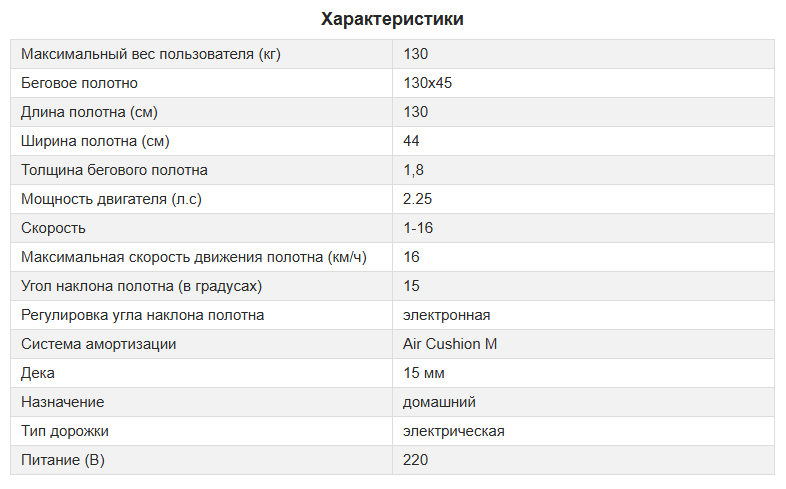
Вариант 2


   <!-- Шаблон для товара -->
    <xsl:template match="shop_item">
       ...
          <xsl:variable name="myItem" select="." />
          
          <xsl:for-each select="/shop/shop_item_properties//property">
             <xsl:variable name="propertyId" select="@id" />
             <xsl:choose>
             <xsl:when test="count($myItem/property_value[property_id = $propertyId])">
                <xsl:apply-templates select="$myItem/property_value[property_id = $propertyId]"/>
             </xsl:when>
             <xsl:otherwise><td></td></xsl:otherwise>
             </xsl:choose>
          </xsl:for-each>
      ...
    </xsl:template>

Вариант 3

Используется при сортировке значений дополнительных свойств при выводе списка товаров. Хук вносится в код типовых динамических страниц и добавляет тег sort для значений доп. свойств (в примере для значений свойств целого и строчного типа).

Не путайте добавляемый тег sort с тегом sorting, в котором указывается внутренний порядок сортировки множественных значений свойства.
if (!$Shop_Controller_Show->item)
{
    class Property_Value_Observer
    {
        static public function onBeforeGetXml($object, $args)
        {
            $object->addXmlTag('sort', $object->Property->sorting);
        }
    }

    Core_Event::attach('property_value_string.onBeforeGetXml', array('Property_Value_Observer', 'onBeforeGetXml'));
    Core_Event::attach('property_value_int.onBeforeGetXml', array('Property_Value_Observer', 'onBeforeGetXml'));    
}

Вариант 4

Сортировка значений одного свойства в порядке добавления достигается указанием <xsl:sort select="@id" />, например:

<xsl:for-each select="property_value[tag_name='img'][file !='']">
    <xsl:sort select="@id" />
    <div class="item">
        <a href="{../dir}{file}" class="elevatezoom-gallery" data-image="{../dir}{file}" data-zoom-image="{../dir}{file}">
            <img class="img-responsive" height="150" width="100" src="{../dir}{file}"/>
        </a>
    </div>
</xsl:for-each>

XSL

Ссылка на предыдущую и следующую новость в Инфосистеме

в ТДС информационной системы перед показом добавляем:
// добавляем окружающие элементы
// Если мы находимся на странице новости
if ($Informationsystem_Controller_Show->item) {
   $oInformationsystem_Item = Core_Entity::factory('Informationsystem_Item', $Informationsystem_Controller_Show->item);
   
   // Текущий элемент
   $cur_elem = $Informationsystem_Controller_Show->item;
   // Текущая группа
   $cur_group = $oInformationsystem_Item->informationsystem_group_id;

   // SELECT * FROM informationsystem_Items WHERE informationsystem_Items.id < $cur_elem ORDER BY informationsystem_Items.id DESC LIMIT 1
   $oCore_QueryBuilder_Select = Core_QueryBuilder::select()
      ->select('informationsystem_items.path','informationsystem_items.name')
      ->from('informationsystem_items')
      ->open()
      ->where('informationsystem_items.id', '<', $cur_elem)
      ->setAnd()
      ->where('informationsystem_items.informationsystem_group_id', '=', $cur_group)
      ->setAnd()
      ->where('informationsystem_items.deleted', '=', '0')
      ->close()
      ->clearOrderBy()
      ->orderBy('id', 'DESC')
      ->limit(1);
      $prev = $oCore_QueryBuilder_Select->execute()->asAssoc()->current();
      $prev = $prev['path'];
      $prev_name = $oCore_QueryBuilder_Select->execute()->asAssoc()->current();
      $prev_name = $prev_name['name'];

   // SELECT * FROM informationsystem_Items WHERE informationsystem_Items.id > $cur_elem ORDER BY informationsystem_Items.id LIMIT 1
   $oCore_QueryBuilder_Select = Core_QueryBuilder::select()
      ->select('informationsystem_items.path','informationsystem_items.name')
      ->from('informationsystem_items')
      ->open()
      ->where('informationsystem_items.id', '>', $cur_elem)
      ->setAnd()
      ->where('informationsystem_items.informationsystem_group_id', '=', $cur_group)
      ->setAnd()
      ->where('informationsystem_items.deleted', '=', '0')
      ->close()
      ->clearOrderBy()
      ->orderBy('id')
      ->limit(1);
      $next = $oCore_QueryBuilder_Select->execute()->asAssoc()->current();
      $next = $next ['path'];
      $next_name = $oCore_QueryBuilder_Select->execute()->asAssoc()->current();
      $next_name = $next_name['name'];

   $Informationsystem_Controller_Show
      ->addEntity(Core::factory('Core_Xml_Entity')
      ->name('neighboring_items')
         ->addEntity(Core::factory('Core_Xml_Entity')->name('prev_item')->value($prev))
         ->addEntity(Core::factory('Core_Xml_Entity')->name('prev_item_name')->value($prev_name))
         ->addEntity(Core::factory('Core_Xml_Entity')->name('next_item')->value($next))
         ->addEntity(Core::factory('Core_Xml_Entity')->name('next_item_name')->value($next_name))
      );
}
// добавляем окружающие элементы
в XSL в нужное место вставляем:
<!-- Получаем ID родительской группы и записываем в переменную $group -->
      <xsl:variable name="group" select="/informationsystem/group"/>
      <!-- окружающие элементы -->
      <xsl:variable name="link_path" select="/informationsystem//informationsystem_group[@id=$group]/url"/>
      <xsl:variable name="prev_item" select="/informationsystem/neighboring_items/prev_item"/>
      <xsl:variable name="next_item" select="/informationsystem/neighboring_items/next_item"/>
      <xsl:variable name="prev_item_name" select="/informationsystem/neighboring_items/prev_item_name"/>
      <xsl:variable name="next_item_name" select="/informationsystem/neighboring_items/next_item_name"/>
      <div class="navigator">
         <xsl:choose>
            <xsl:when test="$prev_item != ''">
               <a href="{$link_path}{$prev_item}/">&#60; Предыдущий элемент (<xsl:value-of select="$prev_item_name" />)</a>
            </xsl:when>
            <xsl:otherwise>
               <span class="previous">&#60; Предыдущий элемент</span>
            </xsl:otherwise>
         </xsl:choose>
         <xsl:choose>
            <xsl:when test="$next_item != ''">
               <a href="{$link_path}{$next_item}/">(<xsl:value-of select="$next_item_name" />) Следующий элемент &#62;</a>
            </xsl:when>
            <xsl:otherwise>
               <span class="next">Следующий элемент &#62;</span>
            </xsl:otherwise>
         </xsl:choose>
      </div>
      <!-- /окружающие элементы -->
XSL

Текущая дата в Каталоге товаров

В XSL шаблон к xsl:stylesheet добавляем новые атрибуты xmlns:date="http://exslt.org/dates-and-times" и extension-element-prefixes="date", должно получится:

<xsl:stylesheet version="1.0"
	xmlns:xsl="http://www.w3.org/1999/XSL/Transform"
	xmlns:hostcms="http://www.hostcms.ru/"
	exclude-result-prefixes="hostcms"
	xmlns:date="http://exslt.org/dates-and-times" extension-element-prefixes="date">

Далее например можно записать в переменную текущую дату и вычислить разницу с другой датой с помощью date:difference(string, string).


Чтобы код работал, в настройках магазина меняем формат даты на %Y-%m-%d

в ТДС записываем текущую дату 

$oCurrent_date = date('dmY'); // именно в этом формате
$Shop_Controller_Show
    ->addEntity(Core::factory('Core_Xml_Entity')->name('сurrent_date')->value($oCurrent_date)); // теперь в XML есть сurrent_date
В XSL шаблоне (в том месте где это нужно):

Теперь, если дата создания товара меньше 30 дней, выводим слово НОВИНКА

  <xsl:variable name="current_date" select="/shop/current_date"/>
            <xsl:variable name="difference_date" select="date:difference($current_date,datetime)" />
            <xsl:variable name="difference_date_cut" select="substring-before(substring-after($difference_date, 'P'), 'D')" />
            <xsl:if test="number($difference_date_cut) &lt; 30"> <!-- 30 количество дней -->
               <div class="ribbon-wrapper-new">
                  <div class="ribbon-round-new bg-color3">НОВИНКА</div>
               </div>
            </xsl:if>

XSL

Удаление всех товаров из корзины

Для того, чтобы дать возможность пользователю удалить из корзины сразу все товары необходимо:

1. Добавить в настройки ТДС корзины перед строкой 

Core_Page::instance()->object = $Shop_Cart_Controller_Show 

вот этот код:

// Удаление всех товаров из корзины
 if (Core_Array::getGet('delete_all'))
{
        $oShop_Cart_Controller = Shop_Cart_Controller::instance();
        $oItemsInCart = $oShop_Cart_Controller->getAll($oShop);
        foreach( $oItemsInCart as $oItemInCart)
        {
                        $oShop_Cart_Controller
                                ->shop_item_id($oItemInCart->shop_item_id)
                                ->delete();
        }
}

2. Для удаления всех товаров в XSL шаблоне Корзины разместить ссылку

<a title="Удалить все товары из заказа" onclick="return confirm('Вы уверены, что хотите удалить все товары из заказа?')" href="/shop/cart/?delete_all=1">Удалить все</a>

УДАЛЕНИЕ И ДОБАВЛЕНИЕ ТОВАРОВ В КРАТКОЙ КОРЗИНЕ

Открываем типовые динамические страницы интернет магазина, далее "Интернет-магазин корзина" и "Настройки страницы"
Находим:
// Добавление товара в корзину
if (Core_Array::getRequest('add')) ...
И выше добавляем:
// Ajax Обновление товара в корзине
if (Core_Array::getRequest('updateCart')) {
    $shop_item_id = intval(Core_Array::getRequest('updateCart'));    
    $count = intval(Core_Array::getRequest('count'));    
    if (($shop_item_id) && ($count)) {    
        $oShop_Cart_Controller = Shop_Cart_Controller::instance();
        $oShop_Cart_Controller
        ->checkStock($bCheckStock)
        ->shop_item_id($shop_item_id)
        ->quantity($count)
        ->update();
    }
}
// Ajax Удаляение товара из корзины
if (Core_Array::getRequest('deleteCart')) {
    $shop_item_id = intval(Core_Array::getRequest('deleteCart'));
    if ($shop_item_id) {
        $oShop_Cart_Controller = Shop_Cart_Controller::instance();
        $oShop_Cart_Controller
        ->shop_item_id($shop_item_id)
        ->delete();
    }
}
Находим:
// Ajax
if (Core_Array::getRequest('_', FALSE) && (Core_Array::getRequest('add') || Core_Array::getRequest('loadCart')))
И заменяем на:
// Ajax
if (Core_Array::getRequest('_', FALSE) && (Core_Array::getRequest('add') || Core_Array::getRequest('loadCart') || Core_Array::getRequest('updateCart') || Core_Array::getRequest('deleteCart')))
Изменения в JS:
Открываем скрипт магазина /templates/template_НОМЕР/script.js 
Находим:
// Функции без создания коллекции
$.extend({
...
И добалвяем в них 3 функции:
updateCart: function(path, shop_item_id, count){
    $.clientRequest({
        path: path + '?updateCart=' + shop_item_id + '&count=' + count,
        callBack: $.updelCallback,
        context: $('.little-cart')
    });
    return false;
    },
deleteCart: function(path, shop_item_id){
    $.clientRequest({
        path: path + '?deleteCart=' + shop_item_id,
        callBack: $.updelCallback,
        context: $('.little-cart')
    });
    return false;
},
updelCallback: function(data, status, jqXHR){
    $.loadingScreen('hide');
    $(this).html(data);
}
Изменения в XSL-шаблоне:
В XSL-шаблон добавляем для товара:
<xsl:variable name="kol" select="../quantity" />
<xsl:variable name="cena" select="format-number(price, '#####0,##', 'my')" />                                
Стоимость: <xsl:value-of select="$cena * $kol"/>    
<br />
Кол-во: <xsl:value-of select="$kol"/>
<br />
<a href="#" onclick="return $.updateCart('{/shop/url}cart/', {@id}, {$kol}+1)">Добавить</a>
<br />
<a href="#" onclick="return $.updateCart('{/shop/url}cart/', {@id}, {$kol}-1)">Убавить</a>
<br />
<a href="#" onclick="return $.deleteCart('{/shop/url}cart/', {@id})">Удалить</a>
Для вывода общей суммы покупок можно добавить:
<p>Сумма: <xsl:value-of select="total_amount"/><xsl:text> </xsl:text><xsl:value-of select="shop_currency/name"/></p>
Получаем 
Добавить, Убавить и Удалить лучше всего доработать и заменить на иконки

ШАБЛОН "МагазинСамыеПопулярныеТовары"

<?xml version="1.0" encoding="utf-8"?>
<!DOCTYPE xsl:stylesheet>
<xsl:stylesheet version="1.0" xmlns:xsl="http://www.w3.org/1999/XSL/Transform" xmlns:hostcms="http://www.hostcms.ru/" exclude-result-prefixes="hostcms">
     <xsl:output xmlns="http://www.w3.org/TR/xhtml1/strict" doctype-public="-//W3C//DTD XHTML 1.0 Strict//EN" encoding="UTF-8" indent="yes" method="html" omit-xml-declaration="no" version="1.0" media-type="text/xml"/>

     <!-- Шаблон показа популярных товаров.
     Основан на шаблоне "МагазинКаталогТоваровНаГлавнойСпецПред" -->

     <!-- Кол-во товаров в строку
     Если указано 0 то не разбивать, выводить все в одну строку -->
     <xsl:param name="items_per_line" select="'3'"/>

     <!--Формат вывода чисел-->
     <xsl:decimal-format name="my" decimal-separator="," grouping-separator=" "/>

     <!--Создадим ключ по идентификатору товара, чтобы оптимизировать выборку товаров при показе в предопределенном порядке -->
     <xsl:key name="items_id" match="/shop/shop_item" use="@id"/>

     <!--Признак того, что нужно показывать товары в порядке убывания популярности-->
     <xsl:variable name="is_ordered_show" select="/shop/popular/method = 'orders' and /shop/popular/item"/>


     <xsl:template match="/shop">
          <!-- Есть товары -->
          <xsl:if test="shop_item">
               <h1>Популярные товары</h1>

               <!-- Выводим товары магазина -->
               <xsl:choose>

                    <!--Если в XML существуют узлы, описывающие порядок показа товаров-->
                    <xsl:when test="$is_ordered_show">

                         <!--то запустим цикл по этим узлам-->
                         <xsl:for-each select="popular/item">
                              <xsl:sort select="@order" data-type="number" order="ascending"/>

                              <!--и для каждого id товара будем вызывать темплейт item, передавая в него узел соответствующего товара, выбранный с помощью ключа-->
                              <xsl:apply-templates select="key('items_id', .)">
                                   <xsl:with-param name="ordered_count" select="current()/@count"/>
                              </xsl:apply-templates>

                              <!--Если показываем товары в порядке убывания популярности,
                              то добавляем разбивку по N товаров в строке
                              ЗДЕСЬ.-->
                              <xsl:if test="$items_per_line &gt; 3 and position() mod $items_per_line = 3 and position() != last()">
                                   <div style="margin-top:20px;" class="clear"/>
                              </xsl:if>
                         </xsl:for-each>
                    </xsl:when>

                    <!--а в случае рандомного показа просто вызовем темплейт item для всех товаров описанных в XML-->
                    <xsl:otherwise>
                         <xsl:apply-templates select="shop_item"/>
                    </xsl:otherwise>
               </xsl:choose>

               <div class="clear"></div>
          </xsl:if>
     </xsl:template>

     <!-- Шаблон для товара -->
     <xsl:template match="shop_item">
          <div class="shop-item">
               <div class="inner">
                    <a href="{url}" title="Подробная информация // {name} // {shop_producer/name}"  class="item-images-inner">

                         <!-- Изображение для товара, если есть -->
                         <xsl:choose>
                              <xsl:when test="image_small!=''" >
                                   <img src="{dir}{image_small}" alt="{name}" class="item-image"  />
                              </xsl:when>
                              <xsl:otherwise>
                                   <img src="/images/no_img.jpg"  alt="{name}" />
                              </xsl:otherwise>
                         </xsl:choose>

                         <img src="/images/bg-item.png" alt="{name}" class="item-image-back"  />
                    </a>
                    <xsl:if test="property_value[tag_name = 'hit'] != ''">
                         <span class="hit"></span>
                    </xsl:if>

                    <!-- Название товара -->
                    <span class="price">
                         <xsl:value-of select="shop_producer/name" />
                         <!--<xsl:value-of disable-output-escaping="yes" select="name"/>--><xsl:text> / </xsl:text>

                         <xsl:if test="marking != ''">
                         <span><xsl:value-of disable-output-escaping="yes" select="marking"/></span><xsl:text> / </xsl:text>
                         </xsl:if>

                         <!-- Цена товара -->
                         <xsl:choose>
                              <xsl:when test="price != 0">
                                   <span>
                                        <xsl:variable name="price" select="price"/>
                                        <xsl:value-of select="format-number($price, '### ##0', 'my')"/>&#xA0;
                                        <!-- Валюта товара -->
                                        <xsl:value-of disable-output-escaping="yes" select="currency"/>
                                   </span>
                              </xsl:when>
                              <xsl:otherwise>
                                   <span class="shop_price">под заказ</span>
                              </xsl:otherwise>
                         </xsl:choose>

                         <!-- Если цена со скидкой - выводим ее -->
                         <xsl:if test="price_tax != price">
                              <span style="color: gray; text-decoration: line-through;">
                                   <xsl:variable name="price_tax" select="price_tax"/>
                                   <span style="font-size: 11pt">
                                        <xsl:value-of select="format-number($price_tax, '### ##0', 'my')"/>&#xA0;<xsl:value-of disable-output-escaping="yes" select="currency"/>
                                   </span>
                              </span>
                         </xsl:if>

                    </span>
               </div>
               <div class="clear"></div>
          </div>
          <!-- Перевод строки после каждого 3-го элемента -->
          <xsl:if test="((position() - 3) mod 3 = 0) and position() != last()">
               <xsl:text disable-output-escaping="yes">
                    &lt;/div&gt;
                    &lt;div class="wrapper"&gt;
               </xsl:text>
          </xsl:if>
     </xsl:template>

     <!-- Склонение после числительных -->
     <xsl:template name="declension">
          <xsl:param name="number" select="number"/>
          <!-- Именительный падеж -->
          <xsl:param name="nominative" select="nominative"/>
          <!-- Родительный падеж, единственное число -->
          <xsl:param name="genitive_singular" select="genitive_singular"/>
          <!-- Родительный падеж, множественное число -->
          <xsl:param name="genitive_plural" select="genitive_plural"/>

          <xsl:variable name="last_digit">
               <xsl:value-of select="$number mod 10"/>
          </xsl:variable>

          <xsl:variable name="last_two_digits">
               <xsl:value-of select="$number mod 100"/>
          </xsl:variable>
          <xsl:choose>
               <xsl:when test="$last_digit = 1 and $last_two_digits != 11">
                    <xsl:value-of select="$nominative"/>
               </xsl:when>
               <xsl:when test="$last_digit = 2 and $last_two_digits != 12 or $last_digit = 3 and $last_two_digits != 13 or $last_digit = 4 and $last_two_digits != 14">
                    <xsl:value-of select="$genitive_singular"/>
               </xsl:when>
               <xsl:otherwise>
                    <xsl:value-of select="$genitive_plural"/>
               </xsl:otherwise>
          </xsl:choose>
     </xsl:template>
</xsl:stylesheet>
XSL

Шаблон XSL "Поиск" с показом карточек товаров

В результатх поиска выводим только товары интернет-магазина.

XSL

<!-- XSL шаблон "Поиск" -->
<?xml version="1.0" encoding="utf-8"?>
<!DOCTYPE xsl:stylesheet>
<xsl:stylesheet version="1.0" xmlns:xsl="http://www.w3.org/1999/XSL/Transform">;
<xsl:output xmlns="http://www.w3.org/TR/xhtml1/strict"; doctype-public="-//W3C//DTD XHTML 1.0 Strict//EN" encoding="utf-8" indent="yes" method="html" omit-xml-declaration="no" version="1.0" media-type="text/xml"/>
<xsl:decimal-format name="my" decimal-separator="," grouping-separator=" "/>
<xsl:template match="/">
<xsl:apply-templates select="/site"/>
</xsl:template>
<xsl:template match="/site">
<h1>Поиск по каталогу женской одежды</h1>
<!-- Форма поиска -->
<!--form method="get" action="/search/" class="searchform2">
<input id="search_text" type="text" name="text" value="{query}" maxlength="200" class="input_search"/>
<input width="38" type="image" height="34" class="input_buttom_search" src="/images/icon-search.png" title="Искать" />
</form-->
<div class="clear"></div>
<xsl:if test="query!=''">
<!--<p>
<strong>Найдено <xsl:value-of select="total"/>&#xA0;<xsl:call-template name="declension">
<xsl:with-param name="number" select="total"/></xsl:call-template></strong>
</p>-->
<xsl:choose>
<xsl:when test="total!=0">
<h5 style="margin-top:15px;">Мы нашли для вас:</h5>
<div class="shop_table row products-grid">
<div class="row">
<xsl:apply-templates select="search_page"></xsl:apply-templates>
</div>
</div>
<!-- Строка ссылок на другие страницы результата поиска -->
<div class="pagination">
<xsl:variable name="count_pages" select="ceiling(total div limit)"/>
<xsl:variable name="visible_pages" select="5"/>
<xsl:variable name="real_visible_pages"><xsl:choose>
<xsl:when test="$count_pages &lt; $visible_pages"><xsl:value-of select="$count_pages"/></xsl:when>
<xsl:otherwise><xsl:value-of select="$visible_pages"/></xsl:otherwise>
</xsl:choose></xsl:variable>
<!-- Считаем количество выводимых ссылок перед текущим элементом -->
<xsl:variable name="pre_count_page"><xsl:choose>
<xsl:when test="(page) - (floor($real_visible_pages div 2)) &lt; 0">
<xsl:value-of select="page"/>
</xsl:when>
<xsl:when test="($count_pages - (page) - 1) &lt; floor($real_visible_pages div 2)">
<xsl:value-of select="$real_visible_pages - ($count_pages - (page) - 1) - 1"/>
</xsl:when>
<xsl:otherwise>
<xsl:choose>
<xsl:when test="round($real_visible_pages div 2) = $real_visible_pages div 2">
<xsl:value-of select="floor($real_visible_pages div 2) - 1"/>
</xsl:when>
<xsl:otherwise>
<xsl:value-of select="floor($real_visible_pages div 2)"/>
</xsl:otherwise>
</xsl:choose>
</xsl:otherwise>
</xsl:choose></xsl:variable>
<!-- Считаем количество выводимых ссылок после текущего элемента -->
<xsl:variable name="post_count_page"><xsl:choose>
<xsl:when test="0 &gt; (page) - (floor($real_visible_pages div 2) - 1)">
<xsl:value-of select="$real_visible_pages - (page) - 1"/>
</xsl:when>
<xsl:when test="($count_pages - (page) - 1) &lt; floor($real_visible_pages div 2)">
<xsl:value-of select="$real_visible_pages - $pre_count_page - 1"/>
</xsl:when>
<xsl:otherwise>
<xsl:value-of select="$real_visible_pages - $pre_count_page - 1"/>
</xsl:otherwise>
</xsl:choose></xsl:variable>
<xsl:variable name="i"><xsl:choose>
<xsl:when test="(page) + 1 = $count_pages"><xsl:value-of select="(page) - $real_visible_pages + 1"/></xsl:when>
<xsl:when test="(page) - $pre_count_page &gt; 0"><xsl:value-of select="(page) - $pre_count_page"/></xsl:when>
<xsl:otherwise>0</xsl:otherwise>
</xsl:choose></xsl:variable>
<xsl:call-template name="for">
<xsl:with-param name="limit" select="limit"/>
<xsl:with-param name="page" select="page"/>
<xsl:with-param name="total" select="total"/>
<xsl:with-param name="i" select="$i"/>
<xsl:with-param name="post_count_page" select="$post_count_page"/>
<xsl:with-param name="pre_count_page" select="$pre_count_page"/>
<xsl:with-param name="visible_pages" select="$real_visible_pages"/>
</xsl:call-template>
<div style="clear: both"></div>
</div>
</xsl:when>
<xsl:otherwise>
<p style="margin-top:15px;">К сожалению, мы ничего не нашли по Вашему запросу.</p>
<p>Измените запрос или воспользуйтесь <a href="/map">картой сайта</a></p>
</xsl:otherwise>
</xsl:choose>
</xsl:if>
<xsl:if test="query = ''">
<p>Введите поисковой запрос.</p>
</xsl:if>
</xsl:template>
<xsl:template match="search_page">
<xsl:if test="module = 3 and module_value_type = 2">
<xsl:apply-templates select="shop_item" mode="shop" />
</xsl:if>
</xsl:template>
<!-- Шаблон для товара -->
<xsl:template match="shop_item" mode="shop" >
<div class="col-xs-12 col-sm-6 col-md-4 col-lg-3 item">
<div class="grid_wrap maxheight1">
<div class="product-image">
<a href="{url}" title="{name}">
<xsl:choose>
<xsl:when test="image_small != ''">
<img src="{dir}{image_small}" alt="{name}" class="img-responsive"/>
</xsl:when>
<xsl:otherwise>
<img src="/images/default-image.png"/>
</xsl:otherwise>
</xsl:choose>
</a>
<xsl:if test="discount != 0">
<span class="product-label">
<span class="label-sale">
<span class="sale-text">-<xsl:value-of disable-output-escaping="yes" select="round(shop_discount/percent)"/>%</span>
</span>
</span>
</xsl:if>
<xsl:variable name="shop_item_id" select="@id" />
<div class="product-buttons">
<div class="product-wishlist">
<span onclick="return $.addFavorite('{/shop/url}', {@id}, this)">
<xsl:if test="/shop/favorite/shop_item[@id = $shop_item_id]/node()">
<xsl:attribute name="class">favorite-current</xsl:attribute>
</xsl:if>
<i class="fa fa-heart-o"></i>
</span>
</div>
<div class="product-compare">
<span onclick="return $.addCompare('{/shop/url}', {@id}, this)">
<xsl:if test="/shop/comparing/shop_item[@id = $shop_item_id]/node()">
<xsl:attribute name="class">compare-current</xsl:attribute>
</xsl:if>
<i class="fa fa-bar-chart"></i>
</span>
</div>
</div>
<xsl:if test="modifications">
<div class="choice text-center">
<ul>
<xsl:for-each select="modifications/shop_item">
<xsl:sort order="ascending" select="."/>
<xsl:variable name="name1" select="name"/>
<xsl:variable name="name2" select="substring(name, 1, string-length(name) - 2)"/>
<li><xsl:value-of select="substring-after($name1, $name2)" /></li>
</xsl:for-each>
</ul>
</div>
</xsl:if>
</div>
<div class="product-content">
<div class="product-content-inner">
<h5 class="product-name">
<a href="{url}" title="{name}">
<xsl:value-of select="name"/>
</a>
</h5>
<xsl:if test="marking !=''">
<div class="marking">арт. <xsl:value-of select="marking" /></div>
</xsl:if>
</div>
</div>
<div class="product-action">
<div class="price-box">
<span class="regular-price">
<span class="price">
<xsl:apply-templates select="/shop/shop_currency/code">
<xsl:with-param name="value" select="price" />
</xsl:apply-templates>
</span>
<xsl:if test="discount != 0">
<span class="old-price">
<xsl:apply-templates select="/shop/shop_currency/code">
<xsl:with-param name="value" select="price + discount" />
</xsl:apply-templates>
</span>
</xsl:if>
</span>
<!-- <xsl:if test="count(shop_bonuses/shop_bonus)">
<div class="product-bonuses">
+<xsl:value-of select="shop_bonuses/total" /> бонусов
</div>
</xsl:if>-->
</div>
<div class="product-action-buttons">
<xsl:choose>
<xsl:when test="rest !=0">
<div class="shop-item-add-to-cart">
<a class="shop-item-add-to-cart-link" href="#" onclick="return $.bootstrapAddIntoCart('{/shop/url}cart/', {@id}, 1)" title="Добавить в корзину"><i class="fa fa-shopping-basket "></i></a>
</div>
</xsl:when>
<xsl:otherwise>
<span class="color1">на заказ</span>
</xsl:otherwise>
</xsl:choose>
<xsl:if test="rest !=0">
</xsl:if>
<div class="shop-item-fast-order">
<span class="title hidden"><xsl:value-of select="name"/></span>
<!--a class="zakaz shop-item-fast-order-link" href="#" data-toggle="modal" data-target="#oneStepCheckout" title="Быстрый заказ"><i class="fa fa-shopping-cart"></i></a-->
<!--a class="shop-item-fast-order-link" href="#" onclick="return $.oneStepCheckout('{/shop/url}cart/', {@id}, 1)" title="Быстрый заказ" data-toggle="modal" data-target="#oneStepCheckout{@id}"><i class="fa fa-shopping-cart"></i></a-->
</div>
</div>
</div>
</div>
</div>
</xsl:template>
<xsl:template name="url" match="text()">
<xsl:param name="str" select="."/>
<xsl:param name="max">50</xsl:param>
<xsl:param name="hvost">10</xsl:param>
<xsl:param name="begin">
<xsl:choose>
<xsl:when test="string-length($str) &gt; $max">
<xsl:value-of select="substring($str, 1, $max - $hvost)"/>
</xsl:when>
<xsl:otherwise>
<xsl:value-of select="substring($str, 1)"/>
</xsl:otherwise>
</xsl:choose>
</xsl:param>
<xsl:param name="end">
<xsl:choose>
<xsl:when test="string-length($str) &gt; $max">
<xsl:value-of select="substring($str, string-length($str) - $hvost + 1, $hvost)"/>
</xsl:when>
<xsl:otherwise>
</xsl:otherwise>
</xsl:choose>
</xsl:param>
<xsl:param name="result">
<xsl:choose>
<xsl:when test="$end != ''">
<xsl:value-of select="concat($begin, '…', $end)"/>
</xsl:when>
<xsl:otherwise>
<xsl:value-of select="$begin"/>
</xsl:otherwise>
</xsl:choose>
</xsl:param>
<xsl:value-of disable-output-escaping="yes" select="$result"/>
</xsl:template>
<!-- Цикл для вывода строк ссылок -->
<xsl:template name="for">
<xsl:param name="i" select="0"/>
<xsl:param name="limit"/>
<xsl:param name="page"/>
<xsl:param name="total"/>
<xsl:param name="visible_pages"/>
<xsl:variable name="url" select="/site/url"/>
<xsl:variable name="n" select="$total div $limit"/>
<!-- Считаем количество выводимых ссылок перед текущим элементом -->
<xsl:variable name="pre_count_page">
<xsl:choose>
<xsl:when test="$page &gt; ($n - (round($visible_pages div 2) - 1))">
<xsl:value-of select="$visible_pages - ($n - $page)"/>
</xsl:when>
<xsl:otherwise>
<xsl:value-of select="round($visible_pages div 2) - 1"/>
</xsl:otherwise>
</xsl:choose>
</xsl:variable>
<!-- Считаем количество выводимых ссылок после текущего элемента -->
<xsl:variable name="post_count_page">
<xsl:choose>
<xsl:when test="0 &gt; $page - (round($visible_pages div 2) - 1)">
<xsl:value-of select="$visible_pages - $page"/>
</xsl:when>
<xsl:otherwise>
<xsl:choose>
<xsl:when test="round($visible_pages div 2) = ($visible_pages div 2)">
<xsl:value-of select="$visible_pages div 2"/>
</xsl:when>
<xsl:otherwise>
<xsl:value-of select="round($visible_pages div 2) - 1"/>
</xsl:otherwise>
</xsl:choose>
</xsl:otherwise>
</xsl:choose>
</xsl:variable>
<xsl:if test="$i = 0 and $page != 0">
<span class="ctrl">
← Ctrl
</span>
</xsl:if>
<xsl:if test="$i >= $n and ($n - 1) > $page">
<span class="ctrl">
Ctrl →
</span>
</xsl:if>
<xsl:if test="$total &gt; $limit and $n &gt; $i">
<!-- Определяем адрес ссылки -->
<xsl:variable name="number_link">
<xsl:choose>
<!-- Если не нулевой уровень -->
<xsl:when test="$i != 0">page-<xsl:value-of select="$i + 1"/>/</xsl:when>
<!-- Иначе если нулевой уровень - просто ссылка на страницу со списком элементов -->
<xsl:otherwise></xsl:otherwise>
</xsl:choose>
</xsl:variable>
<!-- Ставим ссылку на страницу-->
<xsl:if test="$i != $page">
<!-- Выводим ссылку на первую страницу -->
<xsl:if test="$page - $pre_count_page &gt; 0 and $i = 0">
<a href="{$url}?text={/site/queryencode}" class="page_link" style="text-decoration: none;">←</a>
</xsl:if>
<xsl:choose>
<xsl:when test="$i &gt;= ($page - $pre_count_page) and ($page + $post_count_page) &gt;= $i">
<!-- Выводим ссылки на видимые страницы -->
<a href="{$url}{$number_link}?text={/site/queryencode}" class="page_link">
<xsl:value-of select="$i + 1"/>
</a>
</xsl:when>
<xsl:otherwise></xsl:otherwise>
</xsl:choose>
<!-- Выводим ссылку на последнюю страницу -->
<xsl:if test="$i+1 &gt;= $n and $n &gt; ($page + 1 + $post_count_page)">
<xsl:choose>
<xsl:when test="$n &gt; round($n)">
<!-- Выводим ссылку на последнюю страницу -->
<a href="{$url}page-{round($n+1)}/?text={/site/queryencode}" class="page_link" style="text-decoration: none;">→</a>
</xsl:when>
<xsl:otherwise>
<a href="/page-{round($n)}/?text={/site/queryencode}" class="page_link" style="text-decoration: none;">→</a>
</xsl:otherwise>
</xsl:choose>
</xsl:if>
</xsl:if>
<!-- Ссылка на предыдущую страницу для Ctrl + влево -->
<xsl:if test="$page != 0 and $i = $page">
<xsl:variable name="prev_number_link">
<xsl:choose>
<!-- Если не нулевой уровень -->
<xsl:when test="($page) != 0">page-<xsl:value-of select="$i"/>/</xsl:when>
<!-- Иначе если нулевой уровень - просто ссылка на страницу со списком элементов -->
<xsl:otherwise></xsl:otherwise>
</xsl:choose>
</xsl:variable>
<a href="{$url}{$prev_number_link}?text={/site/queryencode}" id="id_prev"></a>
</xsl:if>
<!-- Ссылка на следующую страницу для Ctrl + вправо -->
<xsl:if test="($n - 1) > $page and $i = $page">
<a href="{$url}page-{$page+2}/?text={/site/queryencode}" id="id_next"></a>
</xsl:if>
<!-- Не ставим ссылку на страницу-->
<xsl:if test="$i = $page">
<span class="current">
<xsl:value-of select="$i+1"/>
</span>
</xsl:if>
<!-- Рекурсивный вызов шаблона. НЕОБХОДИМО ПЕРЕДАВАТЬ ВСЕ НЕОБХОДИМЫЕ ПАРАМЕТРЫ! -->
<xsl:call-template name="for">
<xsl:with-param name="i" select="$i + 1"/>
<xsl:with-param name="limit" select="$limit"/>
<xsl:with-param name="page" select="$page"/>
<xsl:with-param name="total" select="$total"/>
<xsl:with-param name="visible_pages" select="$visible_pages"/>
</xsl:call-template>
</xsl:if>
</xsl:template>
<!-- Склонение после числительных -->
<xsl:template name="declension">
<xsl:param name="number" select="number"/>
<!-- Именительный падеж -->
<xsl:variable name="nominative">
<xsl:text>страница</xsl:text>
</xsl:variable>
<!-- Родительный падеж, единственное число -->
<xsl:variable name="genitive_singular">
<xsl:text>страницы</xsl:text>
</xsl:variable>
<xsl:variable name="genitive_plural">
<xsl:text>страниц</xsl:text>
</xsl:variable>
<xsl:variable name="last_digit">
<xsl:value-of select="$number mod 10"/>
</xsl:variable>
<xsl:variable name="last_two_digits">
<xsl:value-of select="$number mod 100"/>
</xsl:variable>
<xsl:choose>
<xsl:when test="$last_digit = 1 and $last_two_digits != 11">
<xsl:value-of select="$nominative"/>
</xsl:when>
<xsl:when test="$last_digit = 2 and $last_two_digits != 12 or $last_digit = 3 and $last_two_digits != 13 or $last_digit = 4 and $last_two_digits != 14">
<xsl:value-of select="$genitive_singular"/>
</xsl:when>
<xsl:otherwise>
<xsl:value-of select="$genitive_plural"/>
</xsl:otherwise>
</xsl:choose>
</xsl:template>
</xsl:stylesheet>

Экспорт прайс-листа в Excel

Для автоматической генерации прайс-листа в формате Excel необходимо загрузить PHPExcel и распаковать его в корневую директорию.

Обновите код настроек ТДС "Прайс" на следующий:

<?php

$oShop = Core_Entity::factory('Shop', Core_Array::get(Core_Page::instance()->libParams, 'shopId'));

$Shop_Controller_Show = new Shop_Controller_Show($oShop);

$path = Core_Page::instance()->structure->getPath();

$Shop_Controller_Show
	//->pattern(rawurldecode($path) . '({path})(page-{page}/)')
	->pattern(rawurldecode($path) . '({path})({xls})(page-{page}/)')
	->patternExpressions(array(
		'xls' => 'xls\/'
	))
	->addEntity(
		Core::factory('Core_Xml_Entity')
			->name('path')
			->value($path)
	)
	->limit(500)
	->parseUrl();

// Генерация Excel прайса
class HostCMS_Excel extends Core_Servant_Properties
{
	/**
	 * Allowed object properties
	 * @var array
	 */
	protected $_allowedProperties = array(
		'title',
		'filename',
	);

	/**
	 * excelObject
	 * @var object
	 */
	protected $_excelObject = NULL;

	/**
	 * excelSheetObject
	 * @var object
	 */
	protected $_excelSheetObject = NULL;

	/**
	 * excelWriterObject
	 * @var object
	 */
	protected $_excelWriterObject = NULL;

	/**
	 * Shop_Model
	 * @var object
	 */
	protected $_shop = NULL;

	protected $_cell = 2;

	/**
	 * Constructor.
	 */
	public function __construct($objPHPExcel, Shop_Model $oShop)
	{
		parent::__construct();

		$this->_excelObject = $objPHPExcel;

		$this->_shop = $oShop;

		$this->title = 'price';
		$this->filename = 'file';

		// set default font
		$this->_excelObject->getDefaultStyle()->getFont()->setName('Calibri');

		// set default font size
		$this->_excelObject->getDefaultStyle()->getFont()->setSize(10);

		// writer already created the first sheet for us, let's get it
		$this->_excelSheetObject = $this->_excelObject->getActiveSheet();

		// create the writer
		$this->_excelWriterObject = PHPExcel_IOFactory::createWriter($this->_excelObject, "Excel5");

		// autosize the columns
		$this->_excelSheetObject->getColumnDimension('A')->setAutoSize(TRUE);
		$this->_excelSheetObject->getColumnDimension('B')->setAutoSize(TRUE);
		$this->_excelSheetObject->getColumnDimension('C')->setAutoSize(TRUE);
	}

	/**
	 * File output.
	 */
	public function output()
	{
		// rename the sheet
		$this->_excelSheetObject->setTitle($this->title);

		// write header
		$this->header($this->_excelSheetObject);

		$aShop_Groups = $this->fillShopGroup($this->_shop->id, 0);

		foreach ($aShop_Groups as $iShopGroupId => $sShopGroupName)
		{
			$this->_excelSheetObject->getStyle('A' . $this->_cell)->getFont()->setBold(TRUE);

			$this->_excelSheetObject->getCell('A' . $this->_cell)->setValue($sShopGroupName);

			$this->_cell++;

			$this->items(intval($iShopGroupId));
		}

		// Setting the header type
		header('Content-Type: application/vnd.openxmlformats-officedocument.spreadsheetml.sheet');
		header('Content-Disposition: attachment;filename="' . $this->filename . '.xls"');
		header('Cache-Control: max-age=0');

		$this->_excelWriterObject->save('php://output');
	}

	/**
	 * Create header row.
	 */
	public function header($oSheet)
	{
		// let's bold and size the header font and write the header
		// as you can see, we can specify a range of cells, like here: cells from A1 to A4
		$oSheet->getStyle('A1:C1')->getFont()->setBold(TRUE)->setSize(12);

		$oSheet->getCell('A1')->setValue('Наименование');
		$oSheet->getCell('B1')->setValue('Артикул');
		$oSheet->getCell('C1')->setValue('Цена');

		return $oSheet;
	}

	/**
	 * Create items row.
	 */
	public function items($iShopGroupId)
	{
		$offset = 0;
		$limit = 100;

		$sCurrency = $this->_shop->Shop_Currency->name;

		$oShop_Group = $this->_shop->Shop_Groups->getById($iShopGroupId);

		$Shop_Item_Controller = new Shop_Item_Controller();

		if (Core::moduleIsActive('siteuser'))
		{
			$oSiteuser = Core_Entity::factory('Siteuser')->getCurrent();

			if ($oSiteuser)
			{
				$Shop_Item_Controller->siteuser($oSiteuser);
			}
		}

		if (!is_null($oShop_Group->id))
		{
			do {
				$oShop_Items = $oShop_Group->Shop_Items;
				$oShop_Items->queryBuilder()
					->where('shop_items.active', '=', 1)
					->offset($offset)
					->limit($limit);

				$aShop_Items = $oShop_Items->findAll(FALSE);

				foreach ($aShop_Items as $oShop_Item)
				{
					// Shortcut
					$iShortcut = $oShop_Item->shortcut_id;

					if ($iShortcut)
					{
						$oShop_Item = $oShop_Item->Shop_Item;
					}

					$aPrice = $Shop_Item_Controller->getPrices($oShop_Item);

					$price = Shop_Controller::instance()->getCurrencyCoefficientInShopCurrency(
						$oShop_Item->Shop_Currency,
						$oShop_Item->Shop->Shop_Currency) * $aPrice['price_discount'];

					$sPrice = $price . ' ' . $sCurrency;

					$this->_excelSheetObject->getCell('A' . $this->_cell)->setValue($oShop_Item->name);
					$this->_excelSheetObject->getCell('B' . $this->_cell)->setValue($oShop_Item->marking);
					$this->_excelSheetObject->getCell('C' . $this->_cell)->setValue($sPrice);

					$this->_cell++;
				}

				$offset += $limit;
			}
			while (count($aShop_Items));
		}

		return $this;
	}

	/**
	 * Shop groups tree
	 * @var array
	 */
	protected $_aGroupTree = array();

	/**
	 * Build visual representation of group tree
	 * @param int $iShopId shop ID
	 * @param int $iShopGroupParentId parent ID
	 * @param int $aExclude exclude group ID
	 * @param int $iLevel current nesting level
	 * @return array
	 */
	public function fillShopGroup($iShopId, $iShopGroupParentId = 0, $aExclude = array(), $iLevel = 0)
	{
		$iShopId = intval($iShopId);
		$iShopGroupParentId = intval($iShopGroupParentId);
		$iLevel = intval($iLevel);

		if ($iLevel == 0)
		{
			$aTmp = Core_QueryBuilder::select('id', 'parent_id', 'name')
				->from('shop_groups')
				->where('shop_id', '=', $iShopId)
				->where('deleted', '=', 0)
				->where('active', '=', 1)
				->orderBy('sorting')
				->orderBy('name')
				->execute()->asAssoc()->result();

			foreach ($aTmp as $aGroup)
			{
				$this->_aGroupTree[$aGroup['parent_id']][] = $aGroup;
			}
		}

		$aReturn = array();

		if (isset($this->_aGroupTree[$iShopGroupParentId]))
		{
			$countExclude = count($aExclude);
			foreach ($this->_aGroupTree[$iShopGroupParentId] as $childrenGroup)
			{
				if ($countExclude == 0 || !in_array($childrenGroup['id'], $aExclude))
				{
					$aReturn[$childrenGroup['id']] = $childrenGroup['name'];
					$aReturn += $this->fillShopGroup($iShopId, $childrenGroup['id'], $aExclude, $iLevel + 1);
				}
			}
		}

		$iLevel == 0 && $this->_aGroupTree = array();

		return $aReturn;
	}
}
	
if (!empty($Shop_Controller_Show->patternParams['xls']))
{
	require_once(CMS_FOLDER . 'PHPExcel/PHPExcel.php');

	// create new PHPExcel object
	$objPHPExcel = new PHPExcel();

	$HostCMS_Excel = new HostCMS_Excel($objPHPExcel, $oShop);
	$HostCMS_Excel
		->title('Прайс ' . $oShop->name)
		->filename('price')
		->output();
	exit();
}
// /Excel

Core_Page::instance()->object = $Shop_Controller_Show;

Обновите код ТДС "Прайс" на следующий:

<?php

$Shop_Controller_Show = Core_Page::instance()->object;

$Shop_Controller_Show
   ->shopItems()
   ->queryBuilder()
   ->clearOrderBy()
   ->leftJoin('shop_groups', 'shop_groups.id', '=', 'shop_items.shop_group_id')
   ->where('shop_items.active', '=', 1)
   ->open()
   ->where('shop_groups.active', '=', 1)
   ->setOr()
   ->where('shop_groups.active', 'IS', NULL)
   ->where('shop_items.modification_id', '=', 0)
   ->close()
   ->clearOrderBy()
   ->orderBy('shop_items.shop_group_id')
   ->orderBy('shop_items.name');

$Shop_Controller_Show
	->shopGroups()
	->queryBuilder()
	->where('shop_groups.active', '=', 1)
	->clearOrderBy()
	->orderBy('shop_groups.id');

$xslName = Core_Array::get(Core_Page::instance()->libParams, 'xsl');

$Shop_Controller_Show
	->xsl(
		Core_Entity::factory('Xsl')->getByName($xslName)
	)
	->groupsMode('all')
	->itemsProperties(TRUE)
	->group(FALSE)
	->show();

Прайс-лист будет доступен по адресу http://ваш_сайт/shop/price/xls/

Элемент <xsl:sort> - сортировка

При преобразовании документа элементами xsl:for-each и xsl:apply-templates, выбранные узлы по умолчанию обрабатываются в порядке просмотра документа, который зависит от выражения, использованного в атрибуте select этих элементов. XSLT позволяет изменять этот порядок посредством использования механизма сортировки.
Элементы xsl:for-each и xsl:apply-templates могут содержать один или несколько элементов xsl:sort, которые позволяют предварительно сортировать обрабатываемое множество узлов.

Синтаксис

XSLT 1.0

<xsl:sort
select = "string-expression"
lang = "nmtoken"
data-type = "text | number | qname-but-not-ncname"
order = "ascending | descending"
case-order = "upper-first | lower-first" />

<xsl:apply-templates select="informationsystem_item">
<xsl:sort
select = "sorting"
data-type = "number"
order = "ascending"
/>
</xsl:apply-templates>
Атрибуты
  • select — обязательный атрибут, значением которого является выражение, называемое также ключевым выражением. Это выражение вычисляется для каждого узла обрабатываемого множества, преобразуется в строку и затем используется как значение ключа при сортировке. По умолчанию значением этого атрибута является ".", что означает, что в качестве значения ключа для каждого узла используется его строковое значение.
  • order — необязательный атрибут, определяет порядок, в котором узлы должны сортироваться по своим ключам. Этот атрибут может принимать только два значения — "ascending", указывающее на восходящий порядок сортировки, и "descending", указывающее на нисходящий порядок. Значением по умолчанию является "ascending", то есть восходящий порядок.
  • lang — необязательный атрибут, определяет язык ключей сортировки. Дело в том, что в разных языках символы алфавита могут иметь различный порядок, что, соответственно, должно учитываться при сортировке. Атрибут lang в XSLT может иметь те же самые значения, что и атрибут xml:lang (например: "en", "en-us", "ru" и т. д.). Если значение этого атрибута не определено, процессор может либо определять язык исходя из параметров системы, либо сортировать строки исходя из порядка кодов символов Unicode.
  • data-type — необязательный атрибут, определяет тип данных, который несут строковые значения ключей.
Техническая рекомендация XSLT разрешает этому атрибуту иметь следующие значения:
  • "text" — ключи должны быть отсортированы в лексикографическом порядке исходя из языка, определенного атрибутом lang или параметрами системы. Это значение используется по умолчанию;
  • "number" — ключи должны сравниваться в численном виде. Если строковое значение ключа не является числом, оно будет преобразовано к не-числу (NaN), и, поскольку нечисловые значения неупорядочены, соответствующий узел может появиться в отсортированном множестве где угодно;
  • "имя" — в целях расширяемости XSLT также позволяет указывать в качестве типа данных произвольное имя. В этом случае реализация сортировки полностью зависит от процессора.
  • case-order — необязательный атрибут, указывает на порядок сортировки символов разных регистров. Значениями этого атрибута могут быть "upper-first", что означает, что заглавные символы должны идти первыми, или "lower-first", что означает, что первыми должны быть строчные символы. К примеру, строки "ночь", "Улица", "фонарь", "Аптека", "НОЧЬ", "Фонарь" при использовании case-order="upper-first" будут иметь порядок "Аптека", "НОЧЬ", "ночь", "Фонарь", "фонарь", "улица". При использовании case-order="lower-first" те же строки будут идти в порядке "Аптека", "ночь", "НОЧЬ", "фонарь", "Фонарь", "улица". Значение case-order по умолчанию зависит от процессора и языка сортировки. В большинстве случаев заглавные буквы идут первыми.

XSLT 2.0 и XSLT 3.0

<xsl:sort
    select? = expression
    lang? = { nmtoken }
    order? = { "ascending" | "descending" }
    collation? = { uri }
    stable? = { "yes" | "no" }
    case-order? = { "upper-first" | "lower-first" }
    data-type? = { "text" | "number" | qname-but-not-ncname }>
    <!-- Content: sequence-constructor -->
</xsl:sort>

Описание и примеры

В случае если xsl:for-each и xsl:apply-templates содержат элементы xsl:sort, обработка множества узлов должна производиться не в порядке просмотра документа, а в порядке, который определяется ключами, вычисленными при помощи xsl:sort. Первый элемент xsl:sort, присутствующий в родительском элементе, определяет первичный ключ сортировки, второй элемент — вторичный ключ, и так далее.
Как можно видеть, элемент xsl:sort определяет сортировку достаточно гибко, но вместе с тем не следует забывать, что эти возможности могут быть реализованы в процессорах далеко не полностью. Поэтому одна и та же сортировка может быть выполнена в разных процессорах по-разному.
Приведем простой пример сортировки имен и фамилий.

Пример

Листинг 8.10. Входящий документ
<list>
    <person>
        <name>William</name>
        <surname>Gibson</surname>
    </person>
    <person>
        <name>William</name>
        <surname>Blake</surname>
    </person>
    <person>
        <name>John</name>
        <surname>Fowles</surname>
    </person>
</list>
Отсортируем этот список сначала по именам в убывающем, а затем по фамилиям в возрастающем порядке.
<xsl:template match="list">
    <xsl:copy>
        <xsl:for-each select="person">
            <xsl:sort select="name" order="descending"/>
            <xsl:sort select="surname"/>
            <xsl:copy-of select="."/>
        </xsl:for-each>
    </xsl:copy>
</xsl:template>
Листинг 8.12. Выходящий документ
<list>
    <person>
        <name>William</name>
        <surname>Blake</surname>
    </person>
    <person>
        <name>William</name>
        <surname>Gibson</surname>
    </person>
    <person>
        <name>John</name>
        <surname>Fowles</surname>
    </person>
</list>
К сожалению, сортировкой нельзя управлять динамически. Все атрибуты элемента xsl:sort должны обладать фиксированными значениями.
XSL